



Here's how it works



How to use or fill out ccgprod with our platform

- Click ‘Get Form’ to open the ccgprod in the editor.
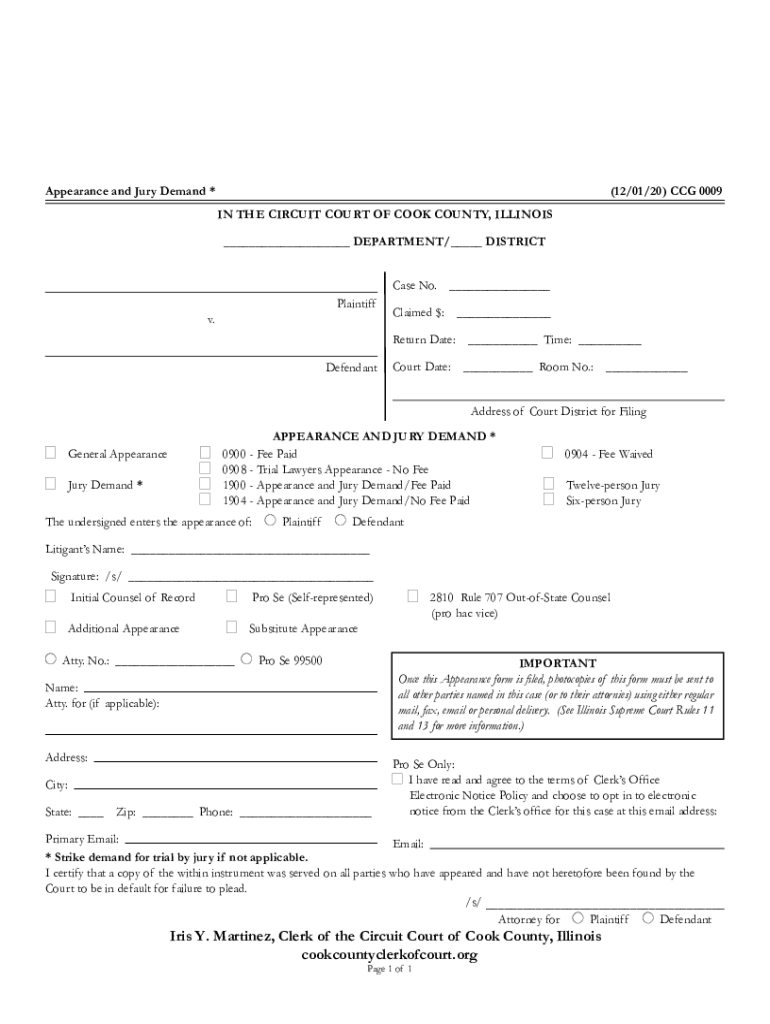
- Begin by entering the case number in the designated field. This is crucial for identifying your case within the court system.
- Fill in the plaintiff and defendant information, ensuring that all names are spelled correctly. Select whether you are entering an appearance for the plaintiff or defendant.
- Indicate if a jury demand is being made by checking the appropriate box. If not applicable, strike through this section.
- Complete the attorney information section if applicable, including your attorney number and contact details.
- For Pro Se filers, opt-in for electronic notice by providing your primary email address.
- Finally, certify that a copy of this form has been served to all parties involved by signing at the bottom of the document.
Start using our platform today to streamline your document editing and form completion process for free!
It's free
See more ccgprod versions
Got questions?
Can I use DocHub to generate legal electronic signatures on my ccgprod cook county ess login?
Yes, you can utilize DocHub for signing any business and personal documentation, including your ccgprod cook county ess login. All electronic signatures you generate with our service are legally binding and court-admissible, as DocHub complies with standards required by ESIGN and UETA. Save your completed document with a detailed Audit Trail if needed.
How do you create an e-signature for the cook county payroll oracle sign in ccgprod on iOS?
Apart from a comprehensive toolset for editing PDFs on mobile devices, DocHub enables you to sign your cook county payroll oracle sign in ccgprod along the way. Open our editor in your web browser, make changes using DocHub’s toolset, and finish your editing by eSigning the completed form.
Security and compliance
At DocHub, your data security is our priority. We follow HIPAA, SOC2, GDPR, and other standards, so you can work on your documents with confidence.
Learn more


Related forms