
Get documents ready to sign through a quick chat
Just answer a few questions and Signature Assistant handles the setup. It adds signers and assigns the fields to the right people, so your document is ready to go in minutes. No manual setup needed.
Aug 6th, 2022

0
forms filled out

0
forms signed

0
forms sent
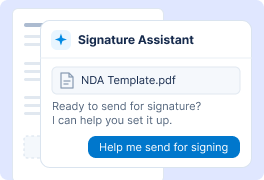
1. Upload a document
Add it from your device, or start from one of your documents or templates. Signature Assistant spots a signable document and offers to help you set up the Sign Request.
Add it from your device, or start from one of your documents or templates. Signature Assistant spots a signable document and offers to help you set up the Sign Request.
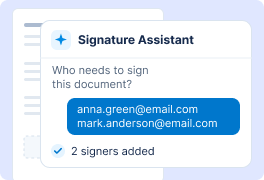
2. Add signers
Enter the email addresses of everyone who needs to sign. Signature Assistant adds them to the request right from the chat.
Enter the email addresses of everyone who needs to sign. Signature Assistant adds them to the request right from the chat.
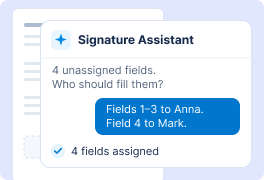
3. Assign fields
Signature Assistant spots any unassigned fields and asks who each one belongs to. Describe who each field should go to and Signature Assistant will assign them for you.
Signature Assistant spots any unassigned fields and asks who each one belongs to. Describe who each field should go to and Signature Assistant will assign them for you.
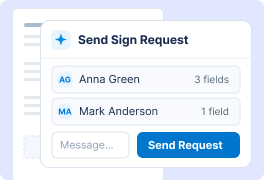
4. Review and send
Signature Assistant opens the Sign Request with everything filled in. Give it a final check, make any changes, add a custom message if you want, and send it off.
Signature Assistant opens the Sign Request with everything filled in. Give it a final check, make any changes, add a custom message if you want, and send it off.
Get documents out faster
Send it while it’s top of mind
Documents that need signatures usually wait until you have a minute to set them up properly. Signature Assistant handles that part, so you can send the document without delays.
Get your document ready to send, right in the chat
No fields to assign by hand or recipient settings to click through. Tell Signature Assistant who’s signing and it takes it from there. Nothing goes out without your yes.
Avoid mistakes and resends
Signature Assistant works out which field belongs to which signer, so you're less likely to catch it after the fact. It means fewer corrections, fewer confused signers, less back-and-forth.
Keep control before anything goes out
Signature Assistant prepares the request, but you make the final call. Review everything, make changes, and send only when it looks right.
Signature Assistant is available with DocHub Pro. To use it, go to Settings → Preferences → AI Assistant Preferences and turn on Automatically initiate Sign Request Flow.
How to Set Up Sign Requests with Signature Assistant

For the documents you send every day
The contract you want signed today
The terms are agreed, and you want the paperwork out while the conversation is still fresh. Get the request ready and send it without spending extra time on setup.
New hire paperwork, without manual setup
Offer letters, NDAs, and acknowledgments all need to go out for signature. Signature Assistant makes the setup quicker each time.
The NDA holding up the next conversation
Sometimes you can’t move forward until the NDA is signed. Get it ready and send it quickly so paperwork doesn’t slow things down.
Client paperwork with multiple signers
When a document needs signatures from several people, setup can get messy fast. Signature Assistant helps get everyone and their fields in place before you send.
Everything you need to work with PDFs, all in one place
A complete PDF toolkit with built-in AI assistant, ready for any document task.

Edit and mark up PDFs
DocHub has all the tools you need to modify your PDFs. Add or edit text and images, highlight or underline important details, and white out anything that shouldn’t be visible. Rearrange, add, or remove pages to get the document just right, from desktop or mobile.

Sign and collect signatures
DocHub lets you securely sign documents online or collect legally binding eSignatures from others. Send a single document to multiple signers, or bundle several documents into one envelope. Set the signing order and get notified as each signature comes through.

Collect data with ease
DocHub makes it easy to capture data online with fillable forms. Just add fields for text, numbers, signatures, and more, then share your form by email or with a quick link. Turn the documents you use most into reusable templates, so you don’t have to start from scratch every time.

Share and collaborate
DocHub lets you share your PDF in whatever way works best for you. Send it by email, drop a secure link into a message, or use a public link for a survey or order form. Give others access to view, edit, or fill out the document. Leave comments and tag people right in the document to keep everyone aligned.

Work seamlessly in Google apps
DocHub integrates with your favorite Google Workspace apps, allowing you to import, edit, sign, and save documents right from Google Drive, Gmail, Google Classroom, or Chrome without any back-and-forth.

Work smarter with AI
DocHub Intelligence brings practical AI into everyday document work. Create documents, make changes, and prepare them for the next step. Move from creation to completion without leaving DocHub.






Drive efficiency with the DocHub add-on for Google Workspace
Access documents and edit, sign, and share them straight from your favorite Google Apps.
Install now
Got questions?
Here are some common questions from our customers that may provide you with the answer you're looking for. If you can't find an answer to your question, please don't hesitate to reach out to us.
What is Signature Assistant in DocHub?
Signature Assistant is part of DocHub’s AI Assistant chat that helps you get documents ready to sign. You tell it who’s signing, and it adds the signers and helps assign each field to the right person, so you don’t have to set up the signature request by hand.
How does Signature Assistant work?
Signature Assistant works in four steps: you upload a document, add signers, assign fields, then review and send. When you upload or open a document, DocHub’s AI scans it. If it looks like a document that needs signing, the Signature Assistant chat opens and offers to help you send it. Choose “Yes, guide me through it,” and it asks for the signers' emails and who each field belongs to, then opens the Sign Request with everything filled in. Choose “No, I'll handle it myself” to set up the request on your own.
Can AI prepare documents for electronic signature?
It can, and it takes care of the most tedious part. In DocHub, Signature Assistant adds the recipients and helps match each field to the right signer based on what you tell it. If the document has no fields yet, it offers to add the signers and their emails. You still check the result and decide when it goes out.
How does AI improve eSignature workflows?
AI saves you the setup work that usually holds a document back. With Signature Assistant in DocHub, you don't add recipients or assign fields one by one, so you can send the document while it's still top of mind. Fields go to the right people from the start, which means fewer corrections and resends.
How do I send a document for signature with Signature Assistant?
Upload your document to DocHub, and when Signature Assistant offers to help, choose “Yes, guide me through it.” Add the signers' emails, tell it who should fill in each field, then look over the Sign Request and hit send.
Can I send a PDF for signature to multiple signers?
Yes. List everyone's email address in the chat, and Signature Assistant adds them all to one request. You can change an email or add another signer in the chat at any point. It then asks who each unassigned field is for and can assign up to 50 of them per document; if there are more, you assign the rest manually.
Does Signature Assistant send documents on its own?
No, nothing goes out without your OK. Signature Assistant prepares the Sign Request, but you're the one who reviews it, makes changes, and sends it.
Can I make changes before sending?
Yes. Signature Assistant opens the prepared Sign Request in DocHub, where you can adjust signers or fields and add a personal message before you send it.
Who can use Signature Assistant, and how do I turn it on?
Signature Assistant is available to DocHub Pro users for documents they own. It's off by default. To turn it on, go to Settings → Preferences → AI Assistant Preferences and switch on Automatically initiate Sign Request Flow.
Are there any limitations?
Signature Assistant works best with text-based documents. Very short or image-only documents may not be analyzed, and in very long documents only part of the text is checked. It offers help once per document, and detection isn't perfect, so it may miss some signable documents. You can always set up a Sign Request manually.
See why our customers choose DocHub
Great solution for PDF docs with very little pre-knowledge required.

A Valuable Document Signer for Small Businesses.

I can create refillable copies for the templates that I select and then I can publish those.
