




Here's how it works

01. Edit your form online
Type text, add images, blackout confidential details, add comments, highlights and more.

02. Sign it in a few clicks
Draw your signature, type it, upload its image, or use your mobile device as a signature pad.

03. Share your form with others
Send it via email, link, or fax. You can also download it, export it or print it out.
How to use or fill out canada hlth 119 with our platform

- Click ‘Get Form’ to open the canada hlth 119 in the editor.
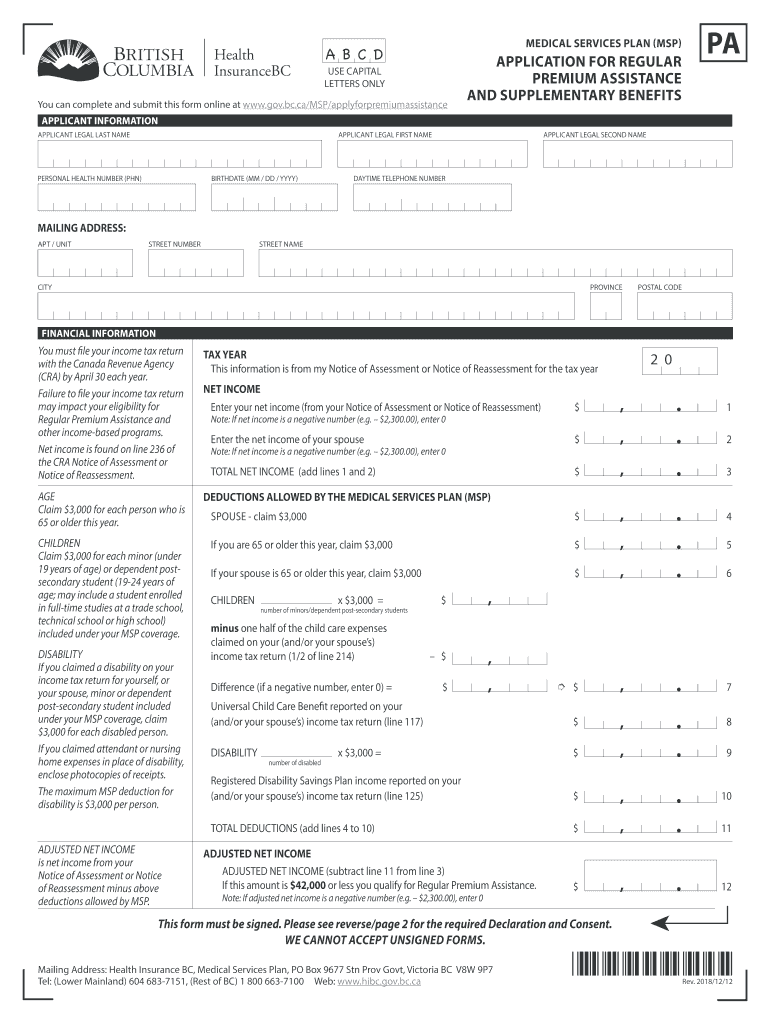
- Begin by filling out the 'Applicant Information' section. Enter your legal last name, first name, personal health number (PHN), and birthdate in the specified fields. Ensure all entries are in capital letters.
- Provide your daytime telephone number and mailing address, including apartment/unit number, street number, street name, city, province, and postal code.
- In the 'Financial Information' section, input your net income from your Notice of Assessment. Remember to include any deductions allowed by MSP for disability or age as applicable.
- Complete the 'Declaration and Consent' section at the end of the form. Make sure to sign and date it; unsigned forms will not be accepted.
Start using our platform today to easily complete your canada hlth 119 form online for free!
Fill out canada hlth 119 online
It's free
See more canada hlth 119 versions
We've got more versions of the canada hlth 119 form. Select the right canada hlth 119 version from the list and start editing it straight away!
Security and compliance
At DocHub, your data security is our priority. We follow HIPAA, SOC2, GDPR, and other standards, so you can work on your documents with confidence.
Learn more


Related forms

Annual Lease Site Owner Rental Proposal
The document is an Express Check-In Request Form for visitors to an annual lease site at Ocean Lakes Family Campground. ...

Ocean lakes express check in
The document is an Express Check-In Request Form for visitors to Ocean Lakes Family Campground, aimed at streamlining th ...

Gun Control: FY2017 Appropriations for the Bureau of Alcohol
The document is the ATF Form 4473, a Firearms Transaction Record used by the Bureau of Alcohol, Tobacco, Firearms and Ex ...

Dd Form 149
The document is an application form (DD Form 149) for the correction of military records under Title 10, U.S. Code, Sect ...

Fs Form 1048
The document is FS Form 1048, a claim form for individuals seeking relief for lost, stolen, or destroyed United States S ...

Alcohol Withdrawal Assessment Scoring Guidelines (CIWA - Ar)
The document outlines the Alcohol Withdrawal Assessment Scoring Guidelines using the Clinical Institute Withdrawal Asses ...

What Makes for Strong Letters of Recommendation
The document provides guidance on writing strong letters of recommendation for fellowship applications, based on feedbac ...