
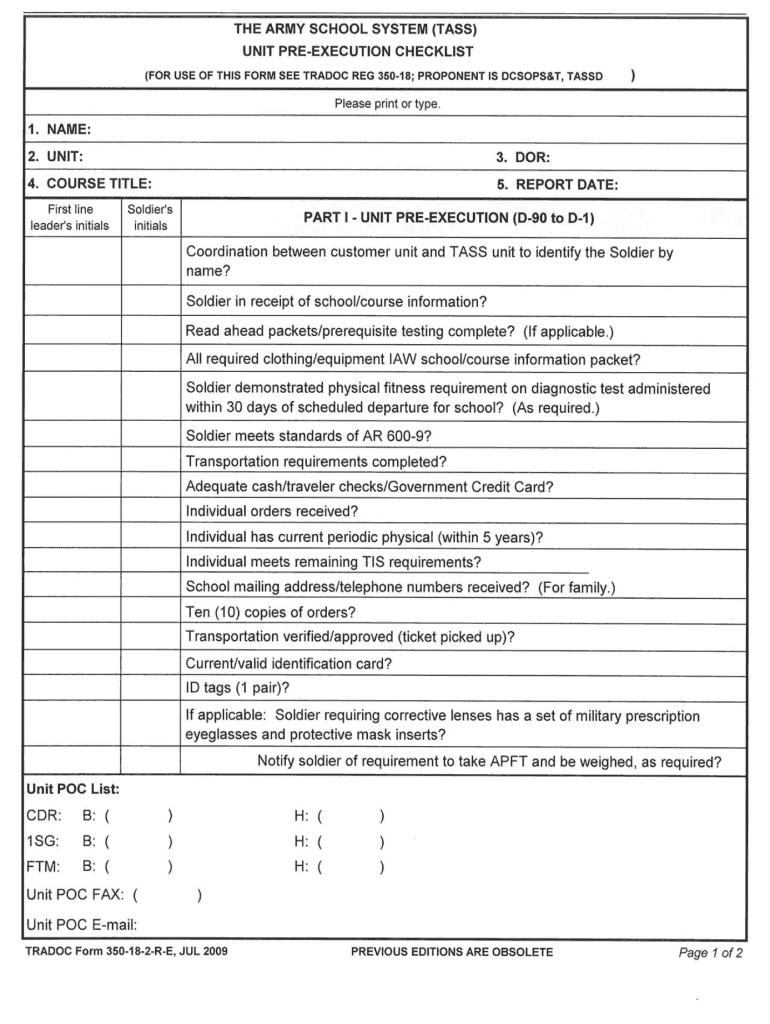




Here's how it works

01. Edit your tradoc form 600 21 1 online
Type text, add images, blackout confidential details, add comments, highlights and more.

02. Sign it in a few clicks
Draw your signature, type it, upload its image, or use your mobile device as a signature pad.

03. Share your form with others
Send tradoc form 350 18 2 r e via email, link, or fax. You can also download it, export it or print it out.
How to use or fill out tradoc form 2009 with our platform

- Click ‘Get Form’ to open the tradoc form 2009 in the editor.
- Begin by entering your personal information in the designated fields at the top of the form. This typically includes your name, contact details, and any relevant identification numbers.
- Proceed to the next section, which may require you to provide specific details about your training or educational background. Ensure that all entries are accurate and complete.
- Review any checkboxes or options provided in the form. Select all that apply to your situation, as this will help streamline processing.
- Finally, sign and date the document using our platform’s signature feature. This ensures that your submission is valid and ready for distribution.
Start using our platform today for free to effortlessly complete your tradoc form 2009!
Fill out tradoc form 2009 online
It's free
See more tradoc form 2009 versions
We've got more versions of the tradoc form 2009 form. Select the right tradoc form 2009 version from the list and start editing it straight away!
Security and compliance
At DocHub, your data security is our priority. We follow HIPAA, SOC2, GDPR, and other standards, so you can work on your documents with confidence.
Learn more


Related forms
Accretion of duties promotion certification - GSA
The document outlines the process for certifying an employee's promotion through accretion of duties, detailing the nece ...

Science Fair Timeline at a Glance - Mrs Evans Earth Science
The document outlines a comprehensive timeline and guidelines for students participating in a science fair, detailing du ...

MARRIAGE CEREMONY BOOKING
The document is a marriage ceremony booking form for Leanne Smith, a registered marriage celebrant. It includes details ...

Nmc declaration form 2022 23
The NMC Faculty Declaration Form (2021-22) is a comprehensive document required for faculty members at medical colleges ...

C o Mike Perkins
The document is a membership dues assessment for the Committee on Foreign Relations Minnesota (CFR-MN) for the 2024/2025 ...

Articles of Incorporation of a Virginia Nonstock Corporation
The document provides instructions for filing Articles of Incorporation for a Virginia Nonstock Corporation, detailing t ...

Natorules
The document is a NATO Travel Order issued by the Department of the Army for authorized military personnel travel. It in ...
REINSURANCE AGREEMENT FOR A BONDS STATUTE PERFORMANCE BOND
The document is a Reinsurance Agreement for a Bonds Statute Performance Bond, outlining the terms under which a Direct W ...