




Here's how it works

01. Edit your ontario works eligibility calculator online
Type text, add images, blackout confidential details, add comments, highlights and more.

02. Sign it in a few clicks
Draw your signature, type it, upload its image, or use your mobile device as a signature pad.

03. Share your form with others
Send ontario works application via email, link, or fax. You can also download it, export it or print it out.
How to use or fill out Ontario Works with our platform

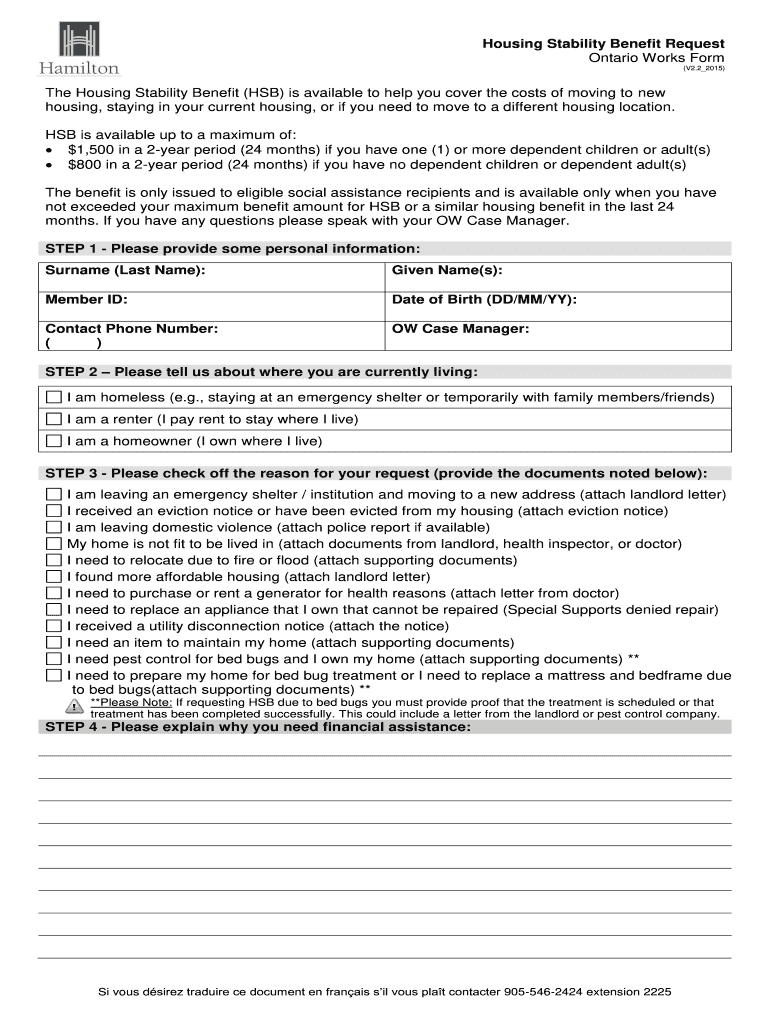
- Click ‘Get Form’ to open the Ontario Works form in the editor.
- Begin by providing your personal information. Fill in your surname, given name(s), member ID, date of birth, contact phone number, and your OW case manager's name.
- Indicate your current living situation by selecting one of the options: homeless, renter, or homeowner.
- Select the reason for your request from the provided list and ensure you attach any required documents that support your claim.
- Explain why you need financial assistance in the designated section. Be clear and concise to help expedite processing.
- Specify what you require financial assistance for by checking the relevant items and providing costs where applicable.
- Review all information for accuracy before signing and dating the application at the bottom of the form.
Start filling out your Ontario Works application today using our platform for free!
Fill out ontario works online
It's free
See more ontario works versions
We've got more versions of the ontario works form. Select the right ontario works version from the list and start editing it straight away!
Security and compliance
At DocHub, your data security is our priority. We follow HIPAA, SOC2, GDPR, and other standards, so you can work on your documents with confidence.
Learn more


Related forms

Cc-courts juryJury Services Center: Contra Costa Superior Court
The document is a Grand Jury Questionnaire for the Superior Court of California, County of Contra Costa. It collects per ...

Form 205
The document is the Australian Securities & Investments Commission (ASIC) Form 205, which is used for notifying resoluti ...
California lighting compliance
The document is a Certificate of Compliance for Sign Lighting issued by the California Energy Commission, detailing requ ...
Form 42 (2013) - Share Schemes - HM Revenue and Customs
The document outlines the requirements for companies to report employment-related securities and options under Section 4 ...

2012 wisconsin form 2015
The document provides detailed instructions for filing the Wisconsin Income Tax Form 1 for the year 2015. It outlines el ...

Keystart Home Loan Product Guide
The document is a Direct Debit Request form for Keystart Loans Limited, allowing customers to authorize the debiting of ...

2017-2018 Verification Worksheet - Truman State University
The document is a 2017-2018 Verification Worksheet for dependent students applying for federal student aid at Truman Sta ...

Nm pte 2013 form
The document is the 2013 PTE New Mexico Information Return for Pass-Through Entities, which outlines the necessary infor ...