




Here's how it works



How to use or fill out Housing Stability Benefit Rent Ready Request - City of Hamilton

- Click ‘Get Form’ to open it in the editor.
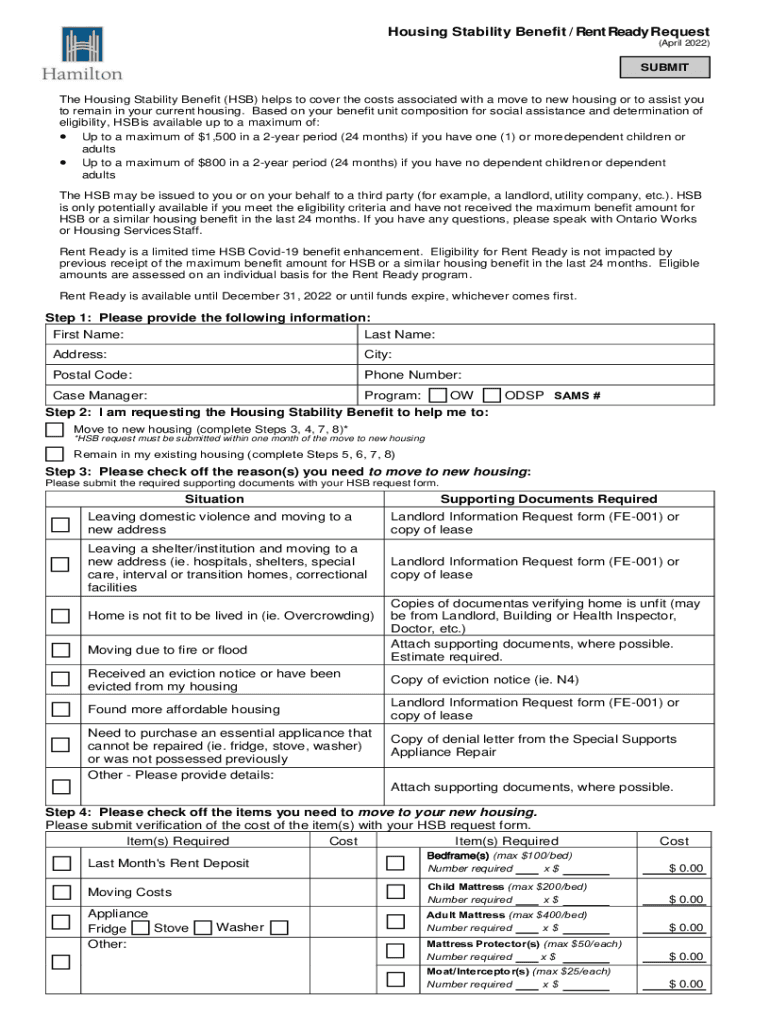
- Begin by entering your personal information in Step 1, including your First Name, Last Name, Address, City, Postal Code, Phone Number, Case Manager, and Program. Ensure all details are accurate for a smooth application process.
- In Step 2, indicate whether you are requesting assistance to move to new housing or remain in your current housing. Depending on your choice, follow the corresponding steps for additional information.
- If moving (Step 3), check off the reasons for your move and attach any required supporting documents. If remaining (Step 5), specify the reasons and provide necessary documentation as well.
- Complete Steps 4 and 6 by checking off items needed for moving or staying in your home. Include cost estimates and verification of expenses where applicable.
- Finally, submit your completed request form at an Ontario Works or Housing Services office as outlined in Step 7. Review the declaration section in Step 8 before signing.
Start using our platform today to complete your Housing Stability Benefit Rent Ready Request effortlessly!
It's free
See more Housing Stability Benefit Rent Ready Request - City of Hamilton versions
Got questions?
How can I sign my city of hamilton housing application on iOS?
With DocHub, you can easily sign your city of hamilton housing application or any other paperwork on iOS, even without setting up additional programs. You can access your DocHub account from any internet-connected browser and complete and sign your document in any way you like with just a few clicks.
How to fill out and sign hamilton rent bank online?
You can easily complete, modify, and even eSign your hamilton rent bank utilizing DocHub. Create a new account and start your free trial. After that, you may upload the file with the form and simply make all the required edits. No need to print on paper or use a third-party application to sign it, as you can place your electronic signature on your document quicker through DocHub.
Security and compliance
At DocHub, your data security is our priority. We follow HIPAA, SOC2, GDPR, and other standards, so you can work on your documents with confidence.
Learn more


