ITEM "9" SUPPORTIVE DOCUMENTS 2026

Get Form
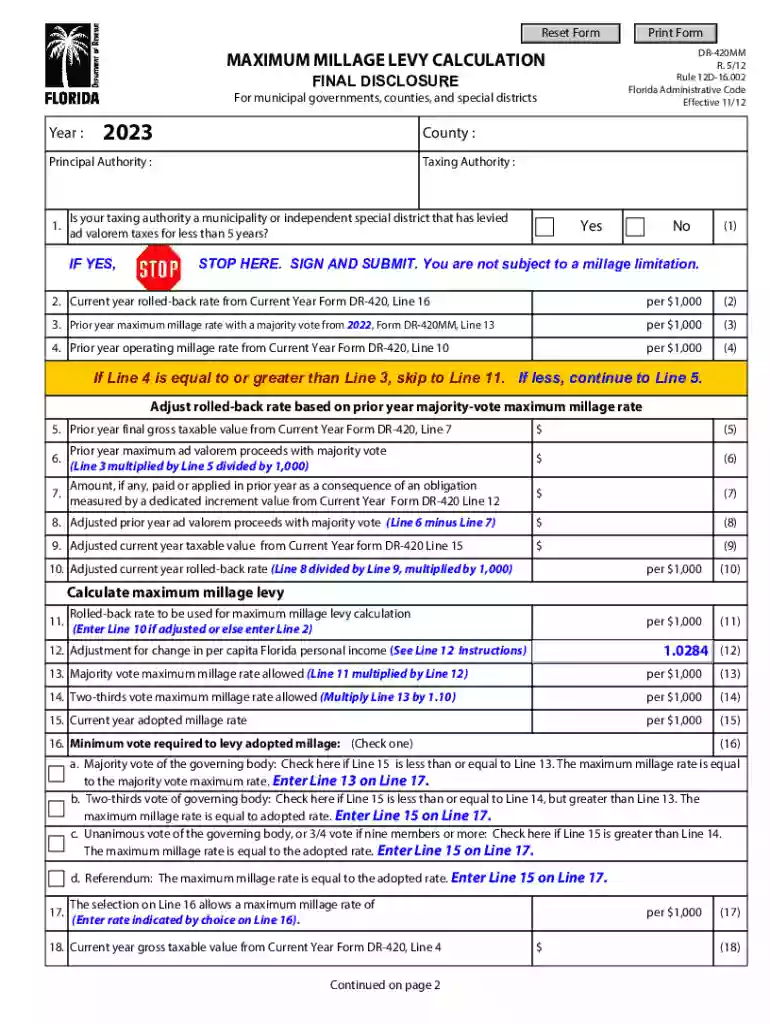
ITEM "9" SUPPORTIVE DOCUMENTS Preview on Page 1

Here's how it works

01. Edit your form online
Type text, add images, blackout confidential details, add comments, highlights and more.

02. Sign it in a few clicks
Draw your signature, type it, upload its image, or use your mobile device as a signature pad.

03. Share your form with others
Send it via email, link, or fax. You can also download it, export it or print it out.

How to use or fill out ITEM "9" SUPPORTIVE DOCUMENTS

Form edit decoration
9.5
Ease of Setup
DocHub User Ratings on G2
9.0
Ease of Use
DocHub User Ratings on G2
  1. Click ‘Get Form’ to open ITEM '9' SUPPORTIVE DOCUMENTS in our editor.
  2. Begin by entering the current year in the designated field. This is crucial for accurate calculations.
  3. Proceed to Line 9, where you will input the adjusted current year taxable value from Current Year form DR-420, Line 15. Ensure that this value reflects your latest assessments.
  4. Review previous lines for any necessary calculations that may affect your entry on Line 9. Double-check values from prior forms to maintain accuracy.
  5. Once all relevant fields are filled, utilize our platform's features to save and submit your completed form efficiently.

Start using our editor today for free and streamline your document completion process!

See more ITEM "9" SUPPORTIVE DOCUMENTS versions

We've got more versions of the ITEM "9" SUPPORTIVE DOCUMENTS form. Select the right ITEM "9" SUPPORTIVE DOCUMENTS version from the list and start editing it straight away!
Versions Form popularity Fillable & printable
2023 4.7 Satisfied (25 Votes)
2022 4.8 Satisfied (21 Votes)
2021 4.8 Satisfied (55 Votes)
2020 4.4 Satisfied (136 Votes)
2019 4.4 Satisfied (294 Votes)
2018 4.3 Satisfied (76 Votes)
2012 4.1 Satisfied (65 Votes)
be ready to get more

Complete this form in 5 minutes or less

Get form

Got questions?

We have answers to the most popular questions from our customers. If you can't find an answer to your question, please contact us.
Contact us

Sure, you’ll find numerous apps for this on the web. However, if you need to eSign your ITEM "9" SUPPORTIVE DOCUMENTS without installing additional software, DocHub is the optimum choice you can make. This robust editor works on mobile devices just like on desktops. Open our editor in any internet browser, register or log in to your account, and start processing your forms.

Document editing with DocHub is equally convenient on desktop and mobile devices. You just need an internet browser to edit your ITEM "9" SUPPORTIVE DOCUMENTS on Android. Open our website and sign in to access the instruments you need. Add your file and introduce your intended modifications. Next, you can keep your form in your file storage or send it out instantly.

Supporting documentation refers to any document you provide alongside your primary application to prove or support the claims or information youve provided. Whether its verifying your identity, financial status, medical history, or educational qualifications, these documents are vital for making your case stronger.
Photo Identification Examples State identification (ID) card. Driver license. US passport, foreign passport, or passport card. US military card (front and back) Military dependents ID card (front and back) Permanent Resident Card (Green card) Certificate of Citizenship.
Form I-9, Employment Eligibility Verification consists of two sections and two supplements: Section One: Employee Information and Attestation. Section Two: Employer or Authorized Representative Review and Verification. Supplement A, Preparer and/or Translator Certification for Section 1.

Security and compliance

At DocHub, your data security is our priority. We follow HIPAA, SOC2, GDPR, and other standards, so you can work on your documents with confidence.

Learn more
ccpa2
pci-dss
gdpr-compliance
hipaa
soc-compliance

People also ask

For Form I-9 purposes, you may accept these cards. School ID card with a photograph. Voters registration card. U.S. Coast Guard Merchant Mariner Card. Native American tribal document. Drivers license issued by a Canadian government authority. For persons under age 18 who are unable to present a document listed above:
I-9 Examples Based on Document Type Used to Substantiate Continued Work: Passport, I-94, I-20 with F-1 Status. Passport, I-94, DS-2019 with J-1 Status. Passport + I-94, DS-2019, and Employment Authorization Letter with J-1 Student Status. Work Permit. Passport with I-94 Indicating TN/E-3/O-1/H-1B/L-1 Status.
Documents you need Examples: Primary document: Drivers license, passport, or other government-issued photo. Secondary document: Social Security card, utility bill, or vehicle registration.
Employees must provide documentation to their employers to show their identity and authorization to work.

Related links