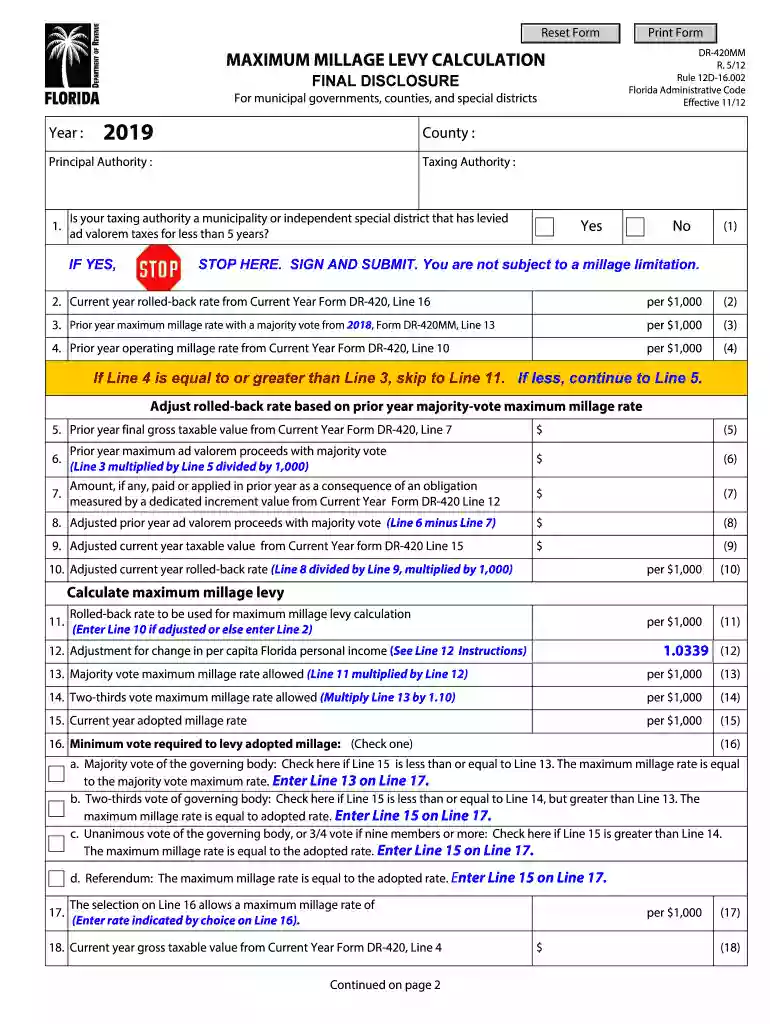
DR-420MM 2026

Get Form
DR-420MM Preview on Page 1

Here's how it works

01. Edit your form online
Type text, add images, blackout confidential details, add comments, highlights and more.

02. Sign it in a few clicks
Draw your signature, type it, upload its image, or use your mobile device as a signature pad.

03. Share your form with others
Send it via email, link, or fax. You can also download it, export it or print it out.

How to use or fill out DR-420MM with our platform

Form edit decoration
9.5
Ease of Setup
DocHub User Ratings on G2
9.0
Ease of Use
DocHub User Ratings on G2
  1. Click ‘Get Form’ to open the DR-420MM in the editor.
  2. Begin by entering the year and county information at the top of the form. Ensure accuracy as this sets the context for your calculations.
  3. In Section 1, answer whether your taxing authority has levied ad valorem taxes for less than five years. If 'Yes', stop here, sign, and submit.
  4. Proceed to enter the current year rolled-back rate from Line 16 of Form DR-420 in Section 2. This is crucial for calculating your maximum millage.
  5. Continue filling out Sections 3 through 10, ensuring you accurately input prior year rates and taxable values as indicated on the form.
  6. In Section 11, calculate the rolled-back rate to be used for maximum millage levy calculation based on previous entries.
  7. Complete Sections 12 through 25 by following instructions carefully, checking boxes where necessary to indicate voting requirements and final calculations.
  8. Finally, review all entries for accuracy before signing and submitting the form along with any required documentation.

Start using our platform today to fill out your DR-420MM easily and efficiently!

See more DR-420MM versions

We've got more versions of the DR-420MM form. Select the right DR-420MM version from the list and start editing it straight away!
Versions Form popularity Fillable & printable
2026 4.2 Satisfied (24 Votes)
2024 4.8 Satisfied (38 Votes)
2023 4.7 Satisfied (25 Votes)
2022 4.8 Satisfied (21 Votes)
2021 4.8 Satisfied (55 Votes)
2020 4.4 Satisfied (136 Votes)
2019 4.4 Satisfied (294 Votes)
2018 4.3 Satisfied (76 Votes)
2012 4.1 Satisfied (65 Votes)
be ready to get more

Complete this form in 5 minutes or less

Get form

Got questions?

We have answers to the most popular questions from our customers. If you can't find an answer to your question, please contact us.
Contact us
Truth in Millage (TRIM) This law is designed to inform taxpayers which governmental entity is responsible for the taxes levied and the amount of tax liability taxpayers owe to each taxing authority. The property appraiser sends this information, known as the TRIM notice, to the property owner.
TRIM Notices (mid- to late-August): The Truth in Millage (TRIM) notice provides a preview of the clients tax liability: assessed value, exemptions, and proposed millage rates. This is not a bill-but it is the only formal notice before appeals are due.

Security and compliance

At DocHub, your data security is our priority. We follow HIPAA, SOC2, GDPR, and other standards, so you can work on your documents with confidence.

Learn more
ccpa2
pci-dss
gdpr-compliance
hipaa
soc-compliance