



Here's how it works



How to use or fill out epo 002 2017-2018 form with our platform

- Click ‘Get Form’ to open the epo 002 2017-2018 form in the editor.
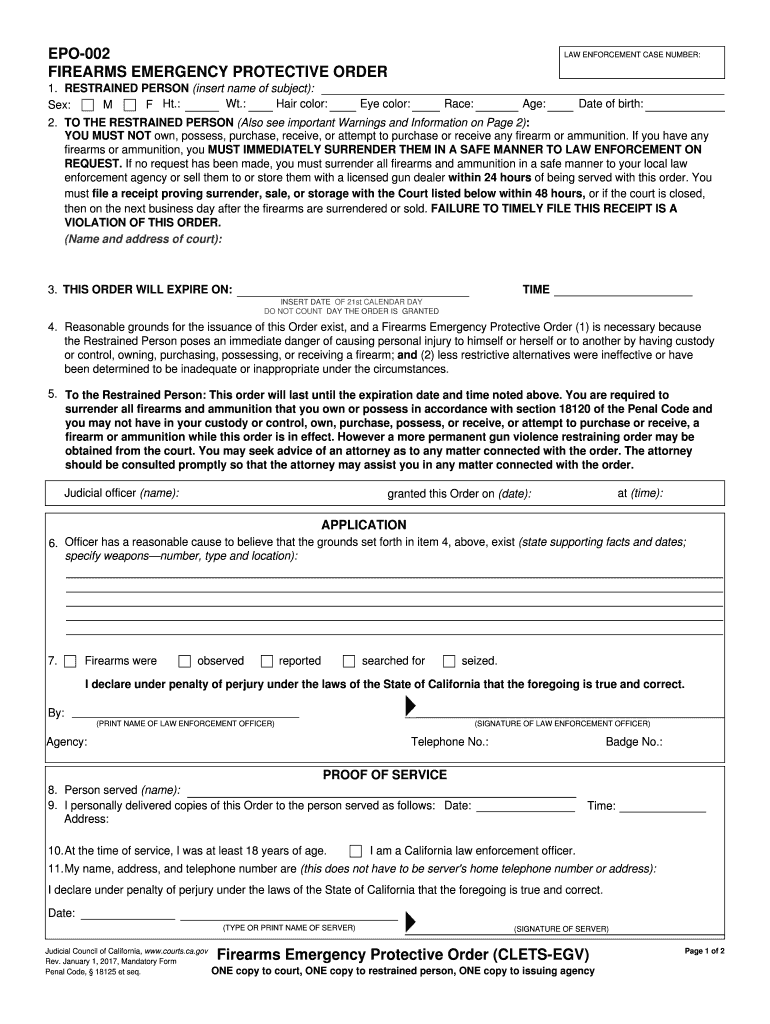
- Begin by filling in the 'Restrained Person' section. Enter the name, weight, hair color, height, sex, eye color, race, age, and date of birth of the individual being restrained.
- In the 'Law Enforcement Case Number' field, input the relevant case number for tracking purposes.
- Specify the expiration date and time of the order in section three. Ensure you calculate this correctly based on the issuance date.
- Provide details in section four regarding why this order is necessary. Clearly state any immediate dangers posed by the restrained person.
- Complete sections six through eleven as required. This includes documenting any firearms observed or seized and providing proof of service information.
Start using our platform today to fill out your forms online for free!
It's free
See more epo 002 2017-2018 form versions
Got questions?
How can I eSign my epo 002 2017-2018 form from Gmail?
With DocHub, it’s quite simple. The platform offers users an add-on called DocHub for Gmail, which you can locate in the Google Workspace Marketplace free of charge. Install it and give it access to your Google account. Open your email with your epo 002 2017-2018 form attached and click on the add-on button in the right-side panel. Sign in to your DocHub account, and import the file to our editor, where you can fill it out and sign.
How to fill out epo 002 2017-2018 form online for free in 2024?
Using a swift editing system like DocHub, you do not need anything but a browser and connection to the internet to modify your epo 002 2017-2018 form on the internet swiftly. Add your document or get the appropriate form in DocHub’s catalog, open our editor with one click, and finish it digitally. To edit your forms at any time, sign up a free profile with DocHub.
How long does epo last?
Why would a judge deny an EPO?
How is an EPO different than a restraining order?
Security and compliance
At DocHub, your data security is our priority. We follow HIPAA, SOC2, GDPR, and other standards, so you can work on your documents with confidence.
Learn more