




Here's how it works

01. Edit your motion for contempt online
Type text, add images, blackout confidential details, add comments, highlights and more.

02. Sign it in a few clicks
Draw your signature, type it, upload its image, or use your mobile device as a signature pad.

03. Share your form with others
Send motion of contempt via email, link, or fax. You can also download it, export it or print it out.
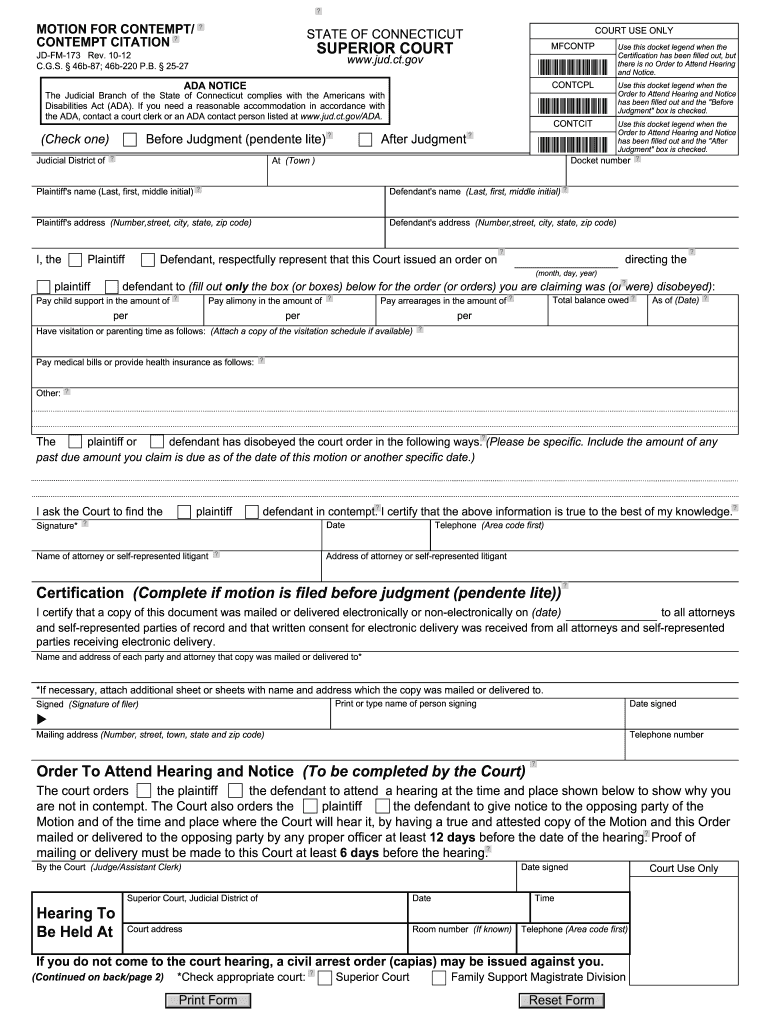
How to use or fill out the Motion for Contempt in Connecticut

- Click ‘Get Form’ to open it in the editor.
- Begin by filling in the 'Judicial District' and 'Docket Number' at the top of the form. This information is crucial for identifying your case.
- In the 'Plaintiff's Name' and 'Defendant's Name' sections, enter the full names as required. Ensure accuracy to avoid any delays.
- Specify whether this motion is 'Before Judgment' or 'After Judgment' by checking the appropriate box.
- Detail the specific court orders that have been disobeyed in the section provided. Be clear and concise about each order and any amounts owed.
- Complete the certification section, ensuring you sign and date where indicated. If applicable, include details of service to other parties involved.
Start using our platform today to easily fill out your Motion for Contempt online, for free!
Fill out how to ct court contempt online
It's free
See more how to ct court contempt versions
We've got more versions of the how to ct court contempt form. Select the right how to ct court contempt version from the list and start editing it straight away!
Security and compliance
At DocHub, your data security is our priority. We follow HIPAA, SOC2, GDPR, and other standards, so you can work on your documents with confidence.
Learn more


Related forms

Fee Sport Fishing License Application -FG355b-2 - State of
The document outlines the application process for a free sport fishing license in California for residents with severe p ...
Usufruct
The document is a legal grant of usufruct from a grantor to a grantee in Louisiana, allowing the grantee to use and main ...

Enhanced Pension Annuity Quotation Request bFormb - Retirement bb - retirementhealthform co
Enhanced Pension Annuity Quotation Request bFormb - Retirement bb - retirementhealthform co
The document is a detailed health questionnaire and consent form for individuals seeking an annuity quotation. It emphas ...

425 Must-Try 'Get to Know You' Questions - The Ultimate List
VIAtrans is a curb-to-curb transportation service for individuals with disabilities that hinder their ability to use pub ...

The Payroll Authorization Period for - dps siu
The document informs that the Payroll Authorization Period for purchasing parking decals has expired, and any forms not ...

Adult learning wed 486 course syllabus - Department of Workforce
The document is a course syllabus for WED 486 Adult Learning, focusing on adult development and learning principles. It ...

CERTIFICATION OF COMPLETION OF THE PRELIMINARY EXAMS
The document is a certification cover sheet for the Research Proposal required for Ph.D. candidacy in the Molecular, Cel ...

The Influence of Framing on Willingness to Pay - gsb stanford
The document explores the 'uncertainty effect' (UE), where individuals value risky prospects less than their worst possi ...