




Here's how it works

01. Edit your 10 10ez online
Type text, add images, blackout confidential details, add comments, highlights and more.

02. Sign it in a few clicks
Draw your signature, type it, upload its image, or use your mobile device as a signature pad.

03. Share your form with others
Send 10 10ez form via email, link, or fax. You can also download it, export it or print it out.
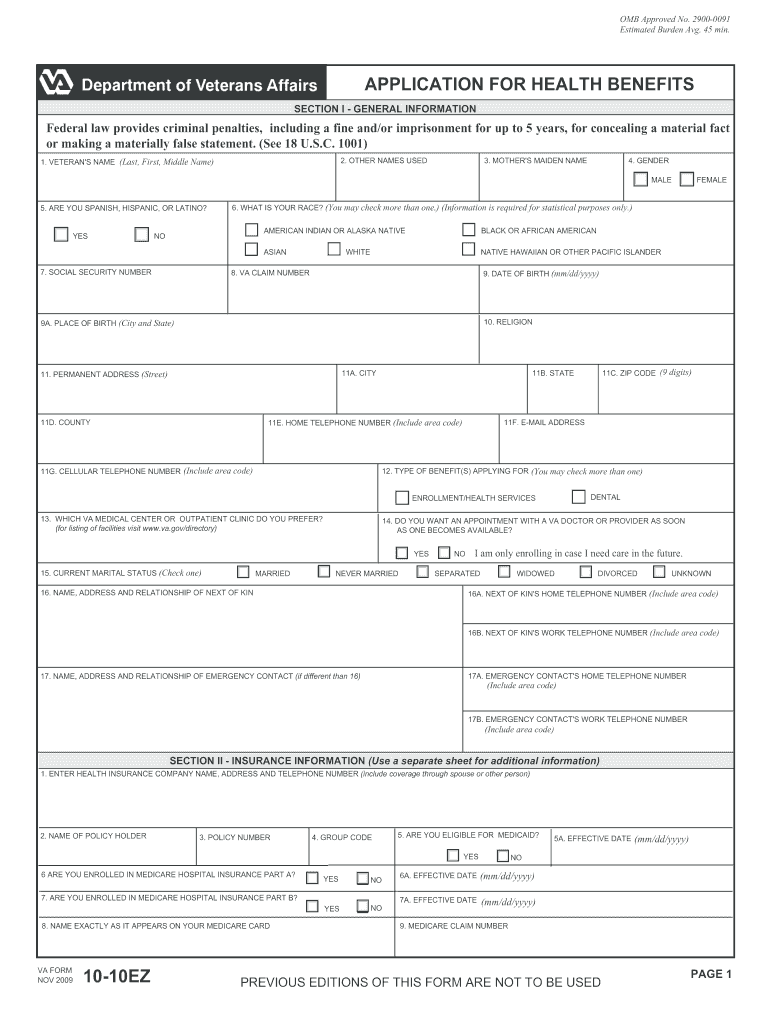
How to use or fill out VA Form 10-10EZ 2009 with DocHub

- Click ‘Get Form’ to open it in the editor.
- Begin with Section I - General Information. Fill in your name, Social Security number, and contact details accurately.
- Move to Section II - Insurance Information. List all health insurance providers, including policy numbers and coverage details.
- In Section III - Employment Information, indicate your employment status and provide details about your employer if applicable.
- Proceed to Section IV - Military Service Information. Complete this section with your military history and any relevant documentation.
- For Sections V - IX, only complete these if applicable. Provide financial disclosures as required for eligibility determination.
- Finally, review all sections for accuracy before signing in Section XII. Ensure you attach any necessary documents.
Start using our platform today to fill out your VA Form 10-10EZ effortlessly and for free!
Fill out va form 10 10ez 2009 online
It's free
See more va form 10 10ez 2009 versions
We've got more versions of the va form 10 10ez 2009 form. Select the right va form 10 10ez 2009 version from the list and start editing it straight away!
| Versions | Form popularity | Fillable & printable |
|---|---|---|
| 2025 | 4.9 Satisfied (31 Votes) | |
| 2024 | 4.4 Satisfied (38 Votes) | |
| 2024 | 4.8 Satisfied (32 Votes) | |
| 2023 | 4.3 Satisfied (41 Votes) | |
| 2021 | 4.8 Satisfied (62 Votes) | |
| 2020 | 4.2 Satisfied (82 Votes) | |
| 2015 | 4.1 Satisfied (74 Votes) | |
| 2013 | 4.4 Satisfied (554 Votes) | |
| 2011 | 4.1 Satisfied (67 Votes) | |
| 2009 | 3.9 Satisfied (52 Votes) | |
| 2008 | 4.4 Satisfied (44 Votes) | |
| 2007 | 4.4 Satisfied (51 Votes) | |
| 2005 | 4.3 Satisfied (44 Votes) | |
| 1998 | 4 Satisfied (44 Votes) |
Security and compliance
At DocHub, your data security is our priority. We follow HIPAA, SOC2, GDPR, and other standards, so you can work on your documents with confidence.
Learn more


Related forms
2022 Pennsylvania E-File Signature Authorization for PA S Corporation Partnership Information Return
2022 Pennsylvania E-File Signature Authorization for PA S Corporation Partnership Information Return
The document is the Pennsylvania E-File Signature Authorization Form (PA-8879P) for PA S Corporations and Partnerships, ...
Florida Supreme Court Approved Family Law Form 12 930(c
The document provides instructions for using Florida Family Law Rules of Procedure Form 12.930(c), which outlines the St ...

First American Mortgage Solutions Individual Certification Package
The document is a Vendor Certification Package from First American Mortgage Solutions, outlining the requirements and pr ...

Jamaica customs form
The document is an application form for obtaining or renewing a Customs Broker's Clerk Identification from the Jamaica C ...

Dr0026
The document outlines the Tax Statement for Leased Motor Vehicle (DR 0026) required by auto dealers in Colorado when sel ...

Nj tobacco certificate
The document outlines the requirements for the Tobacco and Vapor Products Tax in New Jersey, specifically focusing on th ...

Ky revenue exemption
The document is an Affidavit of Exemption for a fiduciary or beneficiary of an estate in Kentucky, stating that all asse ...
Schedule tax
The document provides instructions for completing Form NC-5X, which is used to amend a previously filed Withholding Retu ...