



Here's how it works



How to use or fill out 7 team double elimination bracket with our platform

- Click ‘Get Form’ to open the 7 team double elimination bracket in the editor.
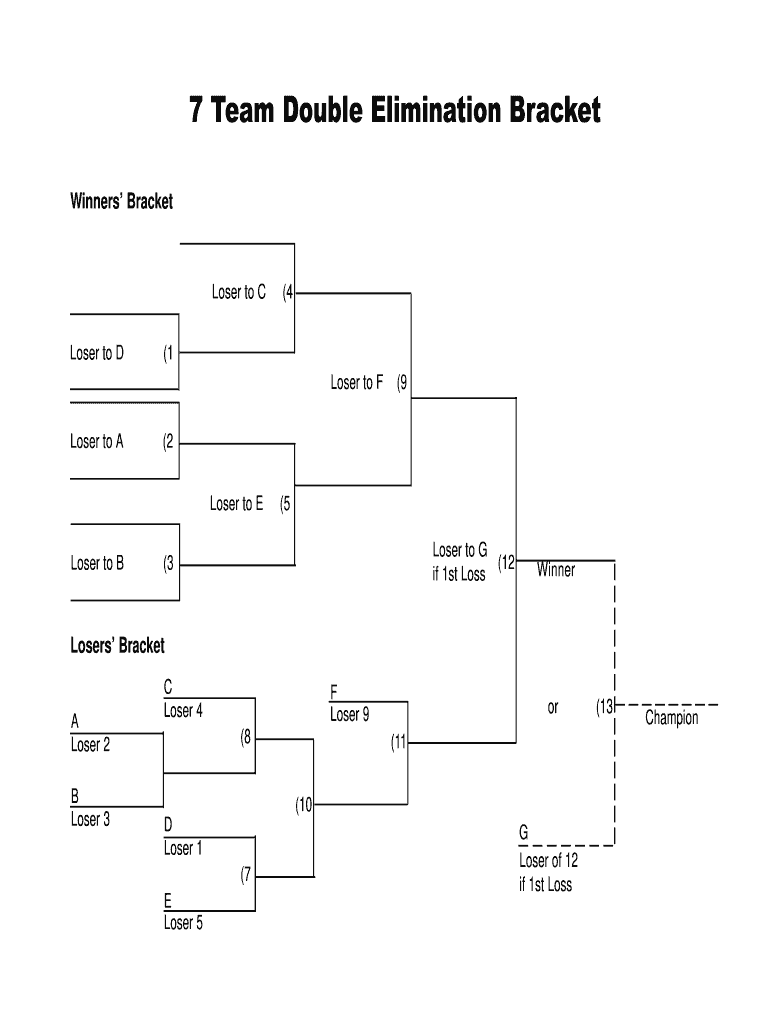
- Begin by filling in the names of the teams participating in the tournament. Enter each team's name in the designated fields within the Winners' Bracket section.
- As matches are played, record the results by entering the winning team's name in the appropriate spot. This will help track progress through the bracket.
- For any teams that lose, ensure you note their placement in the Losers' Bracket. This is crucial for maintaining an accurate flow of matches.
- Continue updating both brackets as teams advance or are eliminated, ensuring all match outcomes are reflected accurately.
- Once completed, review your entries for accuracy and clarity before saving or sharing your bracket.
Start using our platform today to effortlessly manage your tournament brackets online for free!
It's free
Got questions?
How do I sign my 7 team double elimination bracket on iOS?
With DocHub, you can quickly sign your 7 team double elimination bracket or any other document on iOS, even without setting up additional programs. You can access your DocHub account from any internet-connected browser and complete and sign your form in any preferred method with just a couple of clicks.
How do you edit 7 team softball tournament bracket on Android?
Document editing with DocHub is equally convenient on desktop and mobile devices. You just need an internet browser to revise your 7 team softball tournament bracket on Android. Open our site and sign in to access the tools you need. Add your document and introduce your intended modifications. After that, you can keep your form in your document storage or send it out immediately.
Who is the home team in a double-elimination tournament?
What is the formula for double-elimination tournament?
How do tournament losers brackets work?
Security and compliance
At DocHub, your data security is our priority. We follow HIPAA, SOC2, GDPR, and other standards, so you can work on your documents with confidence.
Learn more


Related forms