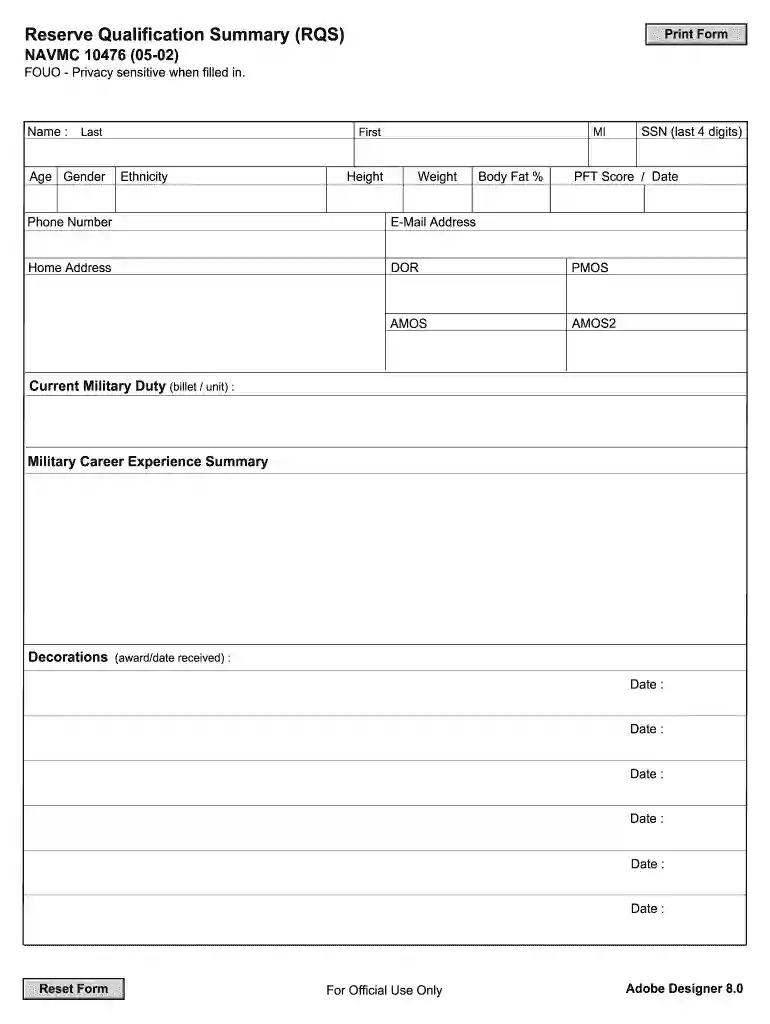
navmc 10476 Preview on Page 1

Navmc 10476 2026

Here's how it works

  • 01. Edit your navmc 10476 online

    Type text, add images, blackout confidential details, add comments, highlights and more.

  • 02. Sign it in a few clicks

    Draw your signature, type it, upload its image, or use your mobile device as a signature pad.

  • 03. Share your form with others

    Send navmc 10476 pdf via email, link, or fax. You can also download it, export it or print it out.

How to use or fill out navmc 10476 with our platform

Form edit decoration
9.5
Ease of Setup
DocHub User Ratings on G2
9.0
Ease of Use
DocHub User Ratings on G2
  1. Click ‘Get Form’ to open the NAVMC 10476 in the editor.
  2. Begin by entering your personal information in the designated fields, including your name, age, gender, and contact details. Ensure accuracy as this information is crucial for identification.
  3. Fill in your military career experience summary. List your current military duty, including billet and unit details, followed by any decorations received along with their dates.
  4. Complete the education sections by detailing both military and civilian education. Include the names of schools attended and dates completed.
  5. In the civilian occupation section, provide a brief description of your job duties. Additionally, list any languages you speak and your proficiency levels.
  6. Use the remarks section to highlight community activities or civilian skills that may benefit your military service.
  7. Finally, sign and date the form before submitting it to the appropriate Headquarters element as required.

Start using our platform today to easily fill out your NAVMC 10476 form online for free!

See more navmc 10476 versions

We've got more versions of the navmc 10476 form. Select the right navmc 10476 version from the list and start editing it straight away!

VersionsForm popularityFillable & printable
20024.7 Satisfied (49 Votes)
19974.4 Satisfied (231 Votes)

be ready to get more

Complete this form in 5 minutes or less

Got questions?

We have answers to the most popular questions from our customers. If you can't find an answer to your question, please contact us.

According to eSignature laws, forms approved electronically have the same validity as those approved with pen and paper. You can electronically sign almost any business and personal paperwork. Four types of paperwork still call for handwritten signatures only - wills and testamentary trusts, court orders and other court papers, state statutes governing divorce, adoption, or other family law, and notice of cancellation of utility services. If you follow the rules and use a trustworthy and compliant software solution, like DocHub, you can eSign your usmc rqs fillable without printing it.

As a comprehensive document modifying service, DocHub is accessible on mobile phones. Open DocHub in your choice of mobile browser and employ our smart mobile-friendly toolset to fill out your reserve qualification summary.

The RQS is intended to provide various selection boards with updated military and civilian skills and qualifications that may not be reflected in the Official Military Personnel Files (OMPF).
Requirements for Enlistment in Reserves Be a U.S. citizen or a resident alien. Meet physical, mental, and moral standards. Be between the ages of 17-29. Have a high school diploma/GED. Take and pass the Armed Services Vocational Aptitude Battery (ASVAB) test. Pass a Military Entrance Processing Station medical exam.
The reserves has many benefits, including, being stationed near home or school, guaranteed military occupational specialty at the time of enlistment, advanced MOS training and leadership opportunities, the same recruit training and formal schools as active-duty Marines, and even educational financial assistance.

Security and compliance

At DocHub, your data security is our priority. We follow HIPAA, SOC2, GDPR, and other standards, so you can work on your documents with confidence.

be ready to get more

Complete this form in 5 minutes or less

People also ask

List of United States Air Force rescue squadrons Rescue Squadrons (RQS)
Marine Tuition Assistance (TA) is available for all active duty and active reserve Marines. Each member receives $4500 per fiscal year (1 Oct-30 Sep). There is a cap of $250 per semester hour, $166.67 per quarter hour, and $16.67 per clock hour.

rqs usmc

Monthly catalog of United States Government publications

10476. 251. Commercial vegetables for fresh market and processing In NAVMC 2578.]) [Other illu.!trations in color on p. 1-4 cover. Superspde.s DoDRead more

Learn more
convening of the college of distance education and training

Officers must complete, sign (digitally or physically) and attach their RQS NAVMC 10476 (05-02), which is the current version located on the online applicationRead more

Learn more
If you believe that this page should be taken down, please follow our DMCA take down process here