Type text, add images, blackout confidential details, add comments, highlights and more.
02. Sign it in a few clicks
Draw your signature, type it, upload its image, or use your mobile device as a signature pad.
03. Share your form with others
Send ds 5535 word format via email, link, or fax. You can also download it, export it or print it out.
How to use or fill out ds 5535 with our platform
Ease of Setup
DocHub User Ratings on G2
Ease of Use
DocHub User Ratings on G2
Click ‘Get Form’ to open the ds 5535 in the editor.
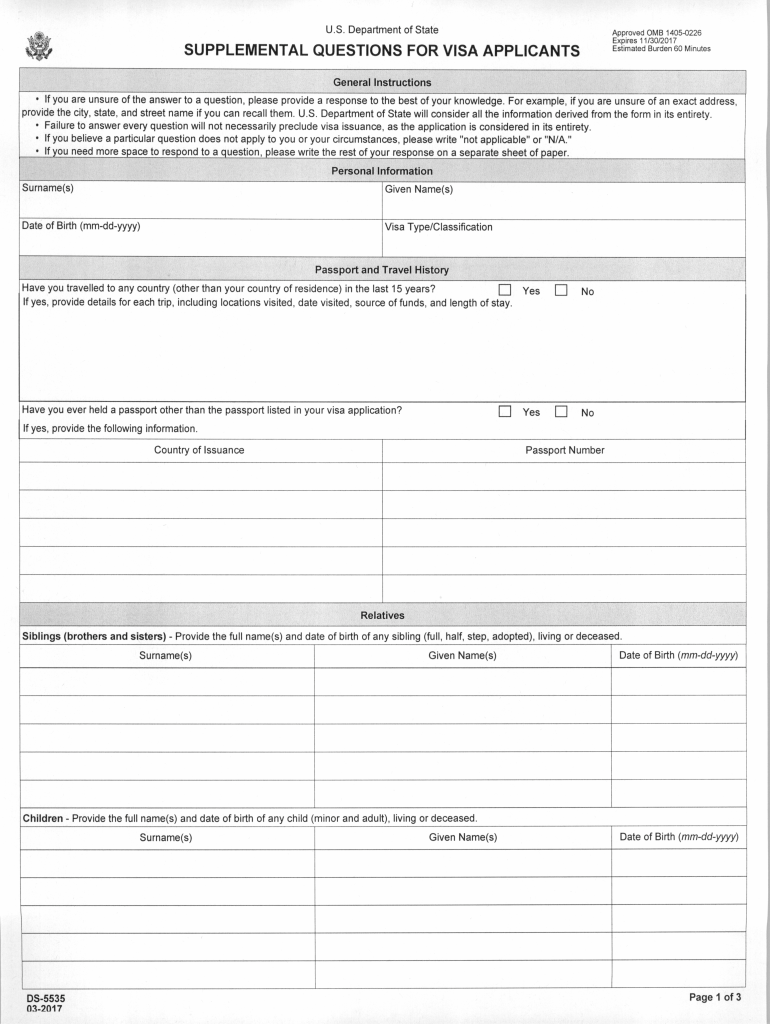
Begin by filling out your personal information, including your surname(s), given name(s), and date of birth. Ensure accuracy as this data is crucial for your visa application.
In the Passport and Travel History section, indicate whether you have traveled outside your country of residence in the last 15 years. If yes, provide details for each trip, including locations and dates.
Complete the Relatives section by providing full names and dates of birth for any siblings and children. Include information about any current or previous spouses.
Fill in your Address and Contact Information, detailing all addresses where you have lived over the past 15 years, along with phone numbers and email addresses used in the last five years.
Lastly, provide information on all employers from the last fifteen years, including job titles and descriptions. Review all entries for completeness before submission.
Start using our platform today to easily fill out your ds 5535 form online for free!
DS-5535 processing timeDS-5535 form pdfDS-5535 trackerDS-5535 LebanonDS-5535 form onlineDS-5535 form downloadDS-5535 processing time 2025Ds 5535 djibouti
Security and compliance
At DocHub, your data security is our priority. We follow HIPAA, SOC2, GDPR, and other standards, so you can work on your documents with confidence.
Siblings (brothers and sisters) - Provide the full name(s) and date of birth of any sibling (full, half, step, adopted), living or deceased. DS-5535. 03-2017.Read more
The operating instructions are an integral part of the product and contain important in- formation for operation and service. The operating instructions areRead more
Cookie consent notice
This site uses cookies to enhance site navigation and personalize your experience.
By using this site you agree to our use of cookies as described in our Privacy Notice.
You can modify your selections by visiting our Cookie and Advertising Notice.