




Here's how it works

01. Edit your msp british columbia online
Type text, add images, blackout confidential details, add comments, highlights and more.

02. Sign it in a few clicks
Draw your signature, type it, upload its image, or use your mobile device as a signature pad.

03. Share your form with others
Send msp form via email, link, or fax. You can also download it, export it or print it out.
How to use or fill out British Columbia MSP Group with our platform

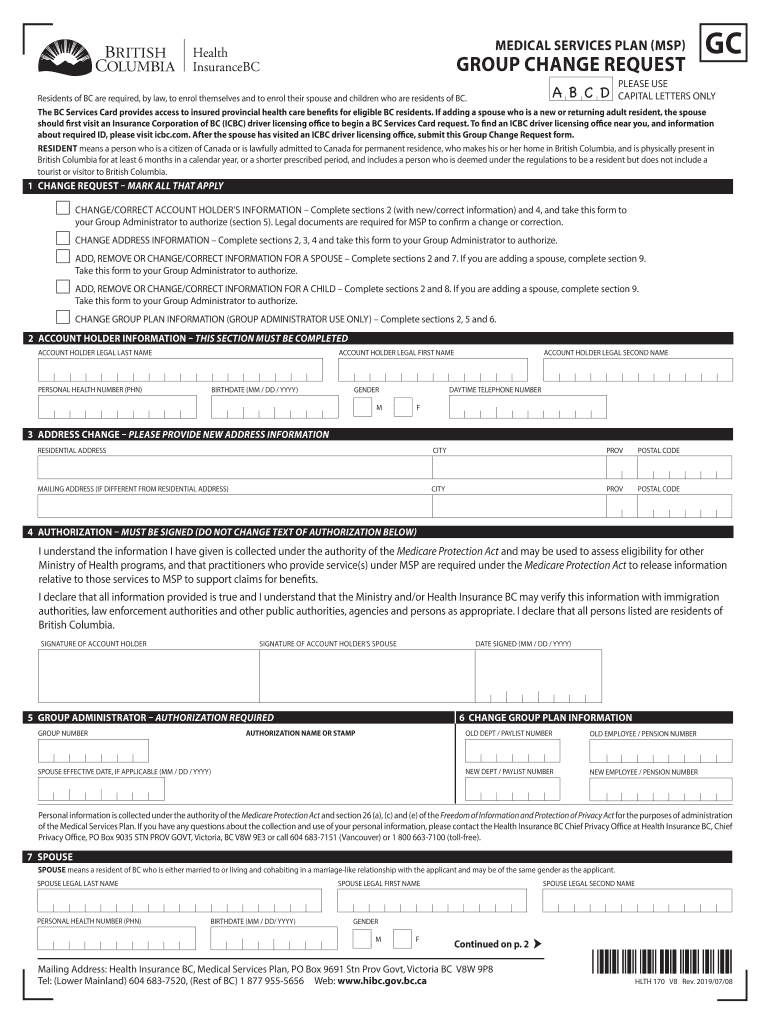
- Click ‘Get Form’ to open the British Columbia MSP Group Change Request form in the editor.
- Begin by completing Section 2, which requires the account holder's legal last name, first name, personal health number (PHN), birthdate, and gender. Ensure all information is accurate and in capital letters.
- If you are changing your address, fill out Section 3 with your new residential and mailing addresses. This ensures that all correspondence is sent to the correct location.
- In Section 4, sign the authorization statement confirming that all provided information is true. This step is crucial for processing your request.
- For adding or removing a spouse or child, complete Sections 7 and 8 respectively. Provide necessary legal documents as indicated to support any changes.
- Once all sections are filled out correctly, submit the form to your Group Administrator for authorization as required in Section 5.
Start using our platform today to streamline your MSP Group Change Request process for free!
Fill out british columbia msp group online
It's free
See more british columbia msp group versions
We've got more versions of the british columbia msp group form. Select the right british columbia msp group version from the list and start editing it straight away!
Security and compliance
At DocHub, your data security is our priority. We follow HIPAA, SOC2, GDPR, and other standards, so you can work on your documents with confidence.
Learn more


Related forms

IT-203-SI - Department of Taxation and Finance - NY
The document outlines the requirements and instructions for New York S corporations to file a group return for their non ...

Form IT-637 Alternative Fuels and Electric Vehicle Recharging Property Credit Tax Year 2024
Form IT-637 Alternative Fuels and Electric Vehicle Recharging Property Credit Tax Year 2024
The document outlines the IT-637 form for claiming the Alternative Fuels and Electric Vehicle Recharging Property Credit ...

New York Form IT-256 (Claim for Special Additional
The document IT-256 is a form from the Department of Taxation and Finance for claiming the Special Additional Mortgage R ...

Form 900-XM Application for Five-Year Ad Valorem Tax Exemption for Oklahoma Manufacturing or Researc
Form 900-XM Application for Five-Year Ad Valorem Tax Exemption for Oklahoma Manufacturing or Researc
The document outlines the application process for a Five-Year Ad Valorem Tax Exemption for manufacturing or research and ...

Medical Clearance Form - Sarasota Memorial Healthplex
The document is a Medical Clearance Form for patients applying to enroll in a Fitness Center. It requires a physician's ...

Form IT-223 Innovation Hot Spot Deduction Tax Year 2024
The document outlines the Innovation Hot Spot Deduction (Form IT-223) for qualified entities in New York State, detailin ...

Form IT-219 Credit for New York City Unincorporated Business Tax Tax Year 2024
The document IT-219 provides instructions for claiming a credit for the New York City Unincorporated Business Tax. It ou ...

Printable 2024 Connecticut Form CT-19 IT (Title 19 Status
The document is the Form CT-19IT for the State of Connecticut's Department of Revenue Services, used to claim Title 19 s ...