




Here's how it works

01. Edit your dochub com fillable form online
Type text, add images, blackout confidential details, add comments, highlights and more.

02. Sign it in a few clicks
Draw your signature, type it, upload its image, or use your mobile device as a signature pad.

03. Share your form with others
Send cbp form 7523 via email, link, or fax. You can also download it, export it or print it out.
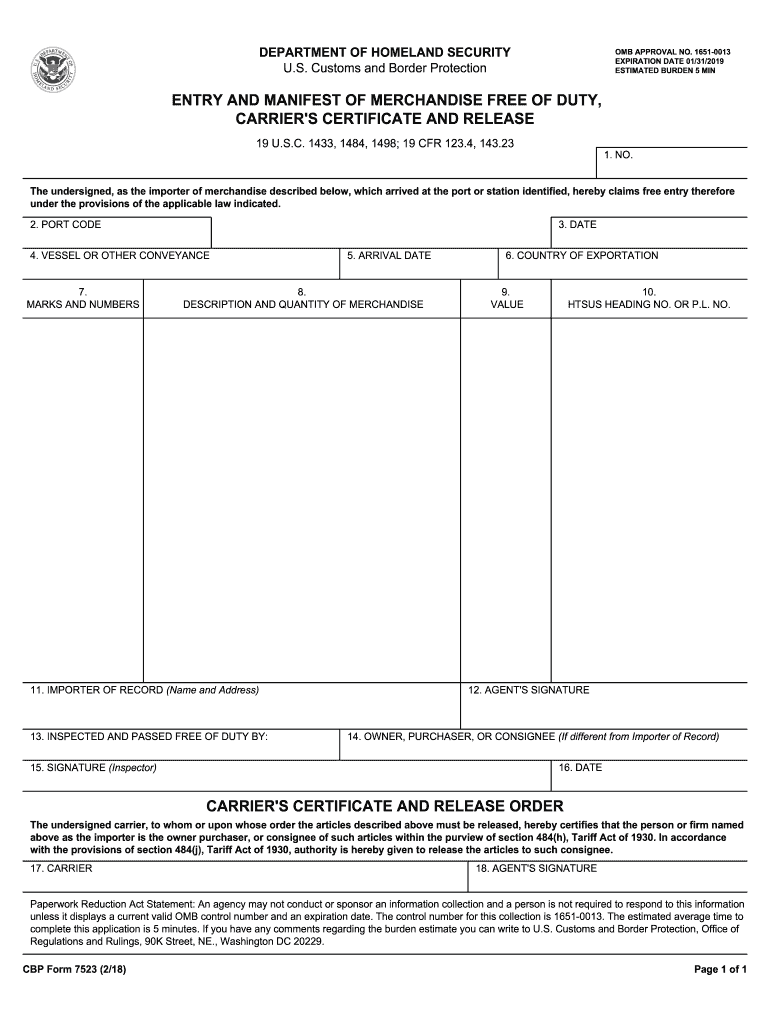
How to use or fill out cbp form 7523 with our platform

- Click ‘Get Form’ to open it in the editor.
- Begin by entering the 'NO.' in the first field, which identifies your entry number.
- Next, input the 'PORT CODE' where your merchandise arrived.
- Fill in the 'DATE' of submission and the 'ARRIVAL DATE' for your shipment.
- Provide details about the 'VESSEL OR OTHER CONVEYANCE' used for transport.
- In the section for 'MARKS AND NUMBERS', describe any identifying marks on your merchandise.
- Detail the 'DESCRIPTION AND QUANTITY OF MERCHANDISE' accurately to avoid delays.
- Enter the 'VALUE' of your goods and their corresponding 'HTSUS HEADING NO. OR P.L. NO.'
- Complete the fields for 'IMPORTER OF RECORD', including name and address.
- If applicable, provide information for 'OWNER, PURCHASER, OR CONSIGNEE'.
- Sign and date where indicated, ensuring all signatures are completed before submission.
Start filling out cbp form 7523 online for free today!
Fill out cbp form 7523 online
It's free
It's free
See more cbp form 7523 versions
We've got more versions of the cbp form 7523 form. Select the right cbp form 7523 version from the list and start editing it straight away!
Security and compliance
At DocHub, your data security is our priority. We follow HIPAA, SOC2, GDPR, and other standards, so you can work on your documents with confidence.
Learn more


Related forms

2023 Form MO MO-1065 Fill Online, Printable, Fillable, Blank
The document is the Missouri Form MO-1065, Partnership Return of Income for the year 2024. It provides instructions for ...

DR 0104AMT, 2024 Colorado Alternative Minimum Tax Computation Schedule If you are using a screen rea
DR 0104AMT, 2024 Colorado Alternative Minimum Tax Computation Schedule If you are using a screen rea
The document provides instructions for calculating the Colorado alternative minimum tax (AMT) for individual taxpayers, ...

2024 Form 990-T
The document is the Form 990-T, which is the Exempt Organization Business Income Tax Return for the calendar year 2024. ...

MO-1040 Book - Individual Income Tax Long Form and
The document is the 2024 Individual Income Tax Return form (MO-1040A) for Missouri, designed for single or married indiv ...

Form MO-3NR - 2024 Partnership or S Corporation Withholding Exemption or Revocation Agreement
Form MO-3NR - 2024 Partnership or S Corporation Withholding Exemption or Revocation Agreement
The document is Form MO-3NR, a Partnership or S Corporation Withholding Exemption or Revocation Agreement for the tax ye ...

MO-2220 Corporation Underpayment of Estimated Tax Schedule 2024
The document is Form MO-2220, used by corporations in Missouri to calculate underpayment of estimated tax and any applic ...

2025 Form 760ES, Estimated Income Tax Payment Vouchers for
The document provides detailed instructions and requirements for individuals in Virginia regarding the submission of est ...

IN THE MATTER OF THE COMPLAINT FILED BY JOAN CLARK, YANKTON, SOUTH DAKOTA, AGAINST ATandT COMMUNICAT
IN THE MATTER OF THE COMPLAINT FILED BY JOAN CLARK, YANKTON, SOUTH DAKOTA, AGAINST ATandT COMMUNICAT
The document is an order from the South Dakota Public Utilities Commission dismissing a complaint filed by Joan Clark ag ...