Type text, add images, blackout confidential details, add comments, highlights and more.

02. Sign it in a few clicks
Draw your signature, type it, upload its image, or use your mobile device as a signature pad.

03. Share your form with others
Send cbp form 7523 via email, link, or fax. You can also download it, export it or print it out.

How to use or fill out cbp form 7523 2014 with our platform
Ease of Setup
DocHub User Ratings on G2
Ease of Use
DocHub User Ratings on G2
Click ‘Get Form’ to open the cbp form 7523 2014 in the editor.
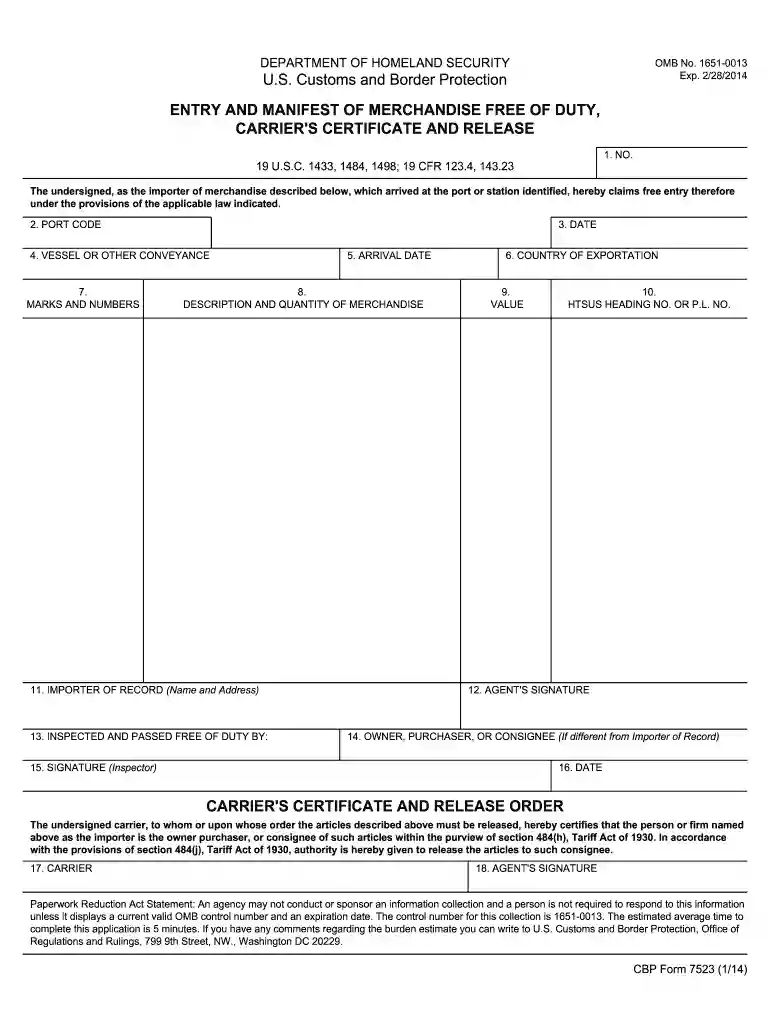
Begin by filling in the 'NO.' field, which is essential for identifying your entry. Ensure you have the correct number as per your records.
Next, enter the 'PORT CODE' where your merchandise arrived. This helps in tracking and processing your entry efficiently.
Fill in the 'DATE' of submission and 'ARRIVAL DATE' to provide accurate timelines for your shipment.
In the 'VESSEL OR OTHER CONVEYANCE' section, specify how your goods were transported. This could be a ship name or flight number.
Complete the 'DESCRIPTION AND QUANTITY OF MERCHANDISE' field with detailed information about what you are importing, including any relevant marks and numbers.
Provide the 'IMPORTER OF RECORD' details, ensuring that all names and addresses are accurate for proper identification.
Finally, sign and date where indicated, including any necessary signatures from agents or inspectors to validate your submission.
Start using our platform today to fill out cbp form 7523 2014 easily and for free!
Cbp form 7523 2014 templateCbp form 7523 2014 pdfCbp form 7523 2014 instructionsCbp form 7523 2014 downloadCbp form 7523 2014 onlineCBP Form 7533CBP Form 7501CBP Form 368
Security and compliance
At DocHub, your data security is our priority. We follow HIPAA, SOC2, GDPR, and other standards, so you can work on your documents with confidence.
Form Number: CBP Form 7523. Abstract: CBP Form 7523, Entry and Manifest of Merchandise. Free of Duty, Carriers Certificate of Release, is used by carriers.Read more
Cookie consent notice
This site uses cookies to enhance site navigation and personalize your experience.
By using this site you agree to our use of cookies as described in our Privacy Notice.
You can modify your selections by visiting our Cookie and Advertising Notice.