Type text, add images, blackout confidential details, add comments, highlights and more.

02. Sign it in a few clicks
Draw your signature, type it, upload its image, or use your mobile device as a signature pad.

03. Share your form with others
Send army application form pdf via email, link, or fax. You can also download it, export it or print it out.

How to use or fill out US Army Application PDF with our platform
Ease of Setup
DocHub User Ratings on G2
Ease of Use
DocHub User Ratings on G2
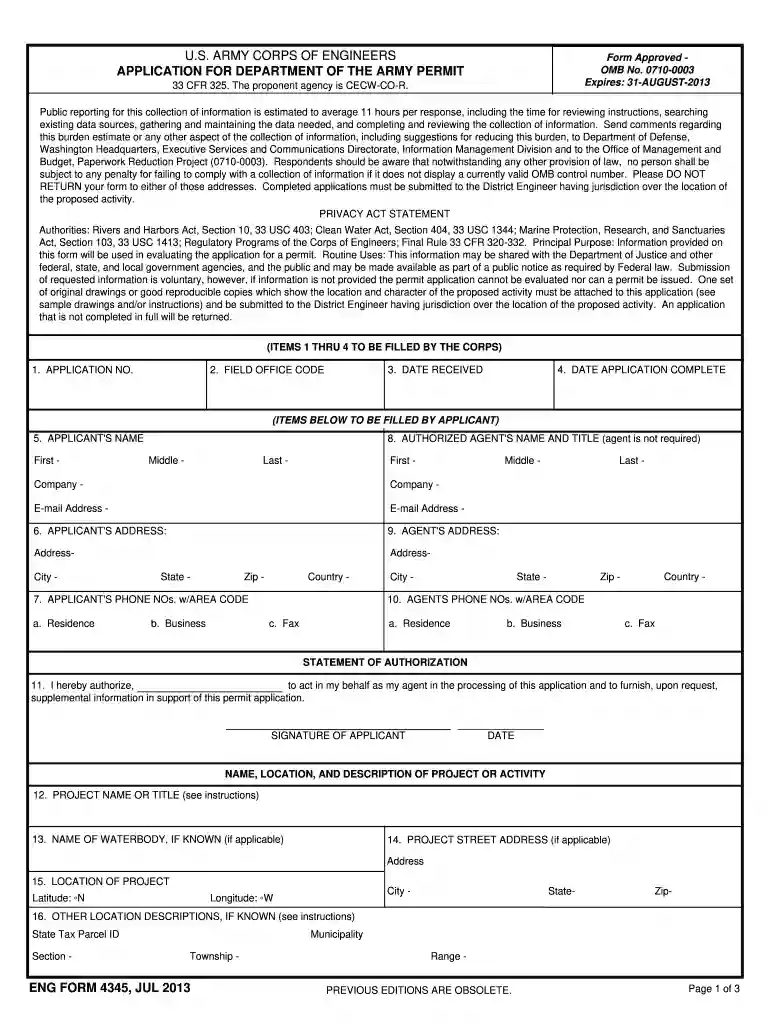
Click ‘Get Form’ to open the US Army application PDF in the editor.
Begin by filling out your personal information in Section 5, including your first, middle, and last name. Ensure accuracy as this is crucial for processing.
In Section 6, provide your complete address. Include city, state, country, and zip code to avoid any delays.
Next, enter your contact numbers in Section 7. This includes residence, business phone numbers, and fax if applicable.
If you have an authorized agent, fill out their details in Sections 8 and 9. This includes their name, title, company information, and contact details.
Proceed to describe your project in Sections 12 through 19. Be detailed about the project name, location coordinates, and purpose of the activity.
Complete Sections 20 through 23 if applicable. Provide information on any dredged or fill material being discharged.
Finally, review all sections for completeness before signing the application at the end of the form.
Start using our platform today to streamline your US Army application process for free!
We've got more versions of the us army application pdf form. Select the right us army application pdf version from the list and start editing it straight away!
Bring a Social Security card, birth certificate and drivers license. Remove piercings, and do not wear clothing with obscene images. If you wear either eyeglasses or contact lens, bring them along with your prescription, case and solution. Get a good nights sleep and arrive early.
How long does a US Army application take?
0:12 1:15 And the job you want the first step is to meet with a recruiter. And take the armed servicesMoreAnd the job you want the first step is to meet with a recruiter. And take the armed services vocational aptitude battery. Test if you pass youll undergo a physical exam and background.
What are the 6 steps to join the army?
Have no criminal record or pending cases. Comply with medical fitness requirements for the appointment. medical evaluation, verification of Criminal record, pre-screening and verification of qualifications.
What documents do I need to join the army?
Paperwork and the Military: What Documents do I need to Enlist? Social Security Card: This number will be used for various identification and benefits purposes throughout your military career. Valid Identification: Youll need a valid government-issued photo ID, such as a drivers license or passport.
How much is army pay per month?
Steps to Joining the Military Meet with a recruiter. MEPS. Take the ASVAB. Pass the physical examination. Determine Military career with a service enlistment counselor. Oath of Enlistment. Basic Training.
us army applications
u.s. army application for foreignersu.s. army application onlineU.S. Army application formU.S. Army recruitment portalu.s. military application form onlineU.S. Army salaryHow to apply for US Army from NigeriaArmy recruiter packet Requirements
Security and compliance
At DocHub, your data security is our priority. We follow HIPAA, SOC2, GDPR, and other standards, so you can work on your documents with confidence.
Step 1: Data Entry: All applicants must register with the College Information System (CIS) as required by the. Command and General Staff College (CGSC) and the
Put announcement number and title as they appear on the job announcement. Name: Include full middle name. SSI/MOS: Self-explanatory for Army. Air personnel will
Cookie consent notice
This site uses cookies to enhance site navigation and personalize your experience.
By using this site you agree to our use of cookies as described in our Privacy Notice.
You can modify your selections by visiting our Cookie and Advertising Notice.