Get and manage Shopify Order Forms online

Speed up your document administration using our Shopify Order Forms collection with ready-made templates that suit your needs. Access your document template, alter it, fill it, and share it with your contributors without breaking a sweat. Begin working more efficiently with your forms.

The best way to use our Shopify Order Forms:

  1. Open our Shopify Order Forms and find the form you require.
  2. Preview your form to ensure it’s what you want, and click on Get Form to begin working on it.
  3. Modify, include new text, or highlight important information with DocHub features.
  4. Prepare your form and save the changes.
  5. Download or share your document template with other recipients.

Explore all of the opportunities for your online file administration using our Shopify Order Forms. Get your totally free DocHub profile right now!

Video Guide on Shopify Order Forms management

video background

Commonly Asked Questions about Shopify Order Forms

Using the Forms app, you can create multiple forms to build your list of marketing email subscribers, approve wholesale retailers, and learn more about visitors to your online store. You can customize a form to control what information it collects, and how it displays on your store. Forms app - Shopify Help Center Shopify Help Center manual create-marketing f Shopify Help Center manual create-marketing f
You can create a form from your Shopify admin in the Forms app. After you create a form, its activated on your store. Create forms - Shopify Help Center Shopify Help Center create-marketing forms-app Shopify Help Center create-marketing forms-app
With Instant Page Builder, you can create stunning Shopify landing pages, without code. Copy paste any Figma frame into Instant, and publish to your Shopify store in seconds, without code. Drag and drop to create responsive pages and sections. Instant Landing Page Builder for Shopify | All-visual, No-code instant.so instant.so
Shopify Forms lets you easily add a lead capture form to your store, so you can connect with potential customers and convert them into lifelong fans. Collect information with pop-ups, overlays, or in-line forms. Add colors and images to your form, and customize messaging, discounts, and more. Shopify Forms: Capture customer info to grow your list Shopify App Store shopify-forms Shopify App Store shopify-forms
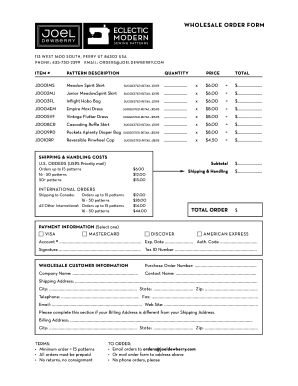
You can create a wholesale order form in Shopify by simply installing applications like Wholesale Order Form ReOrder from the Shopify App Store. Setting up a bulk order form in your store with an app is straightforward, fast, and safe. How To Add A Bulk Order Form In Shopify? [2024] - Wholesale Helper Wholesale Helper blog bulk-order-form-in-sh Wholesale Helper blog bulk-order-form-in-sh
9 Best Contact Form Apps for Shopify Constant Contact Marketing. Wholesale + Ambassador Form. Zero Spam Contact Form. Popup For Constant Contact. Contact Form ‑ Contact Us Form. Constant Contact. Form Builder Pro. Nerdy Contact Form. 9 Best Contact Form Apps for Shopify in 2024 - DelightChat DelightChat best-shopify-apps for-cont DelightChat best-shopify-apps for-cont
You can create a form from your Shopify admin in the Forms app. After you create a form, its activated on your store. Learn more about managing forms. Create forms - Shopify Help Center Shopify Help Center create-marketing forms-app Shopify Help Center create-marketing forms-app
When you need to create an order on behalf of a customer, you can create a draft order in your Shopify admin. You add the customer details and products, and then send an invoice, collect payment, or set payment terms. Draft orders and invoices - Shopify Help Center Shopify Help Center manual orders create-orders Shopify Help Center manual orders create-orders