




Here's how it works



How to use or fill out prudential servicemembers group life insurance election and certificate form with our platform

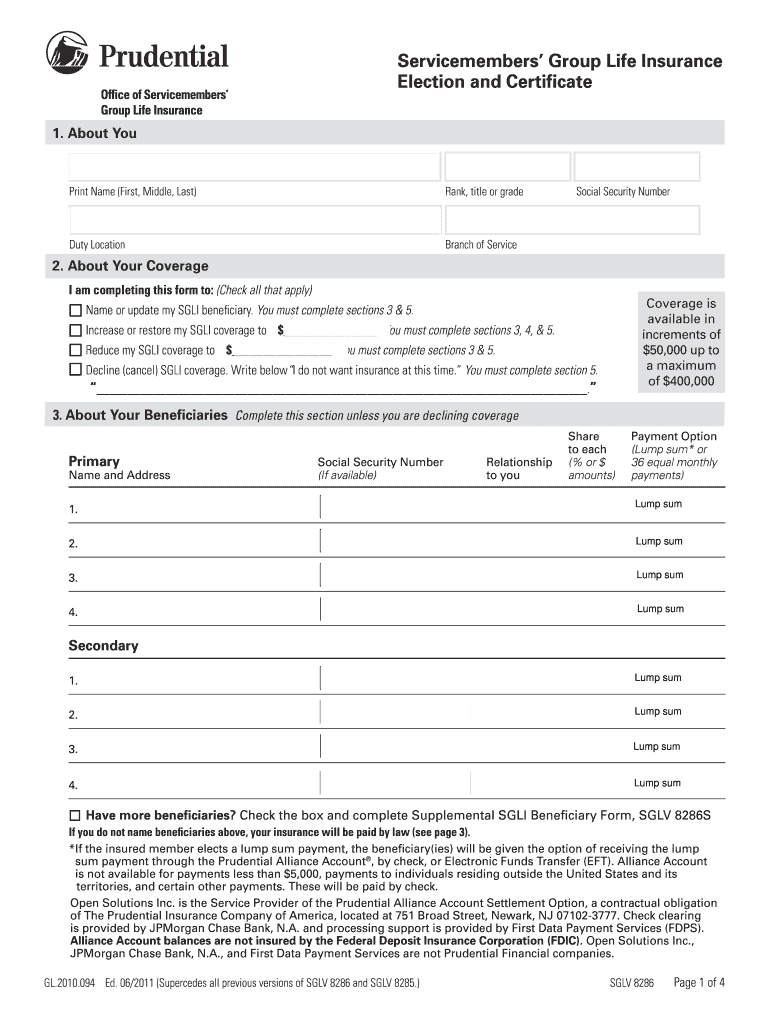
- Click ‘Get Form’ to open the prudential servicemembers group life insurance election and certificate form in the editor.
- Begin by filling out Section 1, 'About You.' Enter your full name, rank, duty location, branch of service, and social security number.
- In Section 2, 'About Your Coverage,' indicate your purpose for completing the form by checking the appropriate boxes. If you are naming or updating a beneficiary, ensure to complete Sections 3 and 5.
- Proceed to Section 3, 'About Your Beneficiaries.' List primary and secondary beneficiaries along with their social security numbers and relationships. Specify payment options for each beneficiary.
- If you are restoring or increasing coverage, complete Section 4, 'About Your Health,' providing necessary health information as required.
- Finally, sign in Section 5 to certify that all information is accurate. Ensure you understand the implications of your selections before submitting.
Start using our platform today to easily fill out your insurance forms online for free!
It's free
See more prudential servicemembers group life insurance election and certificate form versions
Got questions?
Can I sign my the sglv 8287 is a law binding agreement in electronic format?
As outlined by eSignature laws, documents approved electronically have the same validity as those approved with pen and paper. You can eSign almost any business and personal documentation. Four types of paperwork still demand handwritten signatures only - wills and testamentary trusts, court orders and other court papers, state statutes governing divorce, adoption, or other family law, and notice of cancellation of utility services. If you adhere to the regulations and utilize a safe and compliant software solution, like DocHub, you can eSign your the sglv 8287 is a law binding agreement without printing it.
How do you complete sglv army on iOS?
You need only an internet connection and a web browser to fill out your sglv army by using an iOS phone. Open the DocHub website and authenticate. Then, add your file or select it from the list in your dashboard. Then use our editing tools to fill out your form and save all your modifications. You may also send it to a specified recipient immediately.
What is an AF form 1288?
How long do you have to convert your servicemembers group life insurance (SGLI) to veterans group life insurance?
Are SGLV benefits taxable?
Security and compliance
At DocHub, your data security is our priority. We follow HIPAA, SOC2, GDPR, and other standards, so you can work on your documents with confidence.
Learn more


