Type text, add images, blackout confidential details, add comments, highlights and more.
02. Sign it in a few clicks
Draw your signature, type it, upload its image, or use your mobile device as a signature pad.
03. Share your form with others
Send it via email, link, or fax. You can also download it, export it or print it out.
How to use or fill out rmv 3 form 2008 with our platform
Ease of Setup
DocHub User Ratings on G2
Ease of Use
DocHub User Ratings on G2
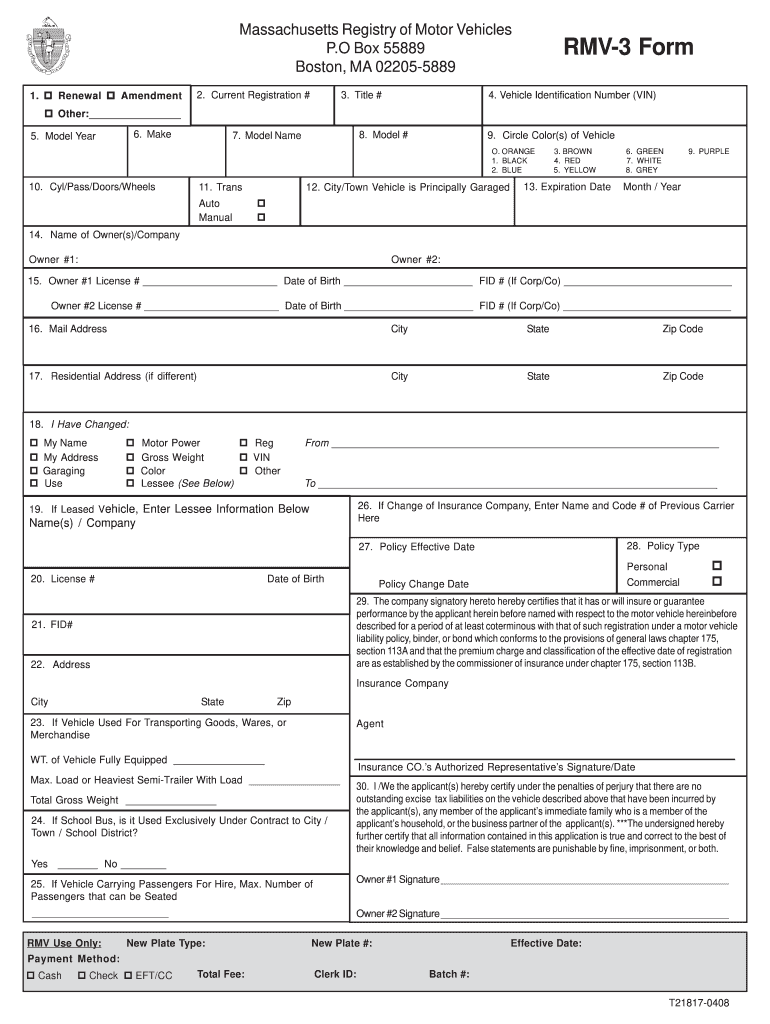
Click ‘Get Form’ to open the RMV-3 form in the editor.
Begin by filling out the 'Current Registration #' and 'Title #' fields. Ensure accuracy as this information is crucial for processing your request.
Enter the Vehicle Identification Number (VIN) and details such as Make, Model Year, Model Name, and Color(s) of the vehicle. This helps in identifying your vehicle correctly.
Complete the Owner(s) information in section 14, including License Numbers and Dates of Birth. If there are two owners, ensure both are listed accurately.
If applicable, indicate any changes in section 18 and provide details about your insurance company in sections 26 to 29. Remember to have your insurance agent sign where required.
Finally, review all entered information for accuracy before signing at box 30. All owners must sign for validation.
Start using our platform today to fill out your RMV-3 form easily and for free!
Results show that there is a machine specific and unique relationship between CMV and RMV and that speed, amplitude, travel direction, and drum-ground behaviorRead more
To obtain a form online to appeal a decision of the RMV to the Division of. Insurances Board of Appeal, go to State.Ma.US/DOI and enter appeal form in theRead more
Environmental Security Technology Certification Program
Jul 31, 2013 This report was prepared under contract to the Department of Defense. This publication is intended to be informational and does not indicateRead more
Cookie consent notice
This site uses cookies to enhance site navigation and personalize your experience.
By using this site you agree to our use of cookies as described in our Privacy Notice.
You can modify your selections by visiting our Cookie and Advertising Notice.