Type text, add images, blackout confidential details, add comments, highlights and more.
02. Sign it in a few clicks
Draw your signature, type it, upload its image, or use your mobile device as a signature pad.
03. Share your form with others
Send it via email, link, or fax. You can also download it, export it or print it out.
How to use or fill out Online fillable esa50 form with our platform
Ease of Setup
DocHub User Ratings on G2
Ease of Use
DocHub User Ratings on G2
Click ‘Get Form’ to open the Online fillable esa50 form in the editor.
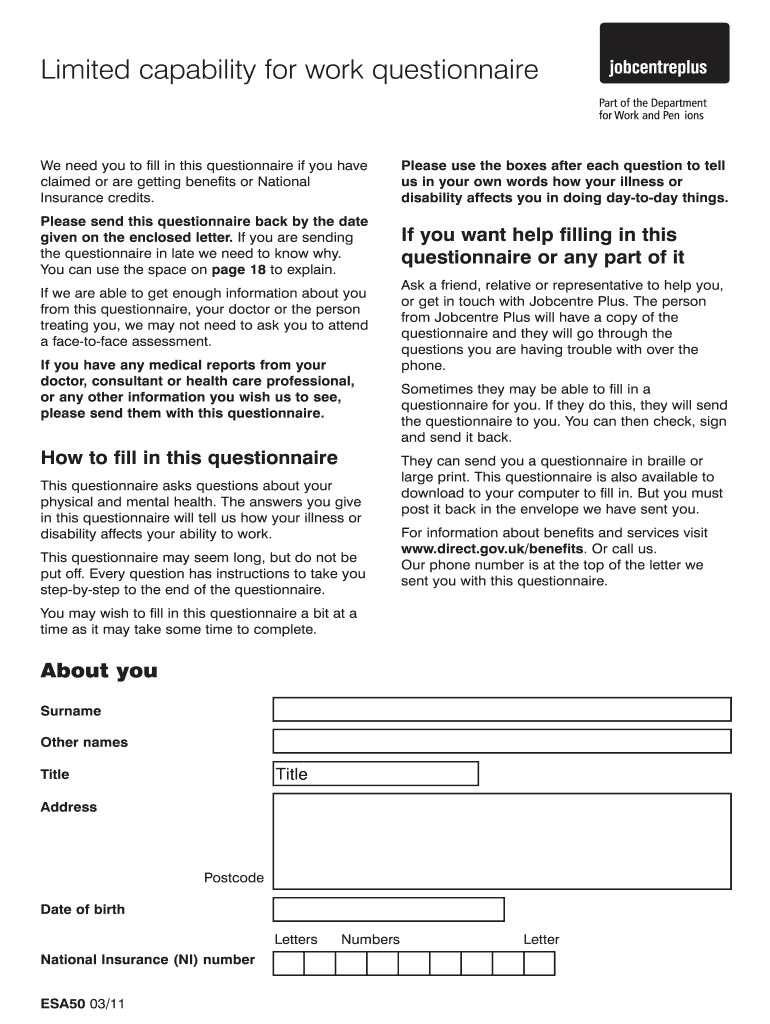
Begin by filling out the 'About You' section. Provide your surname, other names, title, address, postcode, date of birth, and National Insurance number. Ensure all information is accurate.
Move on to the 'About Your Illnesses or Disabilities' section. Use the provided space to describe your condition and how it affects your daily life. Be as detailed as possible.
In the 'Details of Tablets, Medication or Special Treatment' section, list any medications you are taking along with their side effects. This helps provide a complete picture of your health.
Continue through each part of the questionnaire, answering questions about physical functions and mental health. Use the spaces provided to elaborate on any difficulties you face.
Once completed, review your answers for accuracy before submitting. If needed, utilize our platform's save feature to ensure you can return later without losing progress.
Start filling out your Online fillable esa50 form today for free using our platform!
Fill out Online fillable esa50 form online It's free
We've got more versions of the Online fillable esa50 form form. Select the right Online fillable esa50 form version from the list and start editing it straight away!
This ESA50 form, forms part of the Work Capability Assessment, which assesses whether someone has limited capability for work and whether they can remain on Employment and Support Allowance.
Can a work capability assessment be done over the phone?
You may be expected to attend an assessment in person, or you might be assessed over the phone or on a video call. If you want the assessment recorded, you will need to request this in advance by calling the number on the letter you receive inviting you to the assessment.
How to fill in ESA50 form?
Completing the questionnaire. If you tick a box which indicates that you have difficulty with an activity, write something about how performing that activity affects you or why it is difficult to perform the activity. If you have good and bad days, describe these and what happens to you on bad days.
Can you fill in an ESA50 form online?
We will use the information you provide on the form to decide what type of assessment you may need. You may also download the ESA50 form to your computer. If you use the online form, fill it out, print it, sign it and return it to DWP .
Can you complete ESA50 online?
Its important you return the form by the date on the letter you are sent. We will use the information you provide on the form to decide what type of assessment you may need. You may also download the ESA50 form to your computer. If you use the online form, fill it out, print it, sign it and return it to DWP .
Related Searches
Online fillable esa50 form pdfOnline fillable esa50 form 2021UC formsWhere do i send my health assessment formCan I check my ESA claim onlineWCA applicationStarting and finishing tasks
Security and compliance
At DocHub, your data security is our priority. We follow HIPAA, SOC2, GDPR, and other standards, so you can work on your documents with confidence.
How to fill in the UC50 form when living with a mental health condition?
Think about what you can do on a good day, and what you can do on a bad day. Make it clear how you are impacted for at least 50% of the time. If you talk about good days, make it clear that these do not happen all the time. Think about the tasks you can do on a good day, and whether you can still do them on a bad day.
What is the difference between UC50 and ESA50?
When you claim Employment and Support Allowance, you are sent a Limited Capability for Work (LCW) questionnaire (ESA50) to complete and return. When you claim Universal Credit and submit sick notes, you will be sent a UC50 to fill out.
Related links
OWCP-957A - Medical Travel Refund Request Mileage
This is a mileage only reimbursement form. If you need other travel expenses reimbursed, complete Form OWCP-957. Part B Medical Travel Refund Request - ExpensesRead more
Cookie consent notice
This site uses cookies to enhance site navigation and personalize your experience.
By using this site you agree to our use of cookies as described in our Privacy Notice.
You can modify your selections by visiting our Cookie and Advertising Notice.