




Here's how it works



How to use or fill out disney revoke ea license petition 2012 form with our platform

- Click ‘Get Form’ to open the disney revoke ea license petition 2012 form in the editor.
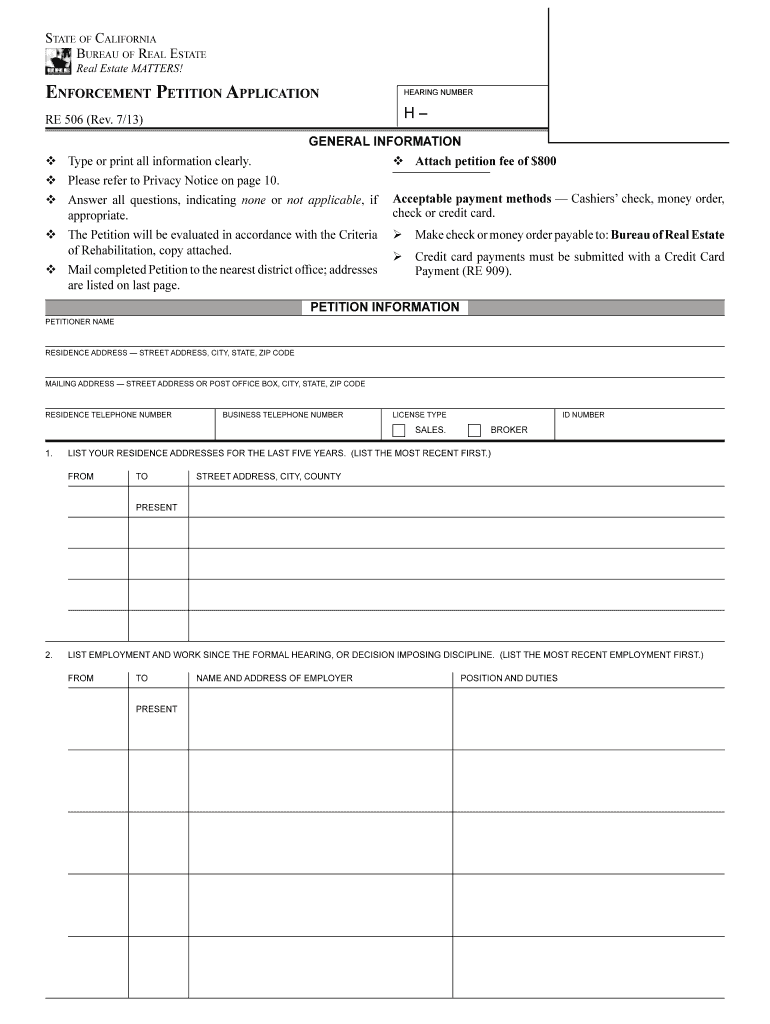
- Begin by filling in your personal information, including your name, residence address, and contact numbers. Ensure all details are accurate and clearly typed.
- In the 'Petition Information' section, specify your license type and ID number. If applicable, list your residence addresses for the last five years.
- Address any criminal history by answering the questions regarding arrests or convictions. If you have any, provide detailed explanations as required.
- Complete sections on civil court litigation and past debts if relevant. Attach any necessary documents directly within the editor for convenience.
- Finally, review all entries for accuracy before signing and submitting your petition. Use our platform's features to ensure everything is complete.
Start using our platform today to fill out your disney revoke ea license petition 2012 form easily and for free!
It's free
See more disney revoke ea license petition 2012 form versions
Got questions?
How do I sign my disney revoke ea license petition 2012 form without printing?
Electronic signatures are a great alternative to traditional signing, as they save time, effort, and money people spend on printing, scanning, and paper delivery. You can electronically sign your disney revoke ea license petition 2012 form using a reliable and powerful online document processing tool like DocHub. It complies with major eSignature policies (ESIGN and UETA), so all forms approved there are legally binding and have the same validity as manually signed ones.
How do you modify disney revoke ea license petition 2012 form from Google Drive?
If you store your documents in Google Drive, there is no need to download your disney revoke ea license petition 2012 form on your computer and upload it back to our editor. A significantly simpler way is to set up a browser extension developed by DocHub to simplify this flow. The extension allows editing PDFs in your browser. Alternatively, you may integrate your DocHub and Gmail accounts for more efficient editing.
Security and compliance
At DocHub, your data security is our priority. We follow HIPAA, SOC2, GDPR, and other standards, so you can work on your documents with confidence.
Learn more


