Doh 3848 form-2026

Get Form
doh 3848 Preview on Page 1

Here's how it works

01. Edit your doh 3848 online
Type text, add images, blackout confidential details, add comments, highlights and more.
02. Sign it in a few clicks
Draw your signature, type it, upload its image, or use your mobile device as a signature pad.
03. Share your form with others
Send it via email, link, or fax. You can also download it, export it or print it out.

How to use or fill out doh 3848 form with our platform

Form edit decoration
9.5
Ease of Setup
DocHub User Ratings on G2
9.0
Ease of Use
DocHub User Ratings on G2
  1. Click ‘Get Form’ to open the doh 3848 form in the editor.
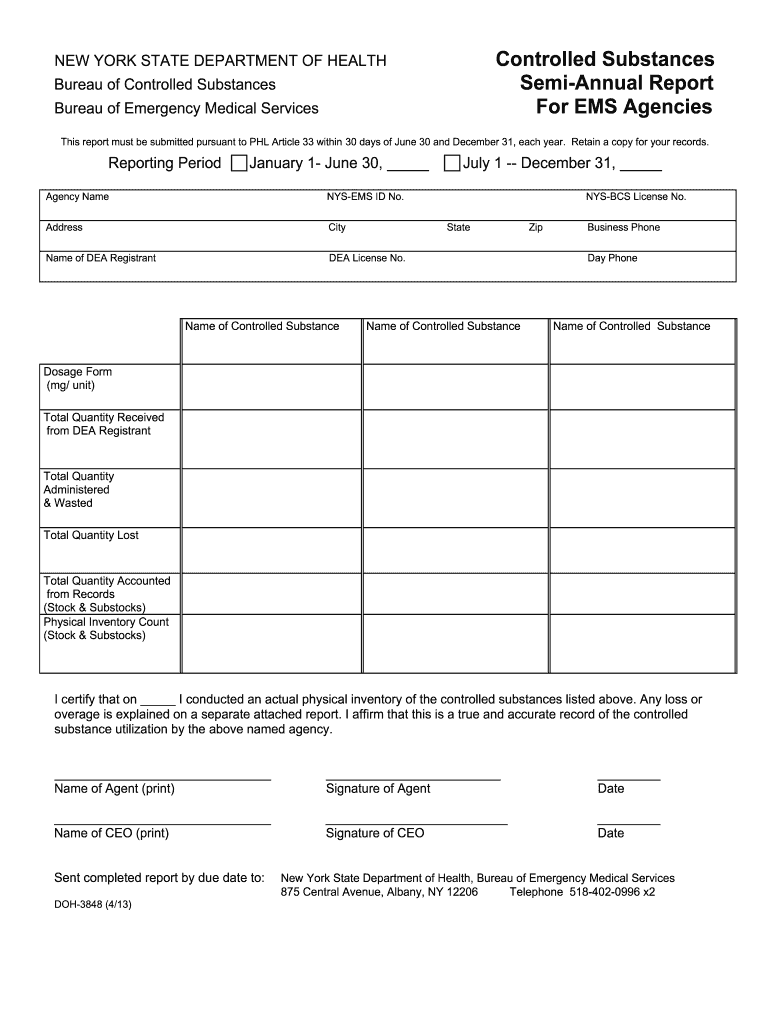
  2. Begin by entering the reporting period at the top of the form, specifying either January 1 - June 30 or July 1 - December 31, along with the corresponding year.
  3. Fill in your agency name and NYS-EMS ID No. in the designated fields, followed by your agency's address, city, state, and zip code.
  4. Provide the name of the DEA registrant and their DEA license number. This information is crucial for compliance.
  5. List each controlled substance used during the reporting period. For each substance, complete fields for dosage form (mg/unit), total quantity received from DEA registrant, total quantity administered & wasted, total quantity lost, and total quantity accounted from records.
  6. Conduct a physical inventory count of stock and substocks and record it in the appropriate section.
  7. Certify your report by printing your name as an agent, signing it, and including the date. Repeat this for the CEO’s information.

Start using our platform today to easily fill out and submit your doh 3848 form online for free!

See more doh 3848 form versions

We've got more versions of the doh 3848 form form. Select the right doh 3848 form version from the list and start editing it straight away!
Versions Form popularity Fillable & printable
2015 4.8 Satisfied (175 Votes)
2013 4 Satisfied (28 Votes)
be ready to get more

Complete this form in 5 minutes or less

Get form

Got questions?

We have answers to the most popular questions from our customers. If you can't find an answer to your question, please contact us.
Contact us

Electronic document signing requires a software solution that works in compliance with data protection and eSignature standards. DocHub is a perfect tool for that, since it fulfills all the above mentioned requirements. Whatever method you prefer to sign your doh 3848 form in DocHub, your electronic signature will be legally binding and court-admissible.

In addition to an extensive toolset for editing PDFs on mobile phones, DocHub allows you to sign your doh 3848 form along the way. Open our editor in your browser, make changes using DocHub’s toolset, and complete your editing by eSigning the completed form.

Security and compliance

At DocHub, your data security is our priority. We follow HIPAA, SOC2, GDPR, and other standards, so you can work on your documents with confidence.

Learn more
ccpa2
pci-dss
gdpr-compliance
hipaa
soc-compliance
be ready to get more

Complete this form in 5 minutes or less

Get form