Gn 3500-2026

Get Form
gn 3500 Preview on Page 1

Here's how it works

01. Edit your gn 3500 online
Type text, add images, blackout confidential details, add comments, highlights and more.

02. Sign it in a few clicks
Draw your signature, type it, upload its image, or use your mobile device as a signature pad.

03. Share your form with others
Send gn 3500 instructions via email, link, or fax. You can also download it, export it or print it out.

How to use or fill out gn 3500 with our platform

Form edit decoration
9.5
Ease of Setup
DocHub User Ratings on G2
9.0
Ease of Use
DocHub User Ratings on G2
  1. Click ‘Get Form’ to open the gn 3500 in the editor.
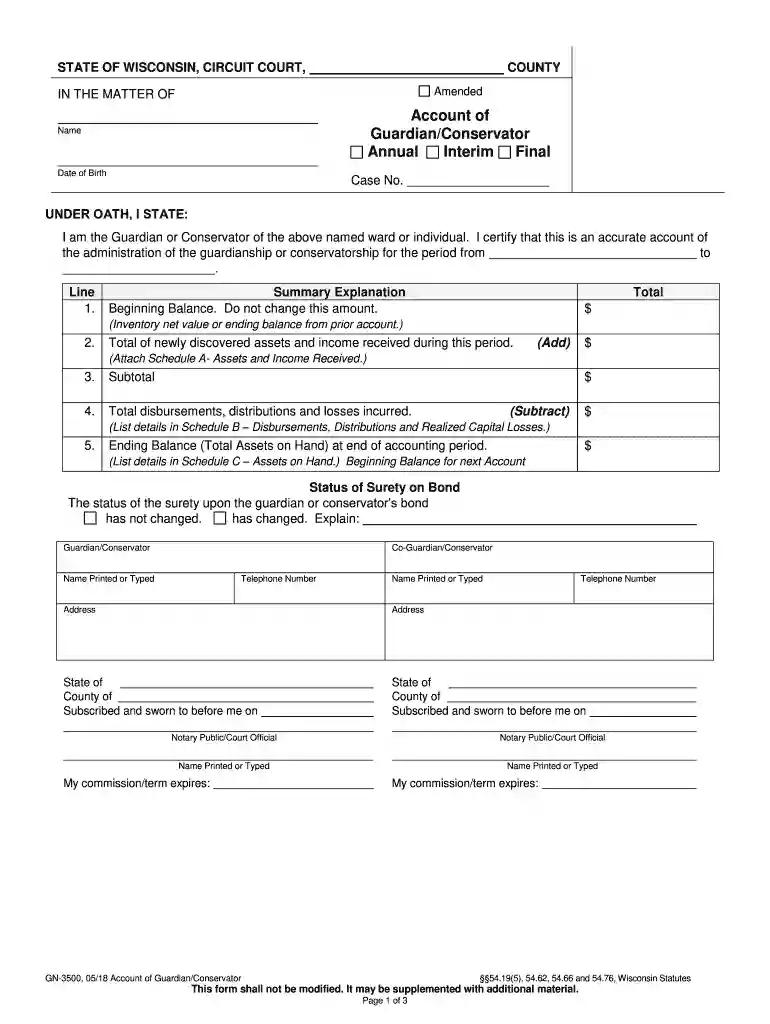
  2. Begin by entering the name and date of birth of the ward or individual in the designated fields. Ensure accuracy as this information is crucial for identification.
  3. In the Summary Explanation section, input the beginning balance from prior accounts. This amount should not be altered.
  4. For Line 2, add any newly discovered assets and income received during this period. Attach Schedule A detailing these assets.
  5. Calculate the subtotal and enter it in Line 3. Then, list total disbursements and losses in Line 4, referencing Schedule B for details.
  6. Finally, complete Line 5 with the ending balance at the end of the accounting period, ensuring all details are accurately listed in Schedule C.

Start using our platform today to easily fill out your gn 3500 form for free!

See more gn 3500 versions

We've got more versions of the gn 3500 form. Select the right gn 3500 version from the list and start editing it straight away!
Versions Form popularity Fillable & printable
2018 4.8 Satisfied (231 Votes)
2006 4.4 Satisfied (566 Votes)
be ready to get more

Complete this form in 5 minutes or less

Get form

Got questions?

We have answers to the most popular questions from our customers. If you can't find an answer to your question, please contact us.
Contact us

Managing your documents with DocHub this way is very easy after you have downloaded its extension for Google Chrome. Navigate to the Chrome Web Store and set up DocHub - Sign PDF from Gmail to get it. Give our tool access to your Google account, and then open an email containing wisconsin gn 3500 as an attachment and point to the file with your cursor - the DocHub extension key will automatically show up there. Click on it to open your form in our editor. Make any necessary modifications, complete the blanks, and click Sign to create your legally-binding eSignature.

When you edit your gn wisconsin with DocHub, you simply will not need to look for other software or solutions to eSign it. An electronic signature is part of DocHub’s substantial editing toolset, which allows you to implement changes in your form without jumping between platforms. Simply complete your form, double-check the correctness of your data and put your electronic signature at the end to make it submission-ready within minutes.

Any person may petition the court for the appointment of a guardian. The petition is filed in the childs county of residence or the county in which the child is physically present, or if the child is a nonresident, the county in which the petitioner proposes the child reside.
A temporary guardianship form (officially known as Appointment of Short-Term Guardianship) can be used to authorize an informal guardianship without the need for court approval. These forms are designed to appoint a temporary guardian without the need for a court hearing.
In Wisconsin, guardianship of a minor is where a family member has custody and placement of a child. Guardianship can be a short-term or a long-term solution depending on the needs of the child and what is in their best interest.

Security and compliance

At DocHub, your data security is our priority. We follow HIPAA, SOC2, GDPR, and other standards, so you can work on your documents with confidence.

Learn more
ccpa2
pci-dss
gdpr-compliance
hipaa
soc-compliance

People also ask

(5) Temporary guardianships. (a) Duration and extent of authority. The court may appoint a temporary guardian for a child for a period not to exceed 180 days, except that the court may extend this period for good cause shown for one additional 180-day period.
You will need to petition the court to terminate the guardianship. You will need to submit all of the proper forms and call to schedule an appointment. At the appointment, a Wisconsin Staff Attorney will need to review your paperwork and determine if it is legally sufficient.
A temporary guardianship form (officially known as Appointment of Short-Term Guardianship) can be used to authorize an informal guardianship without the need for court approval. These forms are designed to appoint a temporary guardian without the need for a court hearing.
A guardian is given the legal authority to make important decisions about the childs life, such as their education, medical needs, shelter, and more. Guardianship transfers the decision-making authority and legal responsibility of the child to the guardian; however, parents rights are not terminated.
A guardian of the estate is an individual or corporation appointed by a probate court pursuant to Ch. 54 of the Wisconsin Statutes (Ch. 880 prior to December 1, 2006) to manage the financial affairs of another person (called the ward) who the court has determined is either incompetent or a spendthrift.

wisconsin form gn 3500