




Here's how it works



How to use or fill out Undergraduate Physical Exam/Health History (PDF) - Biola University - biola with Our Platform

- Click ‘Get Form’ to open the Undergraduate Physical Exam/Health History PDF in our editor.
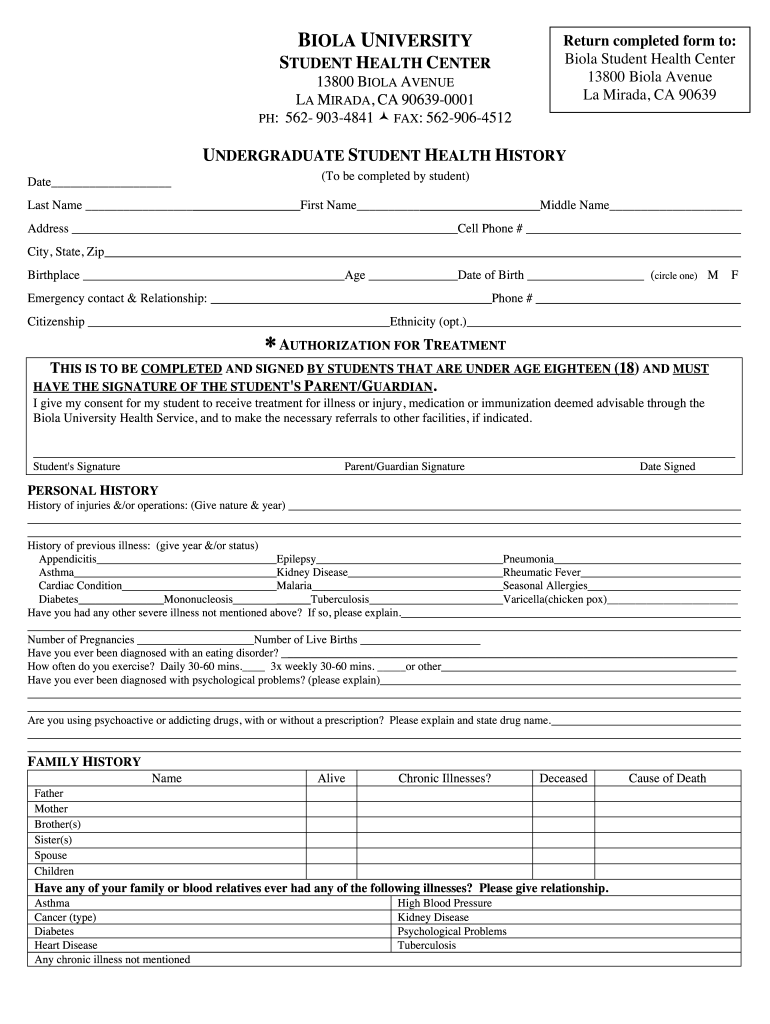
- Begin by entering your personal information at the top of the form, including your last name, first name, middle name, address, cell phone number, birthplace, age, and date of birth.
- Fill out the emergency contact section with the name and relationship of your contact along with their phone number.
- Complete the Personal History section by detailing any past injuries or illnesses. Be thorough in explaining any severe conditions not listed.
- In the Family History section, provide information about your family members' health statuses and any chronic illnesses they may have had.
- Proceed to the Physical Exam and Immunization Record section. Enter details such as height, weight, blood pressure, and pulse rate. Ensure all required immunizations are documented accurately.
- Finally, review all entries for accuracy before saving or printing your completed form for submission to Biola Student Health Center.
Start using our platform today to easily complete your health history form online for free!
It's free
See more Undergraduate Physical Exam/Health History (PDF) - Biola University - biola versions
| Versions | Form popularity | Fillable & printable |
|---|---|---|
| 2011 | 4 Satisfied (50 Votes) |
Got questions?
Can I sign my Undergraduate Physical Exam/Health History (PDF) - Biola University - biola in electronic format?
As outlined by eSignature laws, documents signed digitally have the same validity as traditionally approved ones. You can eSign almost any business and personal paperwork. Four types of paperwork still demand handwritten signatures only - wills and testamentary trusts, court orders and other court forms, state statutes regulating divorce, adoption, or other family law, and notice of cancellation of utility services. If you adhere to the guidelines and use a secure and compliant software solution, like DocHub, you can eSign your Undergraduate Physical Exam/Health History (PDF) - Biola University - biola without printing it.
Can I print my Undergraduate Physical Exam/Health History (PDF) - Biola University - biola and complete it on my own?
When you go for analog ways of completing your Undergraduate Physical Exam/Health History (PDF) - Biola University - biola, you can easily download your file for printing. Search DocHub’s Forms & Templates catalog to find the exact document template you need and open it for editing or download it on your device in the format of your choice. It is possible to complete your form electronically and place your handwritten signature on it right after printing or eSign your document with DocHub.
Security and compliance
At DocHub, your data security is our priority. We follow HIPAA, SOC2, GDPR, and other standards, so you can work on your documents with confidence.
Learn more


