






Definition and Meaning of Face Sheet Template
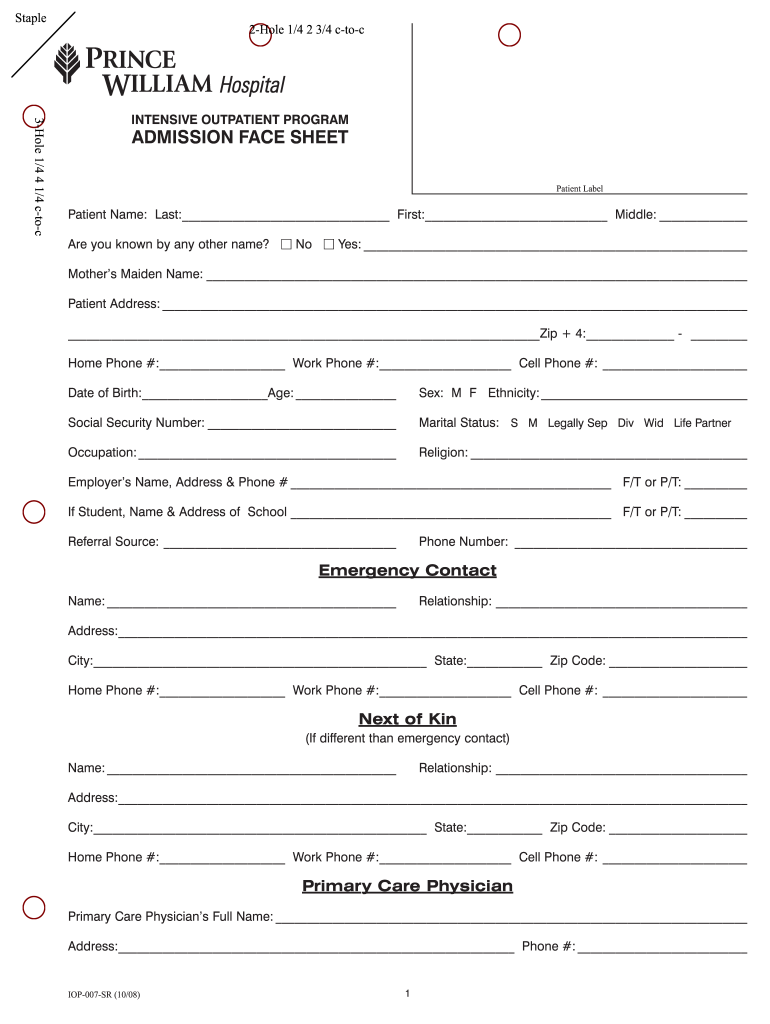
A face sheet template is a structured document primarily used in healthcare settings to gather essential patient information at the time of admission or registration. This document typically includes personal details, medical history, billing information, and emergency contacts. The face sheet serves as a quick reference for healthcare providers and administrative staff, facilitating efficient patient care and streamlined operations.
- Primary Purpose: The face sheet's primary function is to consolidate critical data, ensuring that healthcare providers have immediate access to essential patient details.
- Key Information: The template usually encompasses sections for the patient's name, date of birth, insurance information, and any known allergies.
- Variability: While the core elements remain consistent, variations exist depending on the healthcare facility or specific treatment program, reflecting unique administrative requirements.
How to Use the Face Sheet Template
Utilizing a face sheet template involves a systematic approach to ensure all necessary information is captured efficiently. Here are essential steps you should follow:
-
Obtain the Template: Access a blank face sheet template, either printed or online, that adheres to your facility's specifications. Many healthcare institutions provide standardized templates that are regularly updated to comply with current regulations.
-
Fill in Patient Details: Start by entering basic personal information such as the patient's full name, date of birth, and address. Include contact details and family doctor information.
-
Document Medical History: Add pertinent medical history to provide insights into past conditions, allergies, and current medications. This section is crucial for ensuring patient safety during treatment.
-
Insurance and Billing Information: Fill out sections that include insurance provider details, policy numbers, and any copayment amounts required upon admission. This information facilitates the billing process and ensures proper coverage.
-
Emergency Contacts: Include at least one emergency contact with their relationship to the patient, phone number, and any necessary notes regarding consent or additional care directives.
How to Obtain the Face Sheet Template
Obtaining a face sheet template can be accomplished through several avenues, each designed to meet specific needs:
-
Healthcare Facilities: Many hospitals and clinics provide standardized face sheet templates for patients during registration. These may be available in both physical and digital formats.
-
Online Resources: Numerous websites offer free downloadable face sheet templates in various formats, suitable for both medical facilities and individual use. These templates can often be customized to suit specific requirements.
-
Document Management Software: Platforms like DocHub offer versatile document creation and management tools that include customizable face sheet templates. Users can edit, sign, and share these templates directly from their devices.
Key Elements of the Face Sheet Template
The face sheet template includes several critical elements that collectively ensure cohesive documentation and accurate patient data capture. Some of the vital components include:
-
Patient Information: Sections for the patient's name, date of birth, and contact details. Proper identification is crucial for delivering appropriate care.
-
Medical Background: Documentation of previous medical conditions, allergies, and current medications is essential to avoid complications during treatment.
-
Insurance Details: Information regarding the patient's insurance provider, policy number, and coverage specifics allows for seamless billing processes and ensures proper care access.
-
Emergency Contacts: A list of reliable contacts facilitates communication in case of emergencies and ensures that the patient’s care preferences and decisions are respected.
Examples of Using the Face Sheet Template
Face sheet templates can be employed in various healthcare scenarios, providing functional benefits across settings. Here are some examples:
-
Admission in Hospitals: During patient admission to a hospital, the face sheet template serves as the first point of contact, facilitating quick data collection essential for initial treatment procedures.
-
Outpatient Clinics: In outpatient care, the template helps in gathering necessary information prior to consultations, ensuring that healthcare providers are well-equipped to address patient needs.
-
Therapy and Rehabilitation Centers: Facilities specializing in therapy often utilize face sheets to document patient progress, ensuring continuity of care while tracking treatment effectiveness.
Important Terms Related to Face Sheet Template
Familiarity with essential terms associated with the face sheet template can enhance understanding and ensure proper utilization. Some key terms include:
-
Patient Admission: The process of officially registering a patient for treatment, wherein the face sheet plays a crucial role in documentation.
-
Confidentiality: The ethical and legal obligation to protect patient information gathered in documents like face sheets, ensuring data security and privacy.
-
Medical History: A comprehensive account of a patient’s past and present health conditions, essential for informed medical decisions.
-
Consent: The formal acknowledgment from a patient or their legal representative regarding treatment plans and information sharing.
Digital vs. Paper Version of Face Sheet Template
Understanding the differences between digital and paper face sheet templates can inform decision-making based on operational efficiencies and user preferences:
-
Digital Templates: Often accessible via document management software, these allow for easy editing, storage, and sharing, providing significant advantages in speed and convenience. Digital templates can facilitate real-time updates and enhance collaboration among healthcare staff.
-
Paper Templates: Traditionally used in many healthcare settings, paper face sheets are tangible and may be preferred in environments where digital technology is less integrated. However, they can lead to inefficiencies in data collection and storage.
-
Choosing the Right Format: The decision between digital and paper formats depends on facility size, technological infrastructure, and staff familiarity with digital tools. Many institutions are moving toward digital solutions for enhanced efficiency and data management.
Eligibility Criteria for Using the Face Sheet Template
Utilizing the face sheet template is generally straightforward, but there are specific eligibility criteria that may apply, particularly in healthcare settings:
-
Patient Admission: Patients seeking admission to a healthcare facility typically need to fill out a face sheet to ensure their information aligns with state and federal regulations.
-
Insurance Requirements: Certain insurance providers may require a completed face sheet to process claims effectively, emphasizing the importance of accurate and comprehensive documentation.
-
Regulatory Compliance: Facilities must comply with healthcare regulations, ensuring that the face sheet meets all legal standards, which can involve specific data collection and confidentiality protocols.
This detailed approach to understanding and employing a face sheet template provides a foundational resource for healthcare professionals and administrative staff, enhancing patient care and operational efficiencies in various settings.