



Here's how it works



How to use or fill out emergency lighting log book pdf with our platform

- Click ‘Get Form’ to open the emergency lighting log book PDF in the editor.
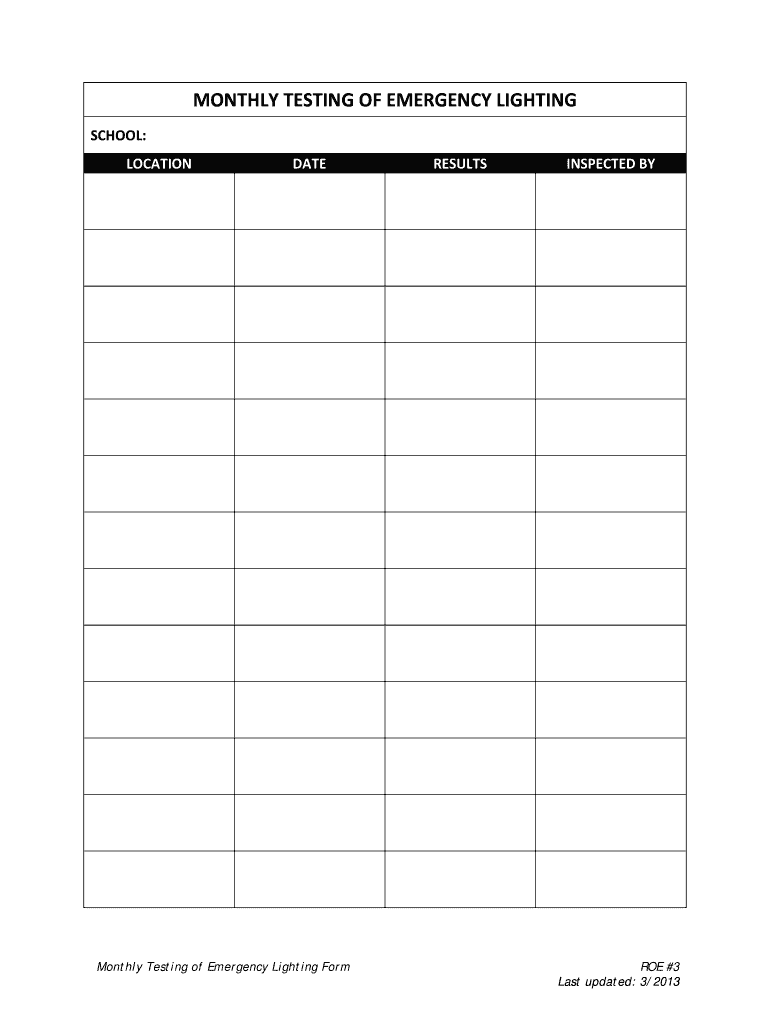
- Begin by entering the 'SCHOOL' name in the designated field. This identifies where the testing is taking place.
- Next, fill in the 'LOCATION' section to specify the exact area within the school being tested.
- In the 'DATE' field, input the date of the monthly test. This helps maintain an accurate record of inspections.
- Document your findings in the 'RESULTS' section. Clearly note whether each light passed or failed during testing.
- Finally, have the inspector sign off in the 'INSPECTED BY' field to validate that testing was completed.
Start using our platform today for free to streamline your emergency lighting log book management!
It's free
See more emergency lighting log book pdf versions
| Versions | Form popularity | Fillable & printable |
|---|---|---|
| 2013 | 4.8 Satisfied (185 Votes) |
Got questions?
What do I need to sign my free printable emergency lighting test log template electronically?
Electronic document approval requires a software solution that works in compliance with data protection and eSignature standards. DocHub is an excellent tool for that, because it fulfills all the aforementioned requirements. Whatever method you prefer to sign your free printable emergency lighting test log template in DocHub, your electronic signature will be legally binding and court-admissible.
Can I sign my emergency lighting test log book while I edit it?
If you edit your emergency lighting test log book with DocHub, you simply will not need to look for other applications or solutions to eSign it. An electronic signature is part of DocHub’s comprehensive editing toolset, which allows you to implement changes in your form without jumping between websites. Just complete your form, double-check the correctness of your data and place your electronic signature at the end to make it submission-ready within minutes.
What is an emergency lighting log book?
Who can issue emergency lighting certificate?
What are OSHA requirements for emergency lighting?
Security and compliance
At DocHub, your data security is our priority. We follow HIPAA, SOC2, GDPR, and other standards, so you can work on your documents with confidence.
Learn more


Related forms