




Here's how it works



How to use or fill out CONSTABLE'S OFFICE, NORTH LAS VEGAS ... - Clark County with our platform

- Click ‘Get Form’ to open the application for a Notice of Eviction in the editor.
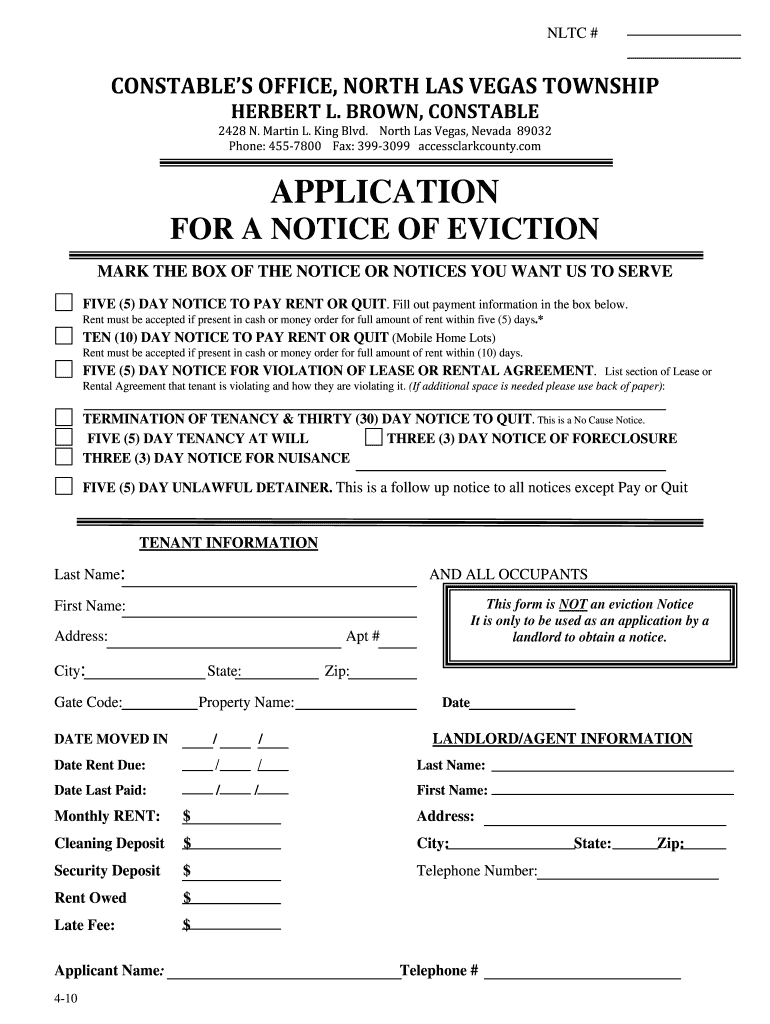
- Begin by marking the appropriate box for the type of notice you wish to serve, such as 'Five (5) Day Notice to Pay Rent or Quit'.
- Fill out the payment information in the designated box if applicable, ensuring clarity on amounts and methods accepted.
- Complete the Tenant Information section by entering the last name, first name, address, and other required details accurately.
- In the Landlord/Agent Information section, provide your details including last name, first name, address, and contact number.
- Ensure all dates are filled in correctly for 'Date Moved In', 'Date Rent Due', and 'Date Last Paid' to avoid any discrepancies.
- Review all entries for accuracy before saving or submitting your completed form through our platform.
Start using our platform today to streamline your document editing and form completion process for free!
It's free
See more CONSTABLE'S OFFICE, NORTH LAS VEGAS ... - Clark County versions
Got questions?
Is it safe to sign my north las vegas constable electronically?
You should use only trustworthy software solutions with strong data protection compliance to approve your paperwork electronically. DocHub is just the type of service you need! It stores data on Amazon Web Servers and complies with all essential security standards and eSignature laws, so it’s a reliable way to eSign your north las vegas constable or other forms using this tool.
How do you fill out constables office las vegas on iOS?
You need only a web connection and a web browser to complete your constables office las vegas on an iOS phone. Open the DocHub website and authenticate. Then, add your document or select it from the list in your dashboard. Then use our editing tools to complete your form and preserve all your modifications. You may also send it to a specified recipient right away.
Security and compliance
At DocHub, your data security is our priority. We follow HIPAA, SOC2, GDPR, and other standards, so you can work on your documents with confidence.
Learn more


