




Here's how it works



How to use or fill out Sponsorship Commitment Form - NAWBO Southern Nevada

- Click ‘Get Form’ to open it in the editor.
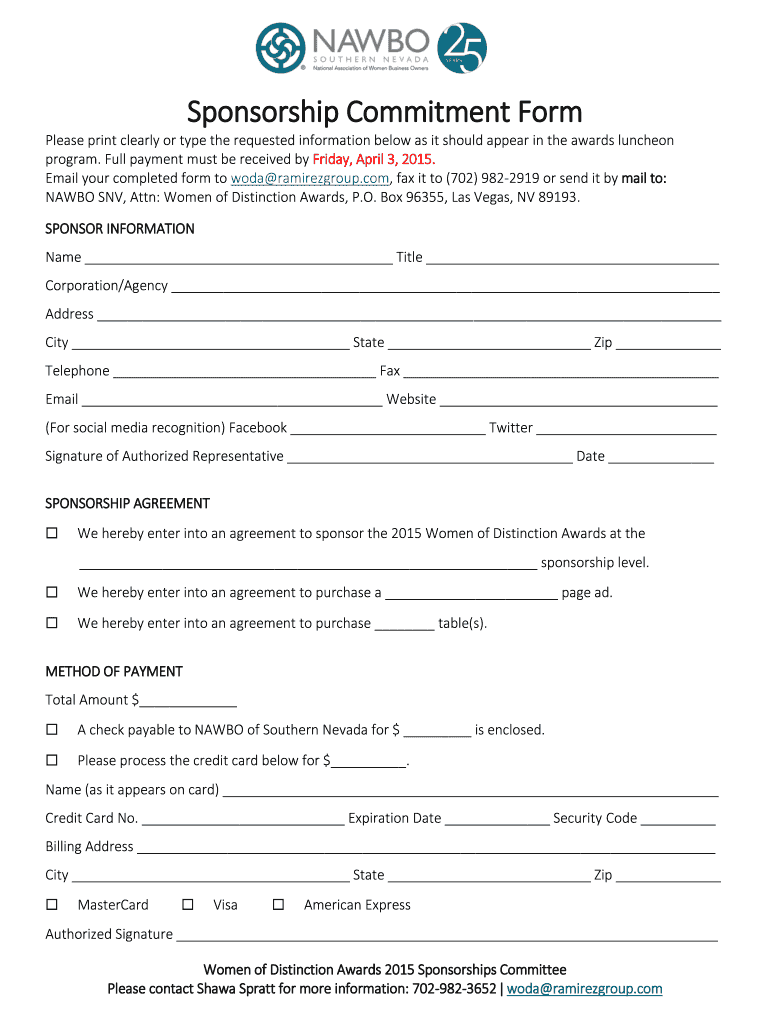
- Begin by filling out the SPONSOR INFORMATION section. Clearly type or print your name, title, corporation/agency, address, city, state, zip code, telephone, fax number, email, and website. Ensure all details are accurate for proper recognition.
- In the SPONSORSHIP AGREEMENT section, select your sponsorship level and specify if you are purchasing an ad or tables. Fill in the necessary details as required.
- Proceed to the METHOD OF PAYMENT section. Indicate the total amount and choose your payment method—either by check or credit card. If using a credit card, provide the cardholder's name, number, expiration date, security code, and billing address.
- Finally, ensure that an authorized representative signs and dates the form before submission.
Start using our platform today to complete your Sponsorship Commitment Form effortlessly!
It's free
See more Sponsorship Commitment Form - NAWBO Southern Nevada - nawbosnv versions
| Versions | Form popularity | Fillable & printable |
|---|---|---|
| 2015 | 4.8 Satisfied (229 Votes) |
Got questions?
Can I sign my Sponsorship Commitment Form - NAWBO Southern Nevada - nawbosnv on a mobile?
Of course, you’ll find many different apps for this on the web. However, if you need to eSign your Sponsorship Commitment Form - NAWBO Southern Nevada - nawbosnv without installing additional software, DocHub is the best choice you can make. This powerful editor works on mobile devices just as on desktops. Open our editor in your preferred internet browser, register or log in to your account, and start processing your documents.
How do you get Sponsorship Commitment Form - NAWBO Southern Nevada - nawbosnv for my state?
If you are searching for a state-specific Sponsorship Commitment Form - NAWBO Southern Nevada - nawbosnv sample, you will find it in our DocHub Forms & Templates catalog. Use the search field, key in your form’s name, and search through the results for your state. You can also filter out irrelevant results while exploring our catalog by groups.
Security and compliance
At DocHub, your data security is our priority. We follow HIPAA, SOC2, GDPR, and other standards, so you can work on your documents with confidence.
Learn more


