




Here's how it works



How to use or fill out aroma therapy pdf download with our platform

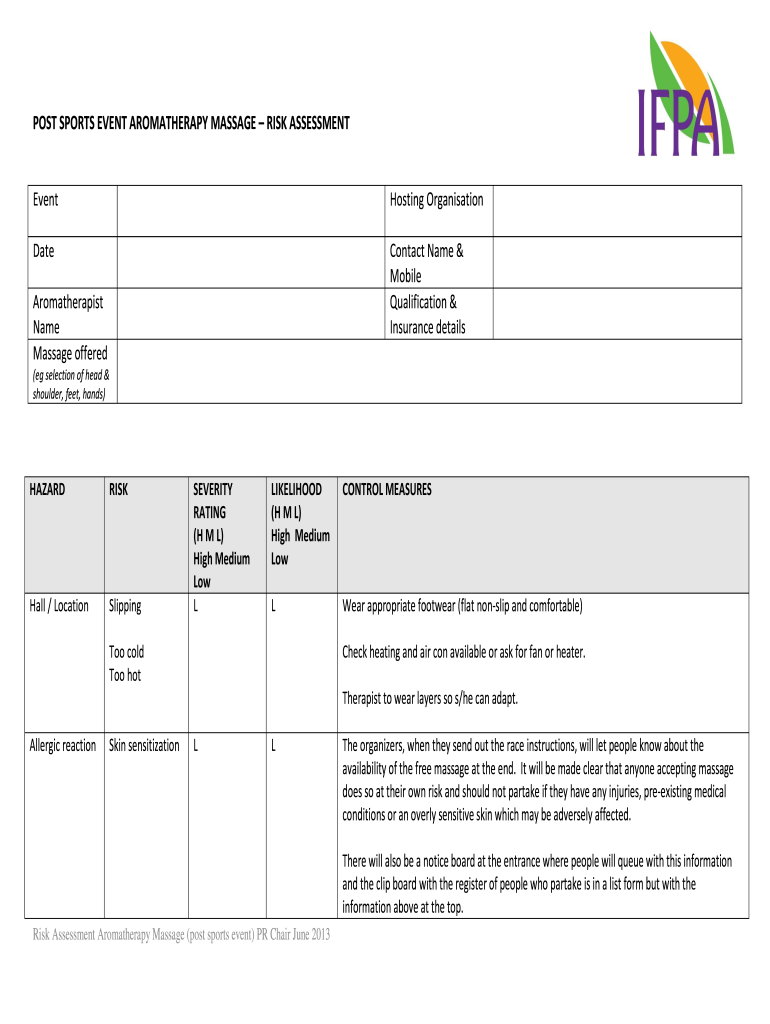
- Click ‘Get Form’ to open the aroma therapy PDF in the editor.
- Begin by filling in the 'Event' and 'Hosting Organisation' fields at the top of the form. This information is essential for identifying the context of your massage service.
- Next, enter the 'Date' and 'Contact Name & Mobile' details. This ensures that participants can reach out if they have questions or concerns.
- In the 'Aromatherapist Name' section, provide your name along with any relevant qualifications and insurance details to establish credibility.
- Specify the type of massage offered, such as head & shoulder or feet, in the designated field.
- Review and complete each hazard and risk assessment section carefully, ensuring you note control measures for each identified risk.
- Finally, sign and date at the bottom of the form to confirm your understanding and acceptance of responsibilities outlined in the disclaimer.
Start using our platform today to easily fill out your aroma therapy PDF for free!
It's free
See more aroma therapy pdf download versions
| Versions | Form popularity | Fillable & printable |
|---|---|---|
| 2013 | 4.8 Satisfied (191 Votes) |
Got questions?
How can I sign my aromatherapy books pdf free download without printing?
Electronic signatures are an excellent replacement for traditional signing, as they save time, effort, and money people spend on printing, scanning, and paper delivery. You can eSign your aromatherapy books pdf free download utilizing a trustworthy and robust online document management tool like DocHub. It complies with major eSignature regulations (ESIGN and UETA), so all documents approved there are legally binding and have the same validity as physically signed ones.
How do you get the complete book of essential oils and aromatherapy pdf free download?
You can find the latest and most relevant version of the the complete book of essential oils and aromatherapy pdf free download in our DocHub forms collection. Search it by categories or utilize the search field to get the exact template that suits your case. You can open this form for editing once you find it.
Security and compliance
At DocHub, your data security is our priority. We follow HIPAA, SOC2, GDPR, and other standards, so you can work on your documents with confidence.
Learn more


