Understanding the Doctor Note 1982 Form
The Doctor Note 1982 Form, often utilized in healthcare settings, serves as an essential document that communicates a patient’s visit details for various purposes, including work or school absences. This document plays a critical role in validating a patient's health status, ensuring that they receive the necessary support from employers or educational institutions.
Key Elements of the Doctor Note 1982 Form
The Doctor Note 1982 Form typically comprises several crucial sections that provide comprehensive information about the patient's visit. These elements include:
- Patient Information: This section includes the patient's name, date of birth, and contact information, ensuring that the note is associated with the correct individual.
- Visit Date: The form should clearly specify the date of the medical consultation, which is essential for records and potential validations.
- Reason for Visit: A brief description of the patient's symptoms or condition may be included. This assists in understanding the context of the absence from work or school.
- Doctor's Recommendations: The healthcare provider may offer advice on any limitations or required accommodations for the patient during their recovery period.
- Doctor's Signature and Information: A legal signature from the attending physician, along with their medical license number and contact information, is a necessary feature to authenticate the note.
How to Complete the Doctor Note 1982 Form
Filling out the Doctor Note 1982 Form requires attention to detail to ensure accuracy and completeness. Here are the steps to effectively complete the form:
- Patient Information: The doctor or administrative staff should input the patient's full name, address, and date of birth accurately to avoid confusion later.
- Medical Visit Details: Record the date of the visit and briefly outline the health issue that necessitated the appointment.
- Recommendations Section: Based on the professional assessment, include any recommendations regarding the patient's activity levels, medications, or follow-up appointments.
- Signature and Credentials: The attending physician must sign the form, providing their name, title, and professional credentials to validate the document.
- Distributing Copies: After completing the form, it's wise to distribute copies to the patient, employer, or school as required, ensuring that all parties have the necessary documentation.
Legal Considerations for the Doctor Note 1982 Form
When utilizing the Doctor Note 1982 Form, it is imperative to acknowledge its legal implications. The form may serve as a valid document in cases of workplace absences or school attendance, which obligates all parties to respect its contents.
- Compliance with HIPAA: Information contained within the form is considered sensitive health information. Therefore, any handling of this document must adhere to HIPAA regulations to protect patient confidentiality.
- Acceptance by Employers and Schools: It is important to verify that employers or educational institutions accept the Doctor Note 1982 Form, as some may have specific requirements for documentation regarding medical absences.
Variants and Updates to the Doctor Note Form
Over the years, variations of the Doctor Note 1982 Form may have emerged to accommodate advancements in medical documentation and technology. The typical variations include:
- Digital Formats: With the rise of electronic health records (EHR), some clinics may provide digital versions of the note that can be emailed directly to employers or schools.
- State-Specific Forms: Certain states may have specific requirements or alternative forms that could be utilized in place of or in addition to the standard Doctor Note 1982 Form.
Real-World Use Cases of the Doctor Note 1982 Form
The Doctor Note 1982 Form is utilized across various scenarios where proof of a medical visit is required. Examples include:
- Workplace Absences: Employees may present this form to their HR departments to explain their absence due to illness, ensuring compliance with company policies.
- School Absences: Students often need to submit this form to their teachers or school administration to receive excused absences related to health issues.
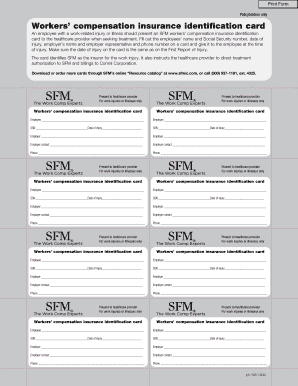
- Legal Situations: In some instances, this note may be required as evidence in legal matters, such as workers' compensation claims due to health-related job injuries.
Completion Timeframe and Best Practices
To ensure the efficient use of the Doctor Note 1982 Form, following best practices can enhance the process:
- Timely Completion: The form should be completed immediately following a visit to ensure all information is fresh and accurately recorded.
- Clear Communication: Discuss any required accommodations or limitations with the patient before filling out the document to ensure that all necessary information is captured.
- Maintain Records: Healthcare providers should retain a copy of the completed form in the patient's medical file for future reference and legal protection.
The Doctor Note 1982 Form is an invaluable document in navigating the intersection of healthcare and professional or educational responsibilities, ensuring that patients can validate their health-related absences effectively.