




Here's how it works



How to use or fill out Workers Comp Claim Form - Karuk Tribe Of California - karuk with our platform

- Click ‘Get Form’ to open the Workers Comp Claim Form in the editor.
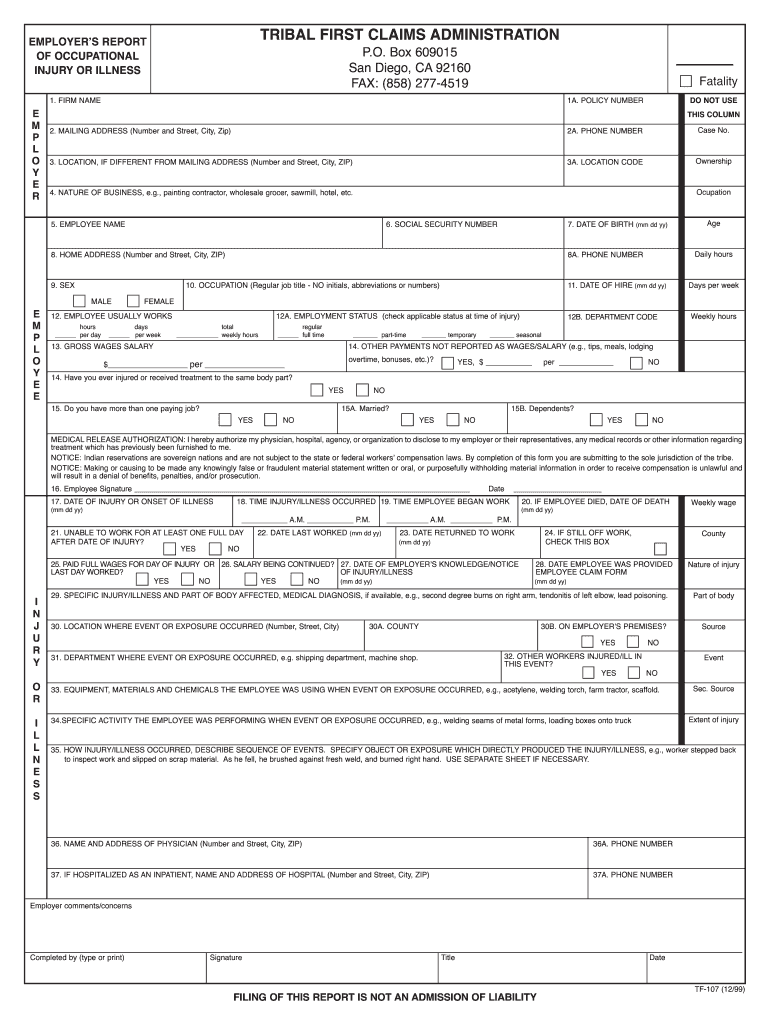
- Begin by filling in the employer's details, including the firm name and policy number. Ensure accuracy as this information is crucial for processing your claim.
- Next, provide the employee's personal information such as name, social security number, date of birth, and home address. This section is vital for identifying the claimant.
- In the nature of business section, describe your occupation clearly. Avoid abbreviations to ensure clarity.
- Complete the injury details by specifying the date of injury, time it occurred, and a detailed description of how it happened. This helps in assessing your claim effectively.
- Finally, review all entries for accuracy before signing and dating the form. Use our platform’s features to save or share your completed document easily.
Start using our platform today to fill out your Workers Comp Claim Form effortlessly and for free!
It's free
See more Workers Comp Claim Form - Karuk Tribe Of California - karuk versions
| Versions | Form popularity | Fillable & printable |
|---|---|---|
| 1999 | 4.5 Satisfied (54 Votes) |
Got questions?
Is it safe to sign my Workers Comp Claim Form - Karuk Tribe Of California - karuk electronically?
You need to use only trusted software solutions with strong data protection compliance to approve your paperwork electronically. DocHub is just the type of service you need! It stores data on Amazon Web Servers and complies with all necessary security criteria and eSignature laws, so it’s a reliable way to eSign your Workers Comp Claim Form - Karuk Tribe Of California - karuk or other documents using this tool.
How do you edit Workers Comp Claim Form - Karuk Tribe Of California - karuk online?
With DocHub, you have several convenient ways to edit your Workers Comp Claim Form - Karuk Tribe Of California - karuk online. You can drag and drop the form and edit it directly at the DocHub site or use our browser extension to fill out your form immediately. On top of that, you can edit your PDF on your phone, as DocHub works with all the available mobile platforms.
Security and compliance
At DocHub, your data security is our priority. We follow HIPAA, SOC2, GDPR, and other standards, so you can work on your documents with confidence.
Learn more


