




Here's how it works



How to use or fill out Door Hanger Order Form - gscb with our platform

- Click ‘Get Form’ to open the Door Hanger Order Form - gscb in the editor.
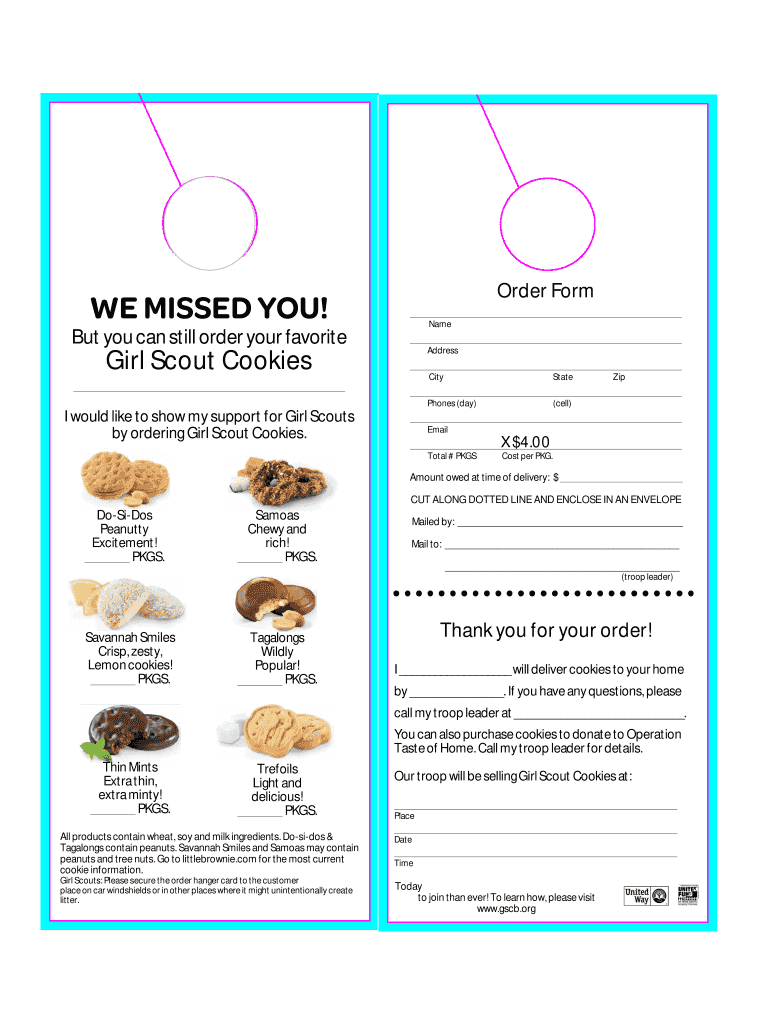
- Begin by entering your name in the designated field to personalize your order.
- Fill in your address, including city, state, and zip code, ensuring accurate delivery.
- Provide your phone numbers (day and cell) for any necessary communication regarding your order.
- Select the types of cookies you wish to order by entering the number of packages next to each cookie type.
- Calculate the total amount owed at delivery by multiplying the number of packages by $4.00 and enter this amount in the appropriate field.
- Complete any additional information required for delivery, including who will deliver and when.
Start using our platform today to effortlessly complete your Door Hanger Order Form - gscb for free!
It's free
See more Door Hanger Order Form - gscb versions
| Versions | Form popularity | Fillable & printable |
|---|---|---|
| 2013 | 4 Satisfied (44 Votes) |
Got questions?
Can I sign my printable girl scout cookie order form 2024 electronically?
Based on eSignature regulations, documents approved digitally have the same validity as those approved with pen and paper. You can electronically sign almost any business and personal paperwork. Four types of documents still demand handwritten signatures only - wills and testamentary trusts, court orders and other court papers, state statutes governing divorce, adoption, or other family law, and notice of cancellation of utility services. If you adhere to the rules and utilize a reliable and compliant software solution, like DocHub, you can eSign your printable girl scout cookie order form 2024 without printing it.
How do you fill out girl scout cookie door hanger 2023 free printable on Android?
It is a no-brainer on a computer or via a mobile device to complete a girl scout cookie door hanger 2023 free printable with DocHub. All you need to do is open any installed web browser on your smartphone and go to the DocHub site. Once authenticated, add your file and open it in editing mode. Use our toolbar to make your edits and save modifications. Optionally, keep your document in your files or send it to a recipient immediately.
Security and compliance
At DocHub, your data security is our priority. We follow HIPAA, SOC2, GDPR, and other standards, so you can work on your documents with confidence.
Learn more


