






Definition and Meaning
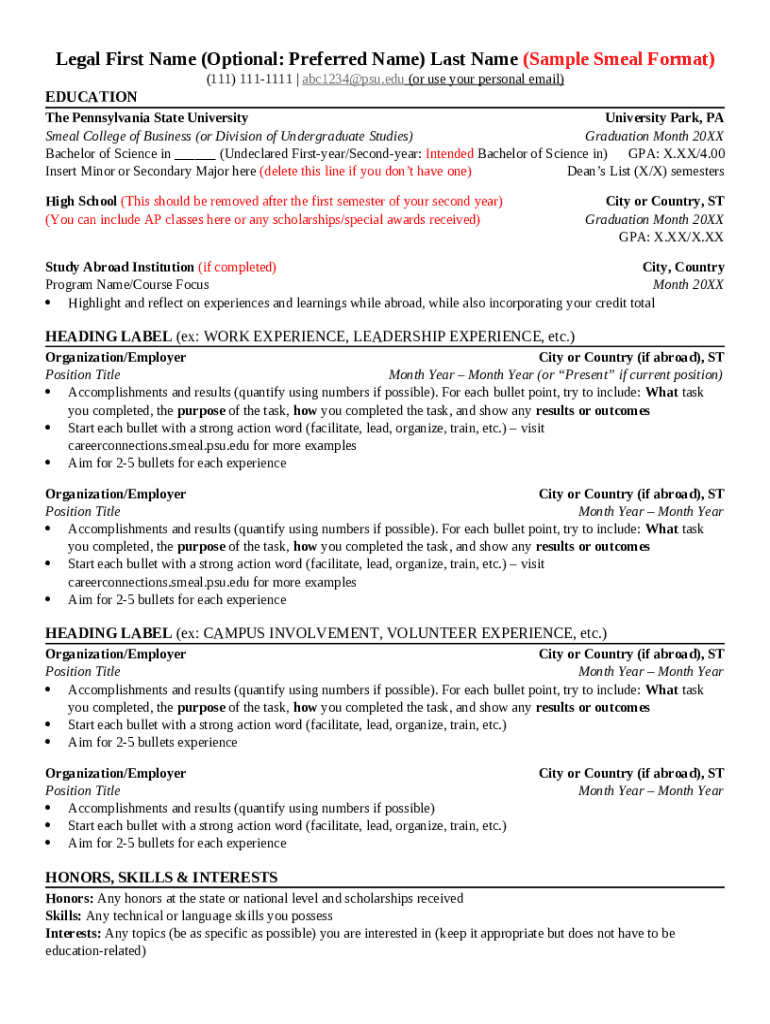
The Penn State Smeal Resume Template is a structured format specifically created to assist students of the Smeal College of Business at Penn State University in presenting their academic and professional qualifications effectively. The template is tailored to align with the expectations of employers, showcasing the skills, experiences, and education most relevant to business roles. It focuses on clarity, professional design, and inclusion of key elements like education, work experience, skills, and leadership activities to ensure students make a strong impression during job applications.
How to Use the Penn State Smeal Resume Template
To effectively utilize the Penn State Smeal Resume Template, follow these steps:
- Download the Template: Obtain the digital version from Penn State Smeal’s official resources or the career services office.
- Input Personal Information: Start with your name, contact information, including email and phone number.
- Education Section: Include your degree program, expected graduation date, and any academic honors.
- Experience Details: List relevant internships, part-time jobs, or volunteer work, focusing on achievements and responsibilities.
- Skills: Ensure you highlight technical and soft skills pertinent to the industry.
- Leadership Roles: Mention positions held in student organizations or projects.
- Proofread and Format: Check for errors and maintain consistent formatting.
- Tailor for Each Application: Customize certain sections to align with the specific job description.
How to Obtain the Penn State Smeal Resume Template
Students of Penn State Smeal can acquire the resume template through:
- University Website: Access the career services section where the template is typically available for download.
- Career Services Office: Obtain a copy by visiting the office in person for guidance and resources.
- Online Portals: Utilize Penn State’s online student portal, which may host documents needed for academic and professional advancement.
A valid university login may be required to access these resources.
Steps to Complete the Penn State Smeal Resume Template
- Gather Your Information: Collect details about your education, work experience, skills, and achievements.
- Input Academic Background: Start with the most recent and work backwards. Include GPA if it's above a certain threshold.
- Detail Work Experience: Use bullet points to describe your roles and accomplishments in a concise and impactful manner.
- Include Skills: Focus on both hard and soft skills relevant to your field.
- Leadership and Involvement: Highlight involvement in clubs, sports, or community service.
- Review and Edit: Ensure there are no grammatical errors and that the layout is professional.
Why Use the Penn State Smeal Resume Template
The template is designed to ensure that students present their qualifications in a format that is easily digestible by recruiters familiar with the business industry. Key reasons to use it include:
- Standardization: Provides a consistent approach to showcasing qualifications.
- Professional Layout: Aligns with industry expectations for business roles.
- Efficiency: Offers a clear structure, saving time during the job application process.
- Comprehensive Coverage: Ensures all important aspects of a candidate’s profile are included.
Key Elements of the Penn State Smeal Resume Template
The template includes several pivotal sections that students should complete:
- Contact Information: Name, email, and phone number.
- Education: University details, degree program, GPA.
- Experience: Jobs, internships, with roles clearly defined.
- Skills: Relevant abilities, including industry-specific tools or software.
- Leadership and Activities: Extracurricular involvement that demonstrates soft skills and initiative.
Each section should be filled with precise and relevant information that portrays the candidate as an ideal fit for the roles they are pursuing.
Who Typically Uses the Penn State Smeal Resume Template
Users of the template primarily include:
- Smeal College Students: Both undergraduates and graduates preparing for internships or full-time roles.
- Career Changers: Alumni looking to shift their career path into new business sectors.
- Academic Advisers: To guide students in developing effective resumes.
This tool is tailored to meet the needs of those aspiring to roles in finance, accounting, marketing, and management, among other business careers.

Digital vs. Paper Version of the Penn State Smeal Resume Template
Students have the option to use either digital or printed versions of the resume template, each offering distinct advantages:
- Digital Version: Provides an editable format that can easily be updated and tailored for specific job applications. It allows for easy sharing via email or online application systems.
- Paper Version: Useful for career fairs and in-person interviews where a physical copy might be requested. Ensures a professional appearance when printed on high-quality paper.
Students are encouraged to maintain both digital and printed versions ready for various job search scenarios.