Type text, add images, blackout confidential details, add comments, highlights and more.
02. Sign it in a few clicks
Draw your signature, type it, upload its image, or use your mobile device as a signature pad.
03. Share your form with others
Send pa duplicate title same day via email, link, or fax. You can also download it, export it or print it out.
How to use or fill out mv380 with our platform
Ease of Setup
DocHub User Ratings on G2
Ease of Use
DocHub User Ratings on G2
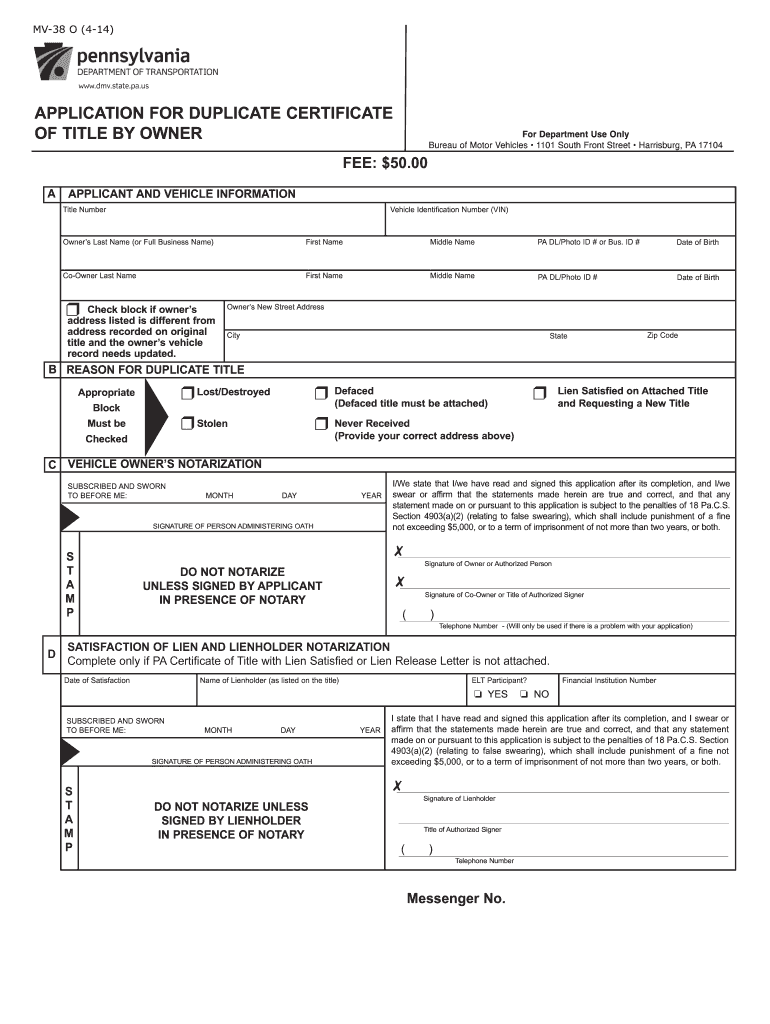
Click ‘Get Form’ to open the mv380 application in the editor.
Begin by filling out Section A, which includes your Title Number and Vehicle Identification Number (VIN). Ensure that you provide your full name and PA DL/Photo ID # or Business ID #.
If applicable, include the co-owner's information in the designated fields, ensuring all names and IDs are accurate.
In Section B, select the reason for requesting a duplicate title by checking the appropriate box—options include Lost/Destroyed, Stolen, or Never Received.
Complete the notarization section by signing in front of a notary public. This is crucial for validating your application.
Finally, review all entries for accuracy before submitting. Make sure to attach any required documents and send it to the specified address.
Start using our platform today to streamline your mv380 form completion process for free!
Noise-SDR: Arbitrary Modulation of Electromagnetic
by G Camurati Cited by 18 AbstractElectronic devices generate electromagnetic noise, also known as EM leakage when the noise leaks information. Many recent research papers exploitRead more
mV380 mV. The electrical characteristics for 1.8V IO signals are shown in Table 5.3-1. Table 5.3-1 1.8V IO Characteristics. Parameter. Min. Typ. Max. Unit.Read more
Furthermore, I/we state that I/we have read and signed this application after its completion, and I/we swear or affirm that the statements made herein.Read more
Cookie consent notice
This site uses cookies to enhance site navigation and personalize your experience.
By using this site you agree to our use of cookies as described in our Privacy Notice.
You can modify your selections by visiting our Cookie and Advertising Notice.