
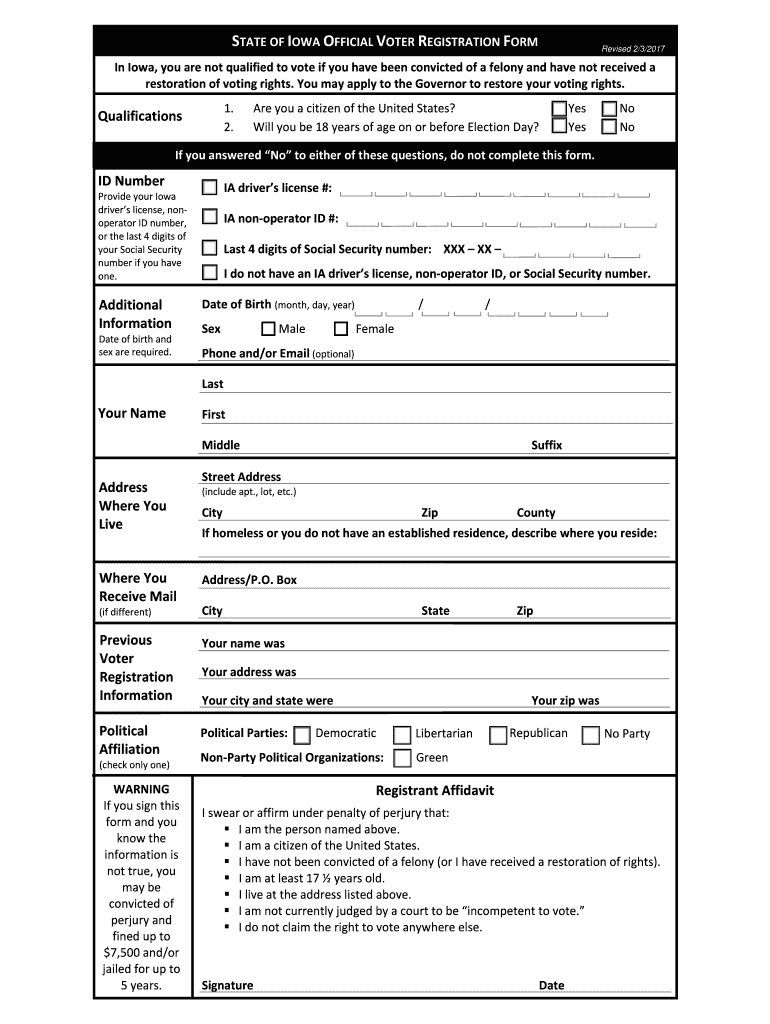







Definition & Purpose of the Fillable Online Voter Registration Form
The Fillable Online Voter Registration Form is designed to streamline the voter registration process for residents. Specifically, the version from April 9, 2014, integrates modern conveniences such as electronic submission via fax, email, and print, making it accessible for users who need to update or create a new voter registration. This form ensures that voters can declare their eligibility to vote and provide necessary personal details, thus enabling them to participate in upcoming elections.
How to Use the Fillable Online Voter Registration Form
To utilize this form effectively, follow these steps:
- Access the Form: Download the form from your state’s election office website or from resources like DocHub that offer fillable versions.
- Fill in Personal Details: Enter your full name, address, date of birth, and other identifying information.
- Verify Eligibility: Confirm whether you meet the criteria to vote, such as age and citizenship.
- Choose Submission Method: After completing the form, decide whether to fax, email, or print and mail it to the appropriate election office.
Steps to Complete the Fillable Online Voter Registration Form
When ready to fill out the form, here's a step-by-step process:
- Review Instructions: Begin by carefully reading any guidelines attached to the form.
- Complete Personal Information: Enter your full legal name, date of birth, and current address. Provide any required identification numbers as indicated.
- Citizenship and Age Confirmation: Check appropriate boxes confirming that you meet legal voting age and citizenship.
- Submit Declaration: Sign and date the form to attest to the accuracy of provided information.
- Submit the Form: Depending on your choice, fax, email, or print and mail the completed form to your local election office.
Who Typically Uses the Fillable Online Voter Registration Form
This form is most commonly used by:
- New Voters: Individuals registering for the first time.
- Address Change: Voters who have recently moved and need to update their registration details.
- Name Changes: Those who have legally changed their names since the last registration.
- Party Affiliation Changes: Voters wishing to alter their party enrollment status.


Key Elements of the Fillable Online Voter Registration Form
The form contains several crucial sections that require attention:
- Personal Information: Full name, residential address, and date of birth.
- Identification Requirement: State ID or other acceptable forms of identification.
- Eligibility Declaration: Confirmation of eligibility criteria, such as age and citizenship.
- Signature Section: Space to provide a signature authenticating the information supplied.
Legal Use of the Fillable Online Voter Registration Form
Legally, this form serves to verify a voter’s identity, eligibility, and political party affiliation. It acts as an official state document, meaning any false information submitted could lead to penalties under law, including fines or disenfranchisement.
Form Submission Methods: Online, Mail, & In-Person
The flexibility of submission methods enhances accessibility:
- Online Submission: Emailing the filled form directly from platforms like DocHub.
- Mail Submission: Printing the form and mailing it to the designated address.
- Fax Submission: Using a fax machine or online service to send the form to election offices.
State-Specific Rules for the Fillable Online Voter Registration Form
Different states may have unique regulations regarding:
- Deadline Compliance: Strict timelines for submitting the registration before an election.
- Identification Requirements: Varying types of accepted ID that differ from state to state.
- Eligibility Variances: Differences in criteria like restoration of voting rights for former felons, impacting a person’s capability to register.
Required Documents for Completing the Form
When filling out this form, you will need:
- Personal Identification: Such as a driver’s license or social security number.
- Proof of Residence: Utility bills or other official documents confirming your address may be required depending on your state laws.
State-by-State Differences in Using the Form
Understanding specific state regulations is crucial:
- Eligibility Criteria Varies: Requirements such as residency duration and ID standards can differ significantly.
- Submission Deadlines: Some states have earlier deadlines to guarantee processing before upcoming elections.
- Processing Timeframes: Verification and approval timelines may vary state to state, impacting when registration is finalized.




