




Here's how it works



How to use or fill out PFA bursary Claim form - Professional Footballers' Association with DocHub

- Click ‘Get Form’ to open it in the editor.
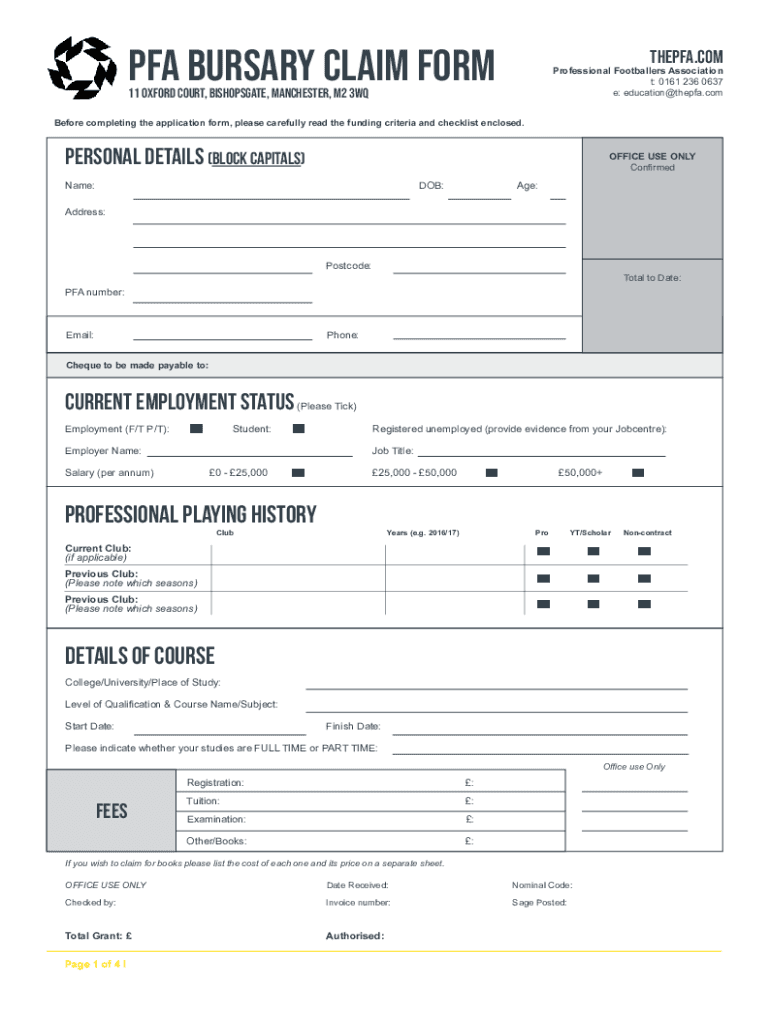
- Begin by filling out your Personal Details in block capitals. Include your name, date of birth, age, address, postcode, PFA number, email, and phone number.
- Indicate your current employment status by ticking the appropriate box. If you are registered unemployed, provide evidence from your Jobcentre.
- In the Professional Playing History section, list your clubs and the years you played for each. Specify if you are currently playing for a club.
- Complete the DETAILS OF COURSE section with information about your college/university, course name/subject, start and finish dates, and whether your studies are full-time or part-time.
- Fill in the financial details regarding registration fees, tuition costs, examination fees, and any other expenses related to your course.
- In the Commercial Opt-In section, indicate if you consent to be contacted by the PFA Charity regarding offers from business partners.
- Provide information about your previous education qualifications and select your ethnicity as per the options provided.
- Finally, sign and date the form to confirm your application for financial assistance.
Start using our platform today to complete your PFA bursary Claim form easily and efficiently!
It's free
See more PFA bursary Claim form - Professional Footballers' Association versions
Got questions?
How can I send my how to get pfa funding from Google Drive for approval?
If you regularly work with documents stored in your Google Drive, DocHub is a perfect option for you to easily and quickly fill out, modify, and approve them. This editor integrates well with Google services, so you can export your how to get pfa funding from your Google Drive to the editor without the need of downloading and re-uploading it. Right-click on your document, select Open With → DocHub PDF Sign and Edit. In our editor, add and assign Signature Fields for all people involved, then click on the Menu option above → Send → choose how you want to share your form.
Do I need to install software to modify my pfa forms?
When you edit your pfa forms with DocHub, you merely need a stable web connection and virtually any browser installed on your device. No need to install any third-party software or study guides. Simply open a tab with DocHub, drag and drop your file, and edit it on the spot.
How many members are in the PFA?
What is a PFA member?
What is PFA funding?
Security and compliance
At DocHub, your data security is our priority. We follow HIPAA, SOC2, GDPR, and other standards, so you can work on your documents with confidence.
Learn more


