




Here's how it works

01. Edit your k 12 form laccd online
Type text, add images, blackout confidential details, add comments, highlights and more.

02. Sign it in a few clicks
Draw your signature, type it, upload its image, or use your mobile device as a signature pad.

03. Share your form with others
Send laccd k 12 form via email, link, or fax. You can also download it, export it or print it out.
How to Use or Fill Out the Military Experience Form Online

- Click ‘Get Form’ to open the Military Experience Form in our editor.
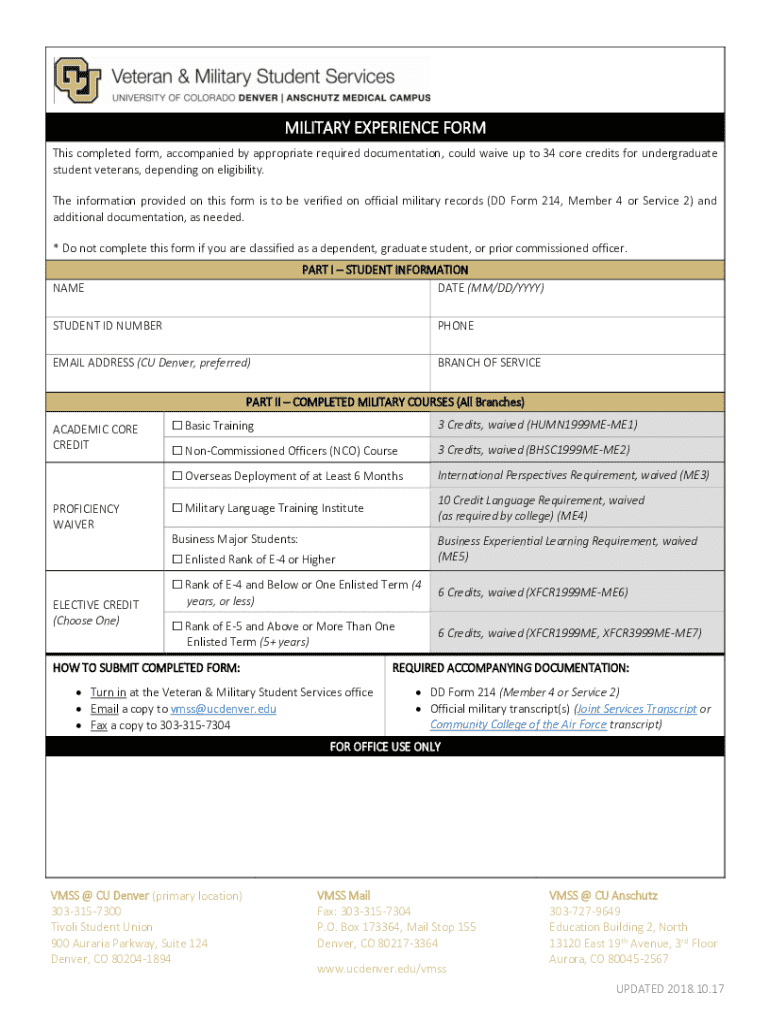
- Begin with Part I – Student Information. Fill in the date, your name, student ID number, phone number, and email address (preferably your CU Denver email).
- Next, move to Part II – Completed Military Courses. Review the list of courses and check the boxes for any that apply to you. Ensure you note the corresponding credits waived.
- If applicable, select your elective credit option based on your rank and service duration. Make sure to check only one box.
- Finally, prepare to submit your completed form along with required documentation such as DD Form 214 and official military transcripts. You can turn it in at the Veteran & Military Student Services office or submit it via email or fax.
Start filling out your Military Experience Form online for free today!
Fill out Military Experience Form online
It's free
See more Military Experience Form versions
We've got more versions of the Military Experience Form form. Select the right Military Experience Form version from the list and start editing it straight away!
Security and compliance
At DocHub, your data security is our priority. We follow HIPAA, SOC2, GDPR, and other standards, so you can work on your documents with confidence.
Learn more


