




Here's how it works



How to use or fill out Pennsylvania PSRS 1237 Job Description with Our Platform

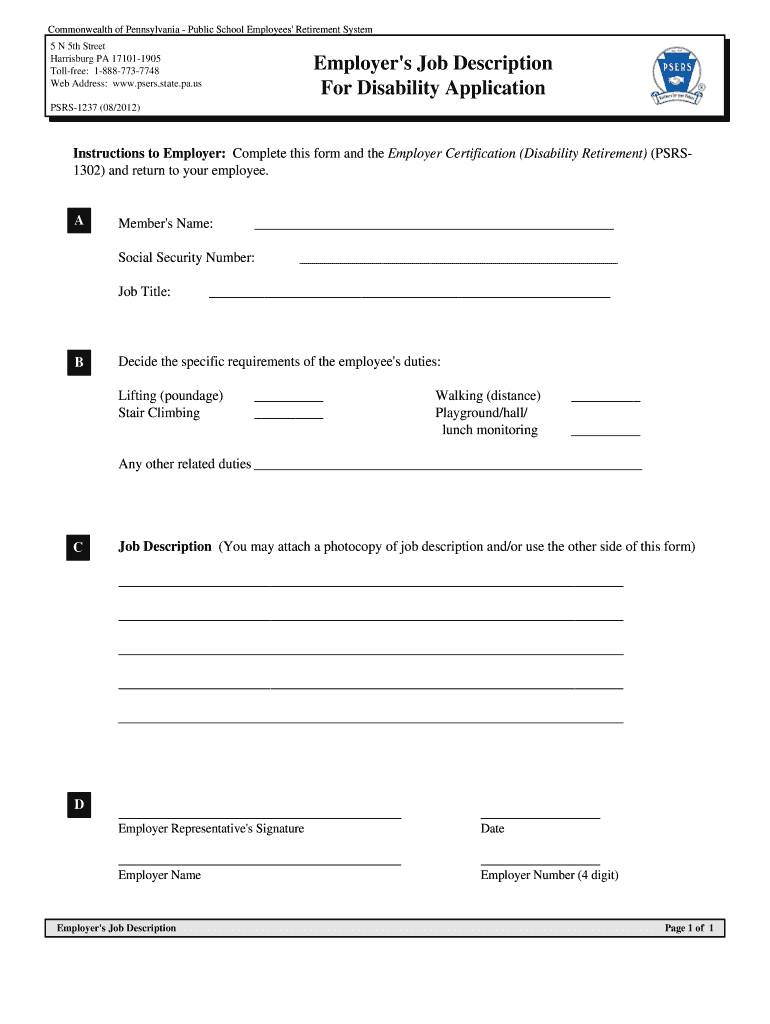
- Click ‘Get Form’ to open the Pennsylvania PSRS 1237 job description in the editor.
- Begin by entering the member's name and social security number in the designated fields. This information is crucial for identifying the employee.
- Next, fill in the job title of the employee. Ensure that this accurately reflects their current position.
- In section A, assess and record specific requirements related to lifting, stair climbing, walking distances, and any additional duties. Use our platform’s text fields to input these details clearly.
- For section C, provide a comprehensive job description. You can either type directly into the field or attach a photocopy of an existing job description using our upload feature.
- Finally, have an employer representative sign and date the form in section D. Ensure that all required information is complete before submission.
Start using our platform today to streamline your document editing and form completion for free!
It's free
See more pennsylvania psrs 1237 job description versions
| Versions | Form popularity | Fillable & printable |
|---|---|---|
| 2012 | 4.8 Satisfied (299 Votes) |
Got questions?
How can I sign my pennsylvania state employees retirement system online?
Log in to your DocHub account and import your pennsylvania state employees retirement system to our editor using one of its upload methods - from your device, cloud storage, secure URL, or your DocHub folders if you have already processed your form before. Open our editor, click the Sign key in the top toolbar, and decide on your signing method. You can use a picture of your handwritten signature, draw it, type in your name, or utilize a QR code as an alternative.
Do I need to set up software to edit my pennsylvania public school employees retirement system?
When you edit your pennsylvania public school employees retirement system with DocHub, you only need a steady internet connection and virtually any web browser installed on your device. No need to set up any third-party software or study guides. Simply open a tab with DocHub, drag and drop your file, and edit it on the spot.
What does a township Supervisor do in PA?
How much does a township Supervisor make in PA?
What are the duties of a township manager?
Security and compliance
At DocHub, your data security is our priority. We follow HIPAA, SOC2, GDPR, and other standards, so you can work on your documents with confidence.
Learn more


