




Here's how it works



How to use or fill out ocf 18 treatment plan print form with our platform

- Click ‘Get Form’ to open the ocf 18 treatment plan print form in the editor.
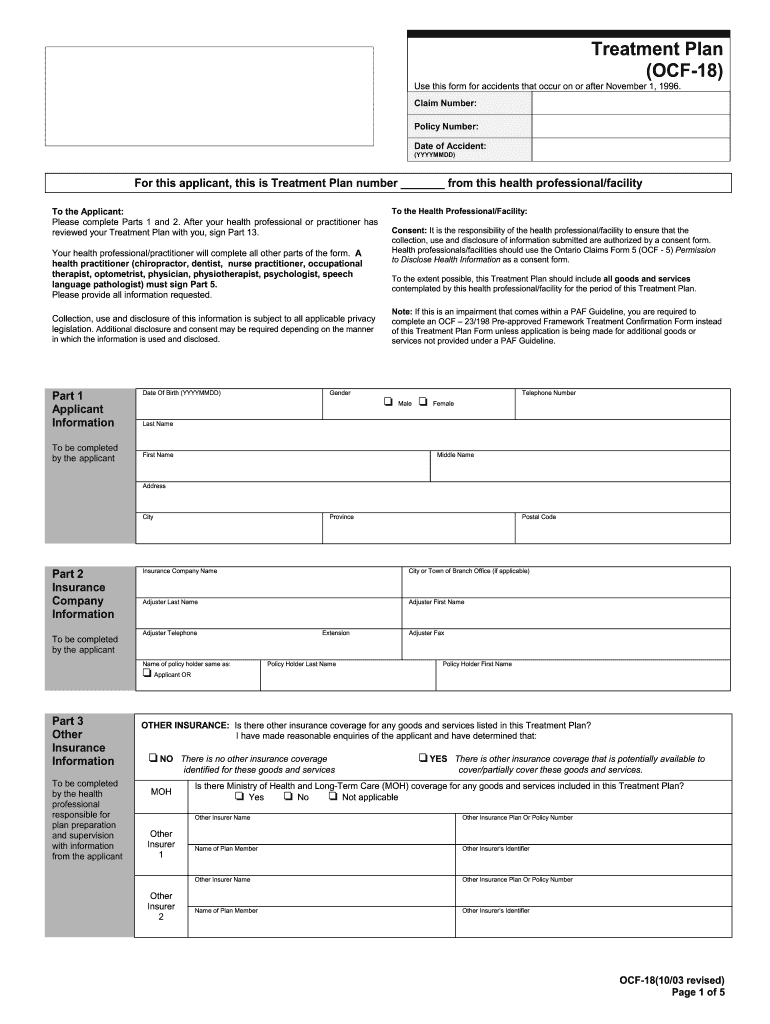
- Begin by filling out Part 1, which includes your personal information such as your name, date of birth, and contact details. Ensure all fields are completed accurately.
- Proceed to Part 2 to provide your insurance company information. Include the name of the insurance company and adjuster details.
- In Part 3, if applicable, indicate any other insurance coverage that may apply. This section must be completed by the health professional responsible for the treatment plan.
- Continue through Parts 4 to 10, where you will provide detailed information about injuries, treatment goals, and any barriers to recovery. Make sure each section is filled out thoroughly.
- Once all sections are complete, review the document for accuracy before signing in Part 13. Your health professional will need to sign in Parts 5 and 6.
Start using our platform today for free to streamline your document editing and ensure a smooth completion of your ocf 18 treatment plan!
It's free
See more ocf 18 treatment plan print form versions
Got questions?
Can I use DocHub to create legal eSignatures on my ocf 18 treatment plan?
Yes, you can use DocHub for signing any business and private documentation, including your ocf 18 treatment plan. All electronic signatures you generate with our service are legally binding and court-admissible, as DocHub complies with standards required by ESIGN and UETA. Save your accomplished form with a detailed Audit Trail if needed.
How do you modify ocf 18 pdf from Google Drive?
If you store your files in Google Drive, there is no need to download your ocf 18 pdf on your computer and upload it back to our editor. A significantly easier way is to set up a browser extension developed by DocHub to streamline this flow. The extension allows editing PDFs in your browser. Alternatively, you may integrate your DocHub and Gmail accounts for more efficient editing.
What is OCF 23?
What is the difference between OCF 18 and 23?
What is the OCF 18 treatment and assessment plan?
Security and compliance
At DocHub, your data security is our priority. We follow HIPAA, SOC2, GDPR, and other standards, so you can work on your documents with confidence.
Learn more


