




Here's how it works



How to use or fill out SCHOOL FACILITIES05 4 AP 21 with our platform

- Click ‘Get Form’ to open the SCHOOL FACILITIES05 4 AP 21 in the editor.
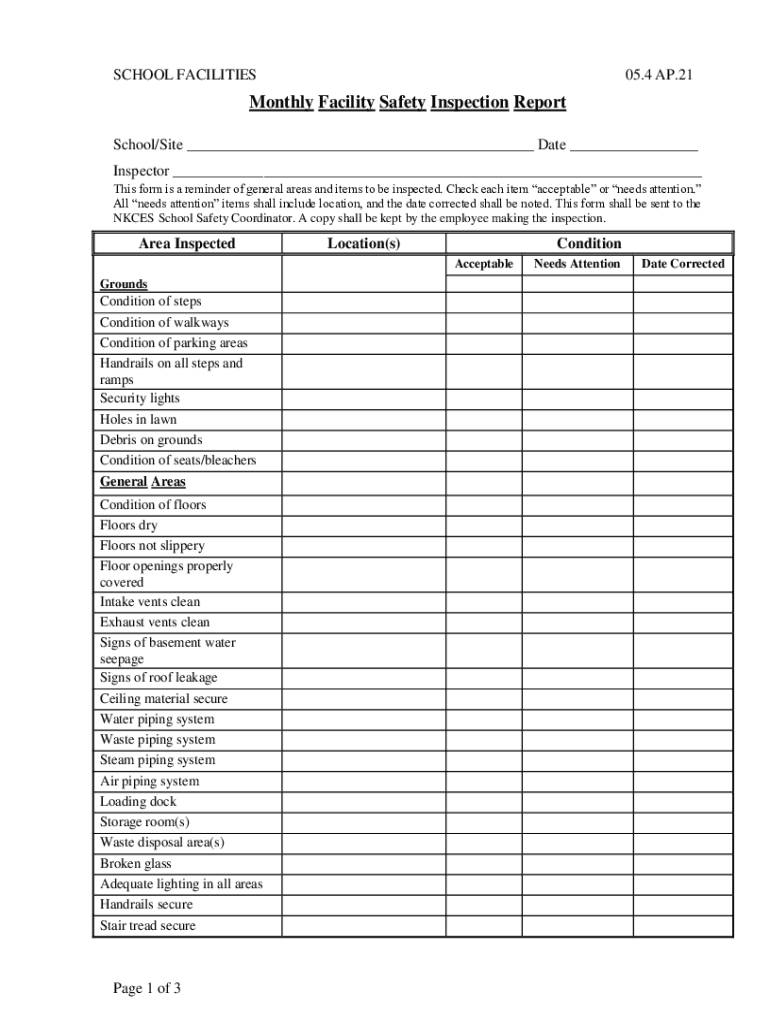
- Begin by entering the school/site name and date at the top of the form. This sets the context for your inspection report.
- In the 'Inspector' field, input your name to identify who conducted the inspection.
- Proceed through each section, such as 'Grounds' and 'General Areas'. For each item listed, check either 'acceptable' or 'needs attention'.
- If any items are marked as 'needs attention', provide specific location details and note the date corrected in the designated fields.
- Continue this process for all areas inspected, including 'Means of Egress', 'Emergency Procedures', and 'Fire Protection'.
- Once completed, review your entries for accuracy before saving or exporting your document.
Start using our platform today to streamline your form completion process for free!
It's free
See more SCHOOL FACILITIES05 4 AP 21 versions
Got questions?
What is the best way to send my SCHOOL FACILITIES05 4 AP 21 for eSignature?
Upload your SCHOOL FACILITIES05 4 AP 21 to DocHub (once you’ve set up an account for this). If you need to complete fields in it, use proper tools from the upper pane. For instance, drop Signature Fields, assign each to a particular party, and click on Sign → Request signatures from others. Personalize your message for your recipients and click Send Request. You can also send your paperwork by fax or as a Signing link instead of using email (you’ll locate these options by navigating to the Menu → Send)
How do you edit SCHOOL FACILITIES05 4 AP 21 online?
With DocHub, you have several convenient ways to edit your SCHOOL FACILITIES05 4 AP 21 online. You can drag and drop the form and edit it directly at the DocHub website or use our browser extension to fill out your form right away. Additionally, you can edit your PDF on your phone, as DocHub works with all the accessible mobile platforms.
What sorts of facilities will you have at your school?
What are the physical facilities of schools?
How to find out a school district code?
Security and compliance
At DocHub, your data security is our priority. We follow HIPAA, SOC2, GDPR, and other standards, so you can work on your documents with confidence.
Learn more


