




Here's how it works



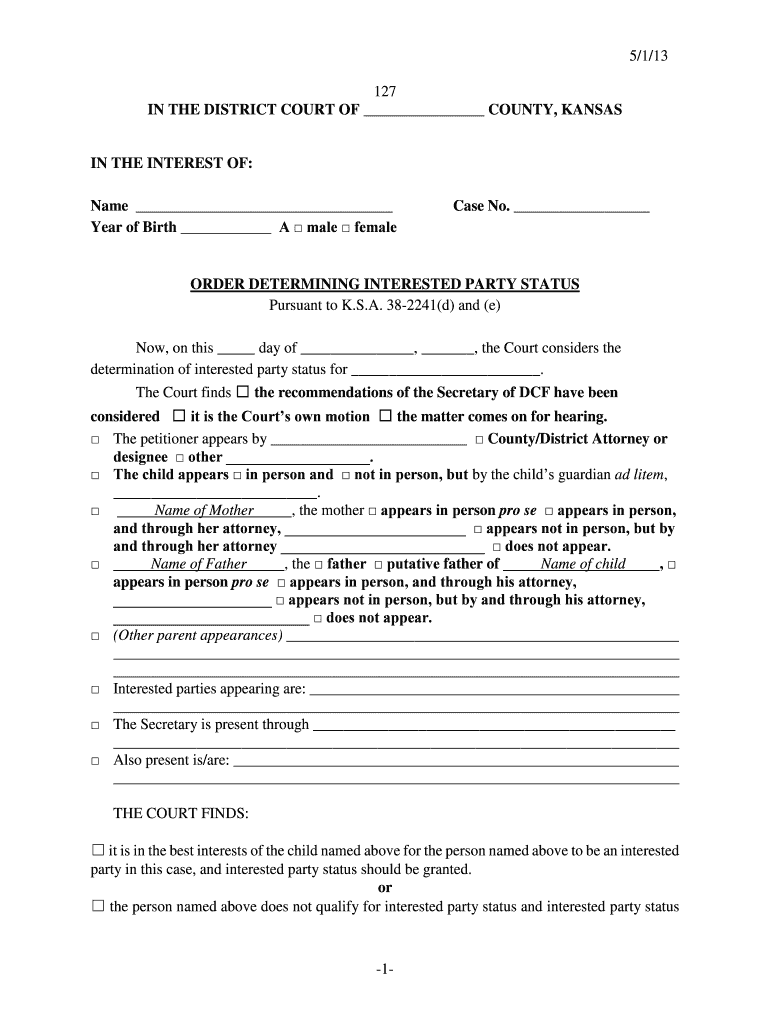
How to use or fill out 5 1 13 -1- 127 IN THE DISTRICT COURT OF - Kansas Judicial Council

- Click ‘Get Form’ to open it in the editor.
- Begin by filling in the county name where the court is located at the top of the form.
- Enter the name of the child and their year of birth, selecting gender options as applicable.
- Input the case number assigned to your matter in the designated field.
- In the section regarding interested party status, check appropriate boxes based on who is present and their representation.
- Complete any findings by checking relevant boxes that reflect the court's decision regarding interested party status.
- Finally, ensure all signatures are completed at the bottom of the form before saving or printing.
Start using our platform today for free to streamline your document editing and signing process!
It's free
See more 5 1 13 -1- 127 IN THE DISTRICT COURT OF - Kansas Judicial Council - kansasjudicialcouncil versions
| Versions | Form popularity | Fillable & printable |
|---|---|---|
| 2013 | 4.8 Satisfied (125 Votes) |
Got questions?
Can I use DocHub to create legal eSignatures on my 5 1 13 -1- 127 IN THE DISTRICT COURT OF - Kansas Judicial Council - kansasjudicialcouncil?
Yes, you can use DocHub for signing any business and private paperwork, including your 5 1 13 -1- 127 IN THE DISTRICT COURT OF - Kansas Judicial Council - kansasjudicialcouncil. All eSignatures you generate with our service are legally binding and court-admissible, as DocHub complies with criteria required by ESIGN and UETA. Save your completed document with a detailed Audit Trail if necessary.
How do you edit 5 1 13 -1- 127 IN THE DISTRICT COURT OF - Kansas Judicial Council - kansasjudicialcouncil online?
With DocHub, you have several convenient ways to edit your 5 1 13 -1- 127 IN THE DISTRICT COURT OF - Kansas Judicial Council - kansasjudicialcouncil online. You can drag and drop the form and modify it straight at the DocHub website or use our browser extension to fill out your form right away. Additionally, you can modify your PDF on your smartphone, as DocHub works with all the available mobile platforms.
Security and compliance
At DocHub, your data security is our priority. We follow HIPAA, SOC2, GDPR, and other standards, so you can work on your documents with confidence.
Learn more


