




Here's how it works



How to use or fill out alaska sc 95 template with our platform

- Click ‘Get Form’ to open the alaska sc 95 template in the editor.
- Begin by entering your personal information in the designated fields, including your name, address, and contact details. Ensure accuracy as this information is crucial for court communication.
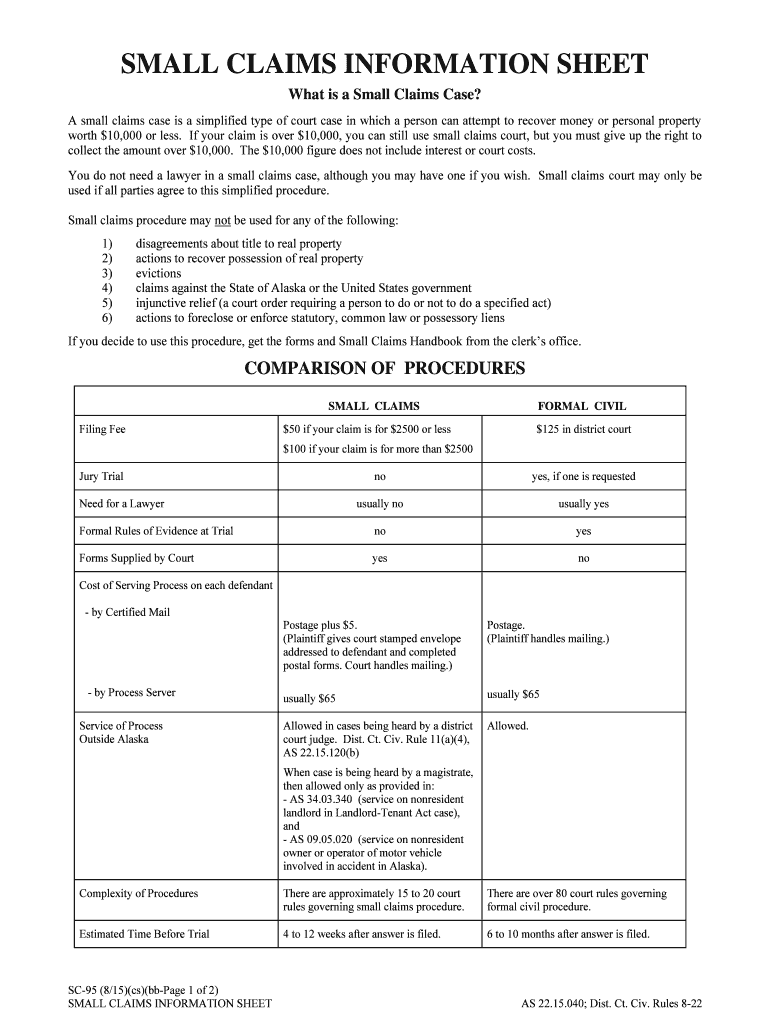
- Next, specify the amount you are claiming. Remember, this should not exceed $10,000. Clearly state the reason for your claim in the provided section to give context to your case.
- If applicable, fill out any additional sections regarding service of process and defendant information. This ensures that all parties are properly notified about the proceedings.
- Review all entered information for completeness and accuracy before finalizing. Use our platform’s tools to make edits easily if needed.
Start using our platform today to fill out your alaska sc 95 template for free!
It's free
See more alaska sc 95 template versions
| Versions | Form popularity | Fillable & printable |
|---|---|---|
| 2015 | 4.8 Satisfied (60 Votes) |
Got questions?
How can I sign my alaska small information sheet online?
Log in to your DocHub account and import your alaska small information sheet to our editor using one of its upload options - from your device, cloud storage, secure URL, or your DocHub folders if you have already managed your form before. Open our editor, click the Sign button in the top toolbar, and decide on your signing method. You can upload a picture of your handwritten signature, draw it, type in your name, or use a QR code instead.
How do you edit alaska sc 95 template on iOS?
You can easily edit fill out your alaska sc 95 template on any iOS gadget. Open an internet browser of your choice, go to the DocHub website, authorize or create a new account, add your file for editing, and make your required alterations. Our service is mobile-friendly, so utilizing its features on your phone will be a no-brainer, even on the first try.
What is the limit for small claims court in Alaska?
How much does it cost to go to small claims court in Alaska?
How to file a civil suit in Alaska?
Security and compliance
At DocHub, your data security is our priority. We follow HIPAA, SOC2, GDPR, and other standards, so you can work on your documents with confidence.
Learn more


