




Here's how it works



How to use or fill out Swimming Pool Rental Agreement - Fill and Sign Printable Template

- Click ‘Get Form’ to open it in the editor.
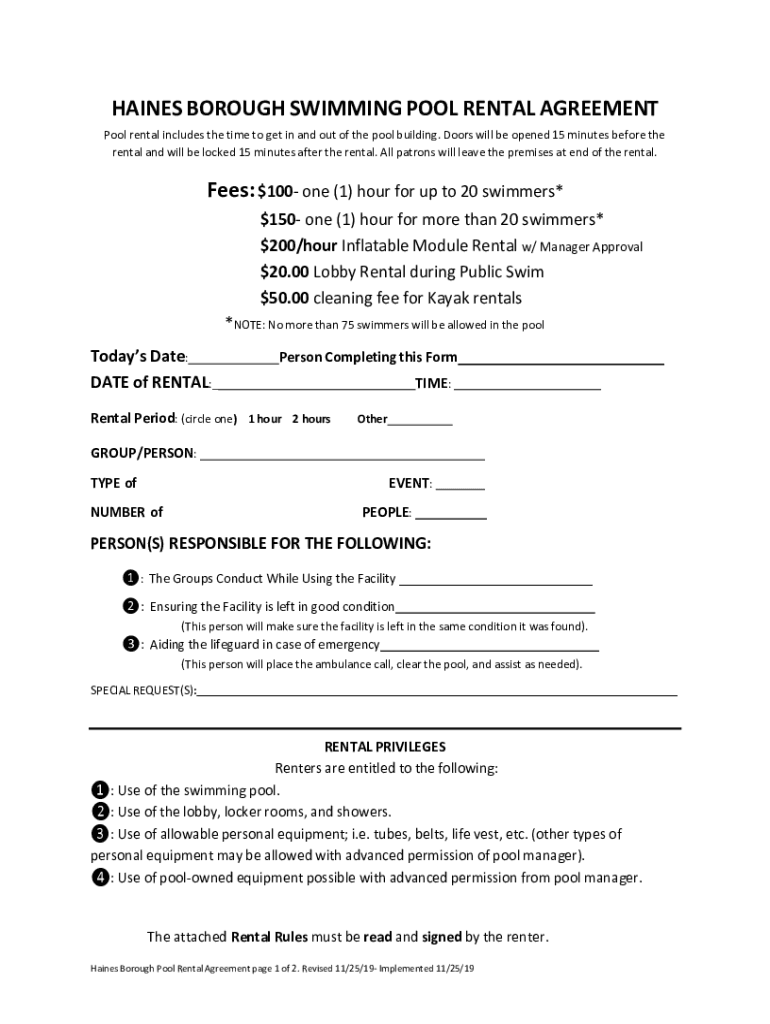
- Begin by entering today’s date and the rental date in the designated fields. This ensures clarity on when the rental is scheduled.
- Select the rental period by circling either '1 hour' or '2 hours' based on your needs, and specify the time of your event.
- Fill in the group or person name responsible for the rental, along with the type of event and expected number of attendees.
- Designate individuals responsible for conduct, facility condition, and emergency assistance by filling in their names in the provided sections.
- List any special requests you may have regarding your rental to ensure all needs are met.
- Review and sign at the bottom of the form to acknowledge that you have read and agree to abide by all rental rules.
Start using our platform today to fill out your Swimming Pool Rental Agreement easily and for free!
It's free
See more Swimming Pool Rental Agreement - Fill and Sign Printable Template versions
Got questions?
How can I sign my dochub com fillable form without printing?
Electronic signatures are a perfect replacement for traditional signing, as they save time, effort, and money people spend on printing, scanning, and paper delivery. You can eSign your dochub com fillable form utilizing a trustworthy and powerful online document processing tool like DocHub. It complies with primary eSignature standards (ESIGN and UETA), so all forms approved there are legally binding and have the same validity as physically signed ones.
How do you complete pool rental agreement example online?
You can complete and sign your pool rental agreement example online, even on a tight deadline. All you need to access top-notch editing tools on any device is a DocHub profile, that you can register in just a few moments. When you register, upload your file or find what you are searching for in our catalog, complete it utilizing the editing tools you want, and put your electronic signature on it at the end.
How to fill out a rental agreement template?
What is required in a California rental agreement?
What are the red flags in rental leases?
Security and compliance
At DocHub, your data security is our priority. We follow HIPAA, SOC2, GDPR, and other standards, so you can work on your documents with confidence.
Learn more


