




Here's how it works



How to use or fill out Fillable Online Saskatchewan Income Support Fax Email Print

- Click ‘Get Form’ to open it in the editor.
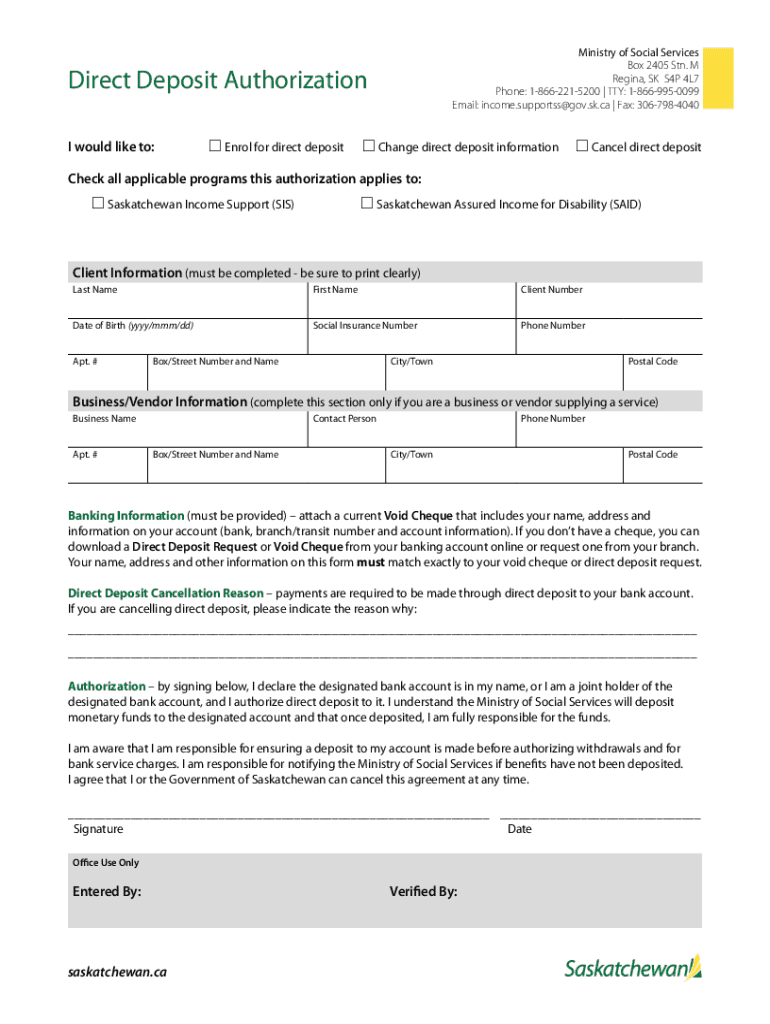
- Begin by selecting your desired action at the top of the form: Enrol for direct deposit, Change direct deposit information, or Cancel direct deposit. Ensure you check only one option.
- Fill in your Client Information clearly. This includes your Last Name, First Name, Client Number, Date of Birth, Social Insurance Number, Phone Number, and address details.
- If applicable, complete the Business/Vendor Information section with your Business Name and contact details.
- Provide your Banking Information. Attach a current Void Cheque that matches the information on this form. If you don’t have a cheque, download a Direct Deposit Request from your bank's website.
- In the Authorization section, read carefully and sign to confirm that you understand your responsibilities regarding the direct deposit.
- Once completed, return the form via email or mail as specified at the bottom of the document.
Start using our platform today to fill out your forms easily and for free!
It's free
See more Fillable Online Saskatchewan Income Support Fax Email Print versions
Got questions?
How do I sign my saskatchewan income support online?
Sign in to your DocHub account and add your saskatchewan income support to our editor using one of its upload methods - from your device, cloud storage, secure URL, or your DocHub folders if you have already processed your form before. Open our editor, click the Sign button in the top toolbar, and choose your signing method. You can upload an image of your handwritten signature, draw it, type in your name, or utilize a QR code as an alternative.
What internet browser do I need to edit direct deposit authorization form sis online?
If you need to edit your direct deposit authorization form sis online easily, it does not matter what browser you employ. DocHub’s simple editing tools are accessible using any internet browser. Just open the appropriate tab in the editor, add your file, and fill it out without stress.
Security and compliance
At DocHub, your data security is our priority. We follow HIPAA, SOC2, GDPR, and other standards, so you can work on your documents with confidence.
Learn more


