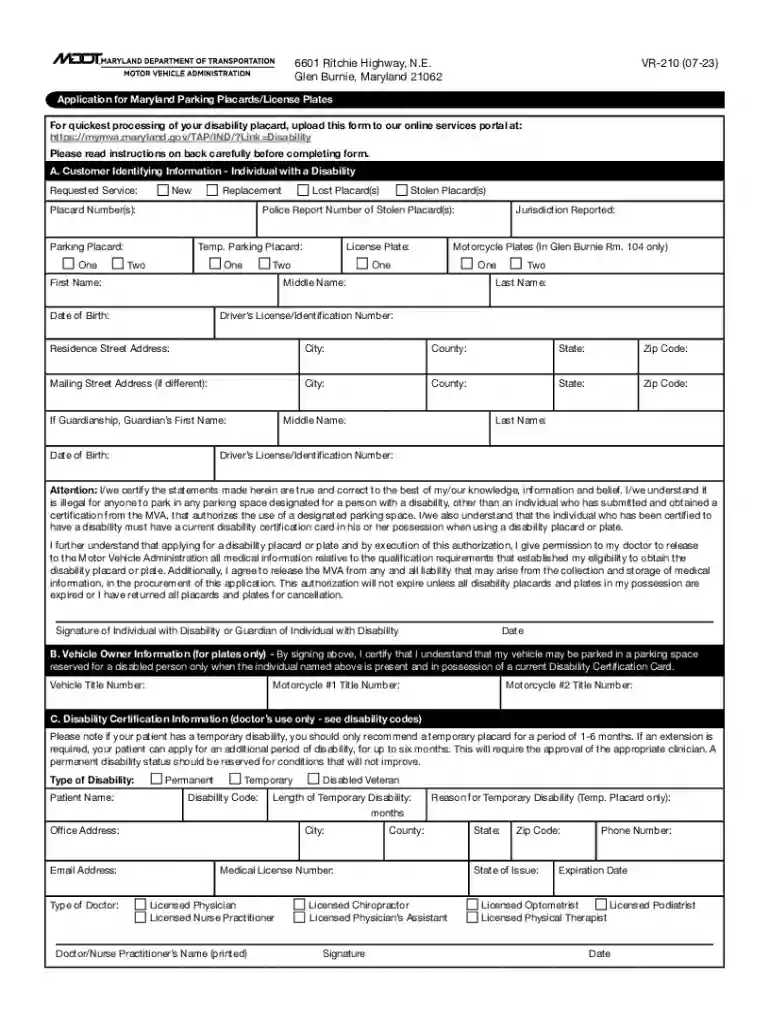
MVA FORM VR-210: APPLICATION FOR MARYLAND 2026

Get Form
maryland handicap parking form Preview on Page 1

Here's how it works

01. Edit your maryland handicap parking form online
Type text, add images, blackout confidential details, add comments, highlights and more.

02. Sign it in a few clicks
Draw your signature, type it, upload its image, or use your mobile device as a signature pad.

03. Share your form with others
Send disability placards via email, link, or fax. You can also download it, export it or print it out.

How to use or fill out MVA FORM VR-210: APPLICATION FOR MARYLAND with our platform

Form edit decoration
9.5
Ease of Setup
DocHub User Ratings on G2
9.0
Ease of Use
DocHub User Ratings on G2
  1. Click ‘Get Form’ to open the MVA FORM VR-210 in the editor.
  2. Begin by filling out Section A, which includes your identifying information. Provide your first name, middle name, last name, date of birth, and driver’s license number. Specify if you are requesting a new or replacement placard.
  3. Indicate the type of service you need: parking placard(s) or license plates. If applicable, include details for stolen or lost placards.
  4. If you are applying for vehicle plates, complete Section B with the vehicle owner information including title numbers and confirm that the individual with a disability is present when using the plates.
  5. Section C must be completed by an approved medical provider. Ensure they provide their certification regarding your disability status.
  6. Review all sections for accuracy before submitting. You can easily save and share your completed form directly from our platform.

Start using our platform today to fill out your MVA FORM VR-210 quickly and efficiently!

See more MVA FORM VR-210: APPLICATION FOR MARYLAND versions

We've got more versions of the MVA FORM VR-210: APPLICATION FOR MARYLAND form. Select the right MVA FORM VR-210: APPLICATION FOR MARYLAND version from the list and start editing it straight away!
Versions Form popularity Fillable & printable
2023 4.8 Satisfied (33 Votes)
2021 4.8 Satisfied (111 Votes)
2018 4.3 Satisfied (64 Votes)
2013 4.3 Satisfied (53 Votes)
2010 4.3 Satisfied (141 Votes)
be ready to get more

Complete this form in 5 minutes or less

Get form

Got questions?

We have answers to the most popular questions from our customers. If you can't find an answer to your question, please contact us.
Contact us
MVA is open by APPOINTMENT ONLY. Find the branch information by clicking on MVA Locations below and selecting your branch in the dashboard. You can visit us online with myMVA! Complete over 60 transactions on your phone, tablet, or computer and create your account here: my MVA Online Services.
Step 1: Complete the VR-210 form. Step 2: Bring the VR-210 to an appointment with your physician. The physician will complete the disability certification portion of the application.
How to Apply for a Handicap Parking Permit Get a handicapped parking application from the DMV office or online. Complete and sign the form. Ask your health-care provider to fill out and sign the portion that certifies disability. Submit the application by mail or in person.
Code Ann., Transportation Article - 13-507 Auctioneers Sales Receipt (VR-112) An MVA form provided for vehicle auctioneers and buyers to document the sale of an abandoned vehicle.

Security and compliance

At DocHub, your data security is our priority. We follow HIPAA, SOC2, GDPR, and other standards, so you can work on your documents with confidence.

Learn more
ccpa2
pci-dss
gdpr-compliance
hipaa
soc-compliance