DocHub form-library479436-earlyEARLY CHILDHOOD EDUCATOR APPLICATION RENEWAL - Fill and 2026

Get Form
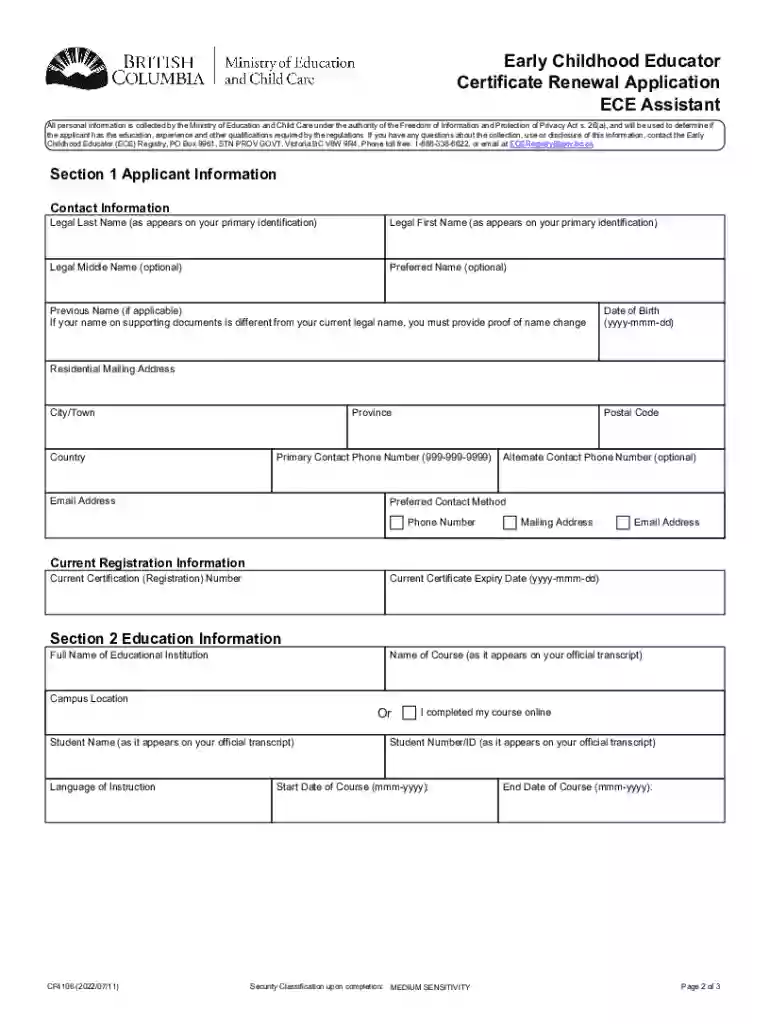
DocHub form-library479436-earlyEARLY CHILDHOOD EDUCATOR APPLICATION RENEWAL - Fill and Preview on Page 1

Here's how it works

01. Edit your form online
Type text, add images, blackout confidential details, add comments, highlights and more.

02. Sign it in a few clicks
Draw your signature, type it, upload its image, or use your mobile device as a signature pad.

03. Share your form with others
Send it via email, link, or fax. You can also download it, export it or print it out.

Definition and Purpose of the Form

The Early Childhood Educator (ECE) Application Renewal form is designed for individuals in British Columbia seeking to renew their ECE Assistant Certificate. This form plays a crucial role in maintaining the credentials necessary for professionals in the early childhood education sector. By keeping their certification up to date, educators demonstrate their commitment to adhering to educational standards and contribute to the consistent quality of early childhood education services.

Obtaining the Form

You can acquire the ECE Application Renewal form through DocHub's extensive form library, specifically designed to cater to various document needs. Accessing the form requires logging into your DocHub account where you can search and locate the specific form using keywords or the form’s name. This process ensures you have the most current and official version of the document, eliminating any concerns over outdated information.

Online Download

  • Visit DocHub’s Library: Navigate to the library on the DocHub platform.
  • Search Form: Use search functionality to find the "Early Childhood Educator Application Renewal."
  • Download: Click to open and download the form.

Direct Link Access

  • If available: Use a direct link provided by educational organizations or the ECE Registry to access the form instantly.

Completing the Form

The process of filling out the ECE Application Renewal form involves several steps to ensure all necessary information and documentation are accurately provided:

  1. Personal Information: Enter your name, address, contact details, and ECE certification number.
  2. Educational Background: Attach an official transcript from an accredited institution to verify your educational qualifications.
  3. Character References: Provide at least two professional character references that vouch for your competence and professional demeanor.
  4. Identification: Include copies of government-issued identification that confirm your identity.
  5. Name Change Proof: If applicable, attach legal documentation that confirms any changes to your name.

Key Elements of the Form

The ECE Application Renewal form contains several important components that applicants must carefully complete to satisfy the requirements of the ECE Registry:

  • Form Identification: Clearly labeled sections to guide applicants in filling out necessary fields.
  • Field Instructions: Detailed instructions accompanying form fields to ensure accurate information entry.
  • Submission Checklist: An integrated checklist to help candidates verify they have included all required documentation before submission.
  • Recipient Designation: Assign specific sections to intended recipients if completing in a collaborative setting.

Legal Use and Compliance

Adhering to legal standards is essential when using the ECE Application Renewal form. Compliance with the form's requirements ensures that all necessary elements are addressed and that applicants remain eligible for certification. Legal considerations include:

  • Certification Validity: Ensuring continuous certification without lapsing.
  • Accurate Information Submission: Providing truthful and accurate information and documentation to the ECE Registry.
  • Document Security: Utilize secure channels when submitting personal documentation to prevent data breaches.

Required Documents for Submission

A successful renewal application requires the submission of several critical documents:

  • Official Transcript: Verifying educational background.
  • Professional References: Documents from peers or supervisors.
  • Identification Documents: Passport or driver’s license.
  • Name Change Documents: If applicable, proof for alteration of name.

Application Process and Approval Time

The application process for renewing an ECE Assistant Certificate involves multiple steps, typically spanning a defined period:

  1. Application Submission: Once the form and all supporting documents are compiled, submit them through the appropriate online or mail-in channels as instructed by DocHub or the ECE Registry.
  2. Processing Time: The registry will review your submission within a window that typically ranges from four to six weeks. It’s advisable to submit renewals well before the expiration of the current certification to avoid potential gaps in certification status.

Considerations and Penalties for Non-Compliance

Failing to comply with application renewal guidelines can lead to significant consequences:

  • Certification Lapse: Operating without valid certification could affect your employment and professional standing.
  • Administrative Penalties: There may be fines or additional renewal requirements imposed if applications are late or incomplete.

Ensure that your application is comprehensive and timely to maintain uninterrupted professional practice as an Early Childhood Educator.

See more DocHub form-library479436-earlyEARLY CHILDHOOD EDUCATOR APPLICATION RENEWAL - Fill and versions

We've got more versions of the DocHub form-library479436-earlyEARLY CHILDHOOD EDUCATOR APPLICATION RENEWAL - Fill and form. Select the right DocHub form-library479436-earlyEARLY CHILDHOOD EDUCATOR APPLICATION RENEWAL - Fill and version from the list and start editing it straight away!
Versions Form popularity Fillable & printable
2022 4.8 Satisfied (46 Votes)
2004 4 Satisfied (33 Votes)
be ready to get more

Complete this form in 5 minutes or less

Get form

Got questions?

We have answers to the most popular questions from our customers. If you can't find an answer to your question, please contact us.
Contact us

Sure, and it’s really easy! DocHub is an online PDF editor with advanced document management capabilities that allow you rapidly adjust your documents, fill out empty fields and drop new ones for others to fill out, and create eSignatures in several ways. Import your DocHub form-library479436-earlyEARLY CHILDHOOD EDUCATOR APPLICATION RENEWAL - Fill and, provide information as requested, and choose how you want to eSign your document - by typing your name, drawing your signature, uploading its image, or utilizing a QR code.

You may get and modify your DocHub form-library479436-earlyEARLY CHILDHOOD EDUCATOR APPLICATION RENEWAL - Fill and online by using DocHub. Its straightforward but feature-rich design enables you to start productive work right after you register your account. Create your profile and add your document, then our user interface will guide you through our stress-free form completion experience.

Instructions on Filling a DocHub Form Click Fill a Copy Sign in to DocHub with one of the authetication options available. Click Fill a Copy. Verify the form to fill out. Fill in the form. When all required fields are filled in, the Finalize button will appear on the top right corner.
Make sure that the security settings allow form filling. (See File Properties Security.) Make sure that the PDF includes interactive, or fillable, form fields. Sometimes form creators forget to convert their PDFs to interactive forms, or they intentionally design a form you can only fill in by hand.
Certificate Renewals Go to the BC ECE Registry website. Under Maintain your certification, select Renew your certificate. Select the type of certificate you are renewing: Follow the renewal pathway steps listed on the website to prepare and submit your renewal application.*

Security and compliance

At DocHub, your data security is our priority. We follow HIPAA, SOC2, GDPR, and other standards, so you can work on your documents with confidence.

Learn more
ccpa2
pci-dss
gdpr-compliance
hipaa
soc-compliance
be ready to get more

Complete this form in 5 minutes or less

Get form

People also ask

To fill in your PDF document online, simply upload your file to the free fill sign tool. Then, sign into your Acrobat account to get started. Explore the Sign toolbar to fill in PDF form fields, including tickboxes, and add your electronic signature. Simply drag and drop it over your initials.