




Here's how it works



How to use or fill out Free Kansas Firearm Bill of Sale Form - Word PDF eForms with DocHub

- Click ‘Get Form’ to open it in the editor.
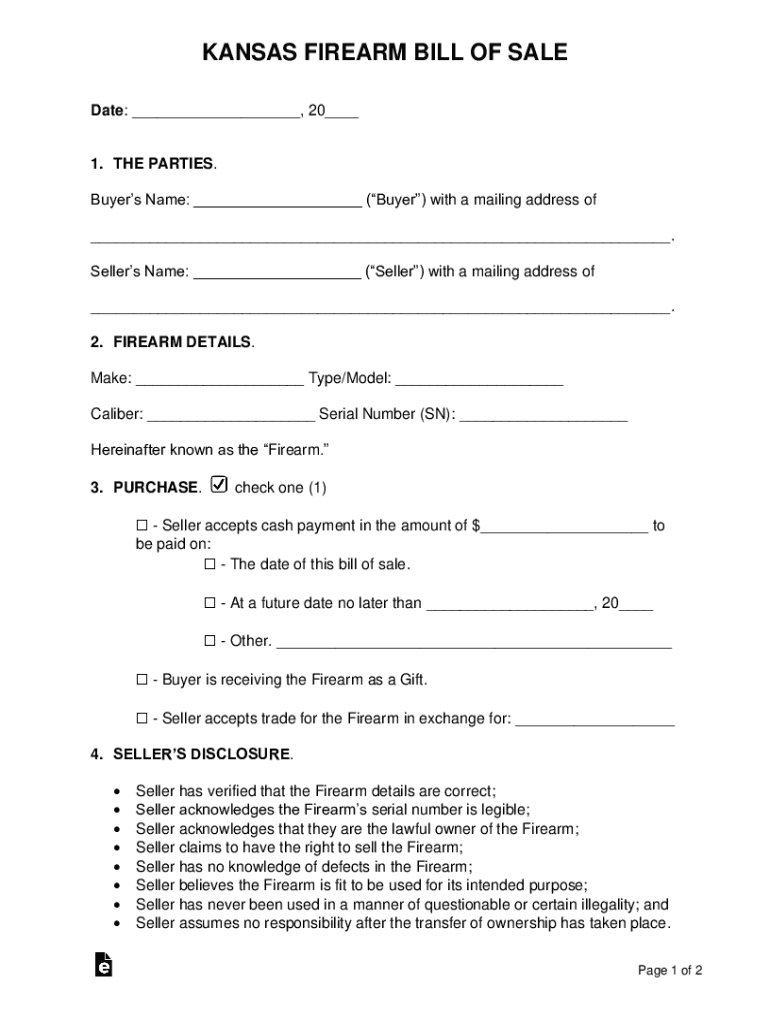
- Begin by filling in the date at the top of the form. This is essential for record-keeping.
- In the 'THE PARTIES' section, enter the Buyer’s and Seller’s names along with their mailing addresses. Ensure accuracy as this information is crucial for legal purposes.
- Next, move to 'FIREARM DETAILS'. Fill in the make, type/model, caliber, and serial number of the firearm being sold. Double-check these details for correctness.
- In the 'PURCHASE' section, select how payment will be made by checking one of the options provided. If applicable, specify any future payment dates or trade details.
- Review and complete both 'SELLER’S DISCLOSURE' and 'BUYER’S DISCLOSURE' sections by confirming all statements are true before signing.
- Finally, both parties should sign and date the document at the bottom to finalize the transaction.
Start using our platform today to easily fill out your Free Kansas Firearm Bill of Sale Form for free!
It's free
See more Free Kansas Firearm Bill of Sale Form - Word PDF eForms versions
Got questions?
Can I use DocHub to create legal eSignatures on my printable bill of sale kansas?
Yes, you can utilize DocHub for signing any business and private paperwork, including your printable bill of sale kansas. All electronic signatures you create with our tool are legally binding and court-admissible, as DocHub complies with criteria required by ESIGN and UETA. Save your completed form with a detailed Audit Trail if necessary.
How do you fill out kansas firearm bill of sale online?
You can find and modify your kansas firearm bill of sale online by using DocHub. Its straightforward yet feature-rich design enables you to begin effective work immediately after you register your account. Create your profile and add your file, then our user interface will guide you through our stress-free form completion experience.
Is there a waiting period to buy a gun in Kansas?
Do I have to register my gun in Kansas?
Which states require you to register your guns?
Security and compliance
At DocHub, your data security is our priority. We follow HIPAA, SOC2, GDPR, and other standards, so you can work on your documents with confidence.
Learn more


