Visa passport 2026

Get Form
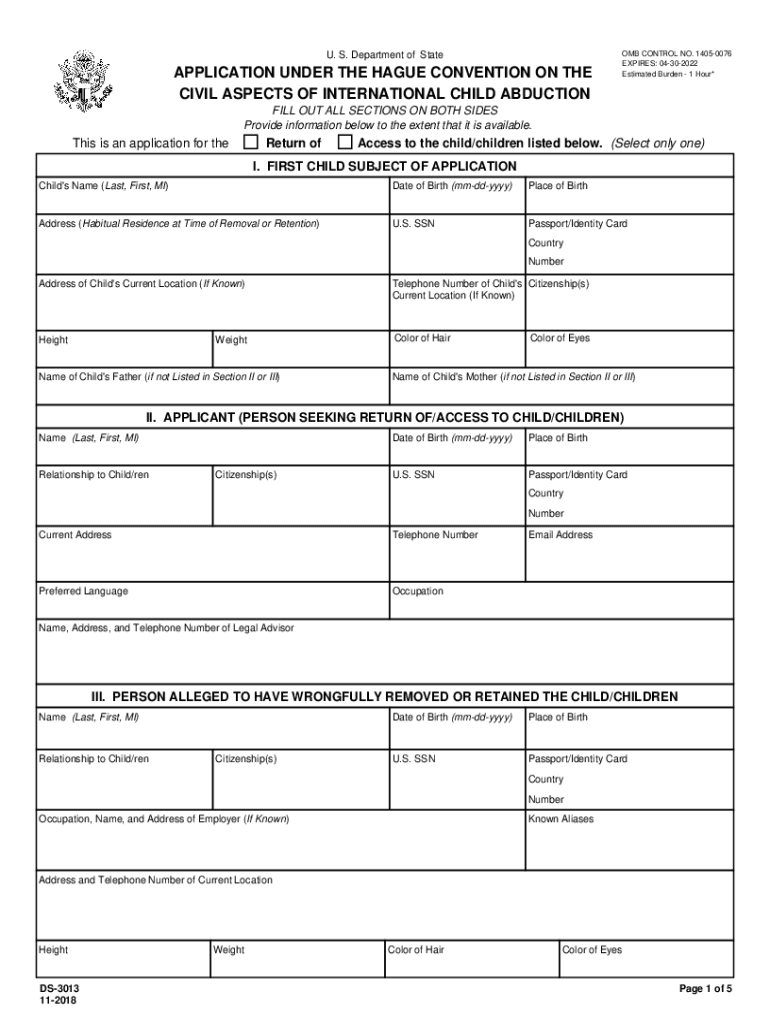
affidavit passport Preview on Page 1

Here's how it works

01. Edit your affidavit passport online
Type text, add images, blackout confidential details, add comments, highlights and more.
02. Sign it in a few clicks
Draw your signature, type it, upload its image, or use your mobile device as a signature pad.
03. Share your form with others
Send birth state via email, link, or fax. You can also download it, export it or print it out.

How to use or fill out visa passport with our platform

Form edit decoration
9.5
Ease of Setup
DocHub User Ratings on G2
9.0
Ease of Use
DocHub User Ratings on G2
  1. Click ‘Get Form’ to open the visa passport application in the editor.
  2. Begin with Section I, where you will enter the child's name, date of birth, and place of birth. Ensure accuracy as this information is crucial for identification.
  3. Provide the child's habitual residence address at the time of removal or retention, along with their U.S. Social Security Number and passport details.
  4. In Section II, fill out your personal information as the applicant. Include your relationship to the child, citizenships, and contact details.
  5. Section III requires details about the person alleged to have wrongfully removed or retained the child. Fill in their name, relationship to the child, and other relevant information.
  6. Continue through Sections IV to IX by providing additional children’s information if applicable, circumstances of wrongful removal, and any supporting documentation required.
  7. Finally, review all entries for accuracy before signing in blue ink and submitting your application.

Start using our platform today for free to streamline your visa passport application process!

See more visa passport versions

We've got more versions of the visa passport form. Select the right visa passport version from the list and start editing it straight away!
Versions Form popularity Fillable & printable
2018 4.8 Satisfied (66 Votes)
2017 4.2 Satisfied (54 Votes)
2016 4.4 Satisfied (181 Votes)
2013 4 Satisfied (55 Votes)
2003 4.2 Satisfied (40 Votes)
be ready to get more

Complete this form in 5 minutes or less

Get form

Got questions?

We have answers to the most popular questions from our customers. If you can't find an answer to your question, please contact us.
Contact us
A visa is an official document that allows the bearer to legally enter a foreign country. The visa is usually stamped or glued into the bearers passport. There are several different types of visas, each of which afford the bearer different rights in the host country.
How to Apply Check the Validity of Your Passport. Complete the Online Nonimmigrant Visa Application, Form DS-160. Collect any Supporting Documentation. Schedule an Interview Appointment. Submit Your Passport and Visa Application Forms. Pay the MRV Fee. Interview for your visa with the Consular Officer. How to Apply for Tourism Visitor Visas usembassy.gov visas-non-gss how-to- usembassy.gov visas-non-gss how-to-
Photo should present full head from top of hair to bottom of chin. Center head within frame. The background should be a plain white background. There should not be any distracting shadows on the face or on the background. Requirement of photograph for Passport / VISA / OCI vfsglobal.com pdf photo-specifiation vfsglobal.com pdf photo-specifiation
Nationals of countries and territories who need a visa to enter or transit the UK Afghanistan. Albania. Algeria. Angola. Bangladesh. Belarus. Burundi. Cameroon.
(Note: U.S. citizens dont need a U.S. visa for travel, but when planning travel abroad may need a visa issued by the country they wish to visit. When planning travel abroad, learn about visa requirements by country, on the country information page of the International Travel Section of this website).

Security and compliance

At DocHub, your data security is our priority. We follow HIPAA, SOC2, GDPR, and other standards, so you can work on your documents with confidence.

Learn more
ccpa2
pci-dss
gdpr-compliance
hipaa
soc-compliance
be ready to get more

Complete this form in 5 minutes or less

Get form